Product Overview
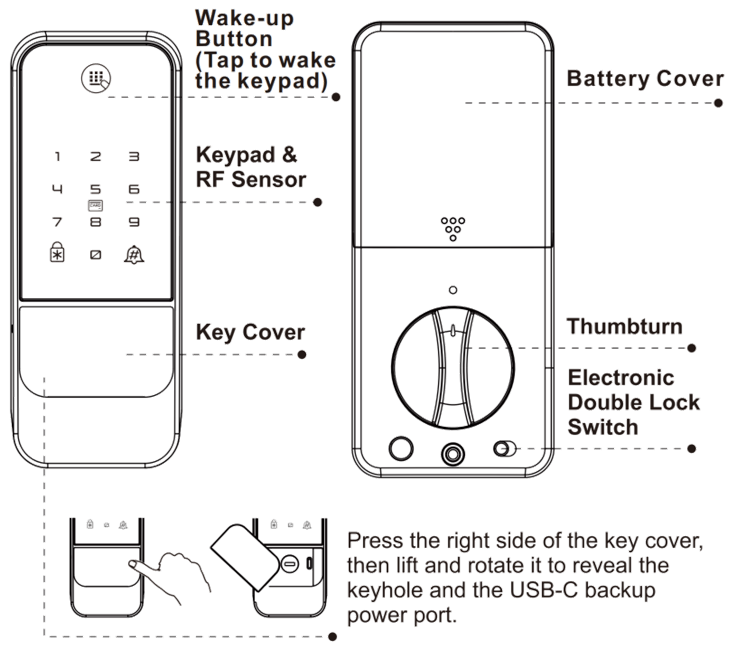
Product Features
Low Battery Alert
When the batteries are low, the red indicator will flash six times after a successful unlock. Replace all batteries promptly.
Failed Attempt Alarm and Lockout
To protect against unauthorized access, the system will trigger an alarm and enter the lockout mode after five consecutive failed PIN or card attempts.
To exit lockout:
Wait 3 minutes for the lockout to clear automatically, or
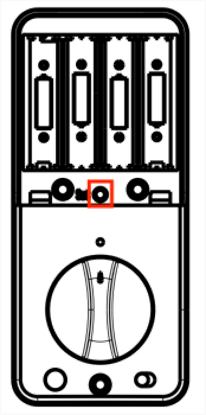
Press the Set button, and then enter a valid credential.
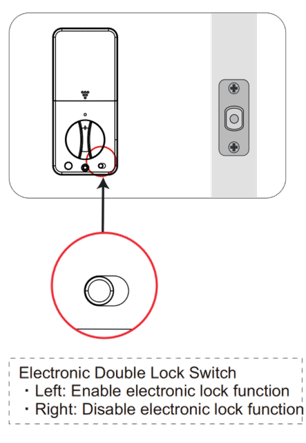
Double-Lock Switch
Slide the indoor electronic double-lock switch to the left to to restrict entry. This disable all user credentials for maximum privacy.
When Double-Lock is enabled, the door can only be opened using:
The admin code
Physical methods (mechanical key, internal thumbturn, or internal button)
The BelaHome app
Away Mode
Away Mode provides the same protection as enabling the double-lock switch.
This mode can be activated from the lock settings, and only be disabled using the admin code.
Fake PIN Code
To prevent others from guessing your PIN, you can enter random digits before and/or after the correct PIN.
The lock verifies the last 20 digits entered and unlocks if the correct PIN is included.
Doorbell
In standby mode, press the bell icon on the keypad to ring the doorbell.
The BelaHome app and HyPanel devices (if paired) will receive an unlock request notification.
Factory Reset & Default Settings
A factory reset permanently deletes all registered user data and restores the lock to its default settings.
After resetting, the lock can be unlocked using any card or the default admin code. For your protection, change the default Admin PIN immediately following a reset.
To restore factory settings:
Make sure the door is open.
Press and hold the Set button for 5 seconds until a beep sounds.
Release the button, then press # to confirm the reset.
Default Settings
Function | Default Setting |
Admin Code | 12345678 |
Auto Lock | Enabled |
Mute Mode | Disabled |
Failed Attempts | 5 times |
System Lockout Time | 3 minutes |