Discovery Mode is a plug-and-play configuration feature supported by all Akuvox devices.
When powered on and connected to the network, devices automatically discover and configure communication with other Akuvox devices within the same discovery address range. This significantly reduces manual configuration and saves deployment time.
No prior server-side or administrator configuration is required.
Once Discovery Mode is enabled:
The device automatically scans for other Akuvox devices on the same discovery address.
Discovered devices are added to the contact list.
Users can directly initiate calls without additional setup.
This mode is ideal for small-scale installations or fast deployment scenarios.
Use the device’s IP to log in to its web interface. The default username and password are admin.
Go to Network > Advanced > Connect Setting.
Enable the Discovery Mode. It is enabled by default.
Configure the Device Address, Device Extension, and Device Location.
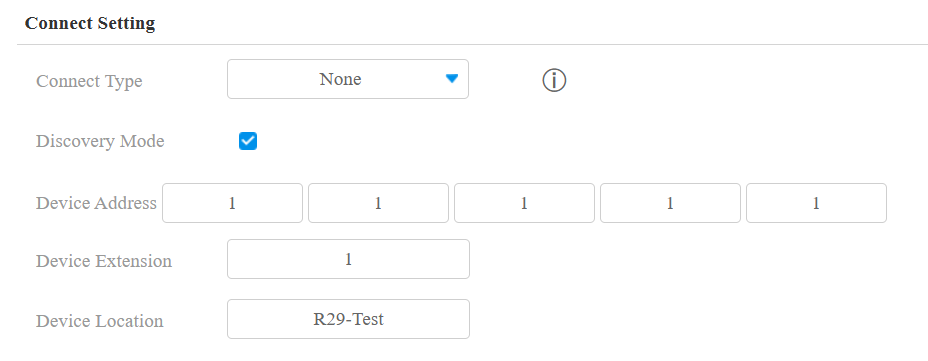
Submit the setting.
After configuration:
The device automatically scans all Akuvox devices within the same discovery address.
Discovered devices appear in the contact list.
Tip
If multiple devices are installed under the same device address, assign different Device Extensions to distinguish them.