Integration via HTTP API
HTTP API is designed to achieve a network-based integration between the third-party device and the Akuvox device.
To set it up, go to the Intercom > HTTP API interface.
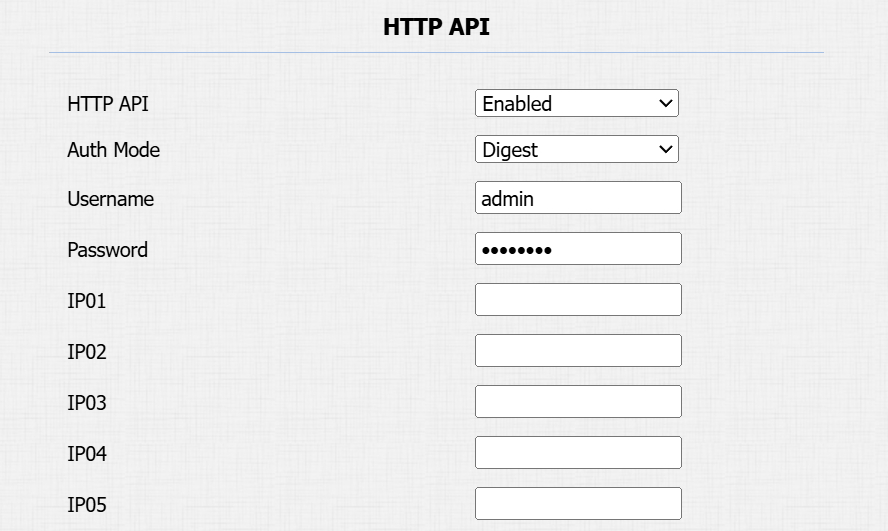
HTTP API Enable or disable the HTTP API function for third-party integration. If the function is disabled, any request to initiate the integration will be denied and return HTTP 403 forbidden status.
Authorization Mode: Select among the following options: None, Normal, Whitelist, Basic, Digest, and Token for authorization type, which will be explained in detail in the following chart.
Username: Enter the user name when Basic or Digest authorization mode is selected. The default username is admin.
Password: Enter the password when Basic or Digest authorization mode is selected. The default password is admin.
1st IP-5th IP: Enter the IP address of the third-party devices when the Allowlist authorization is selected for the integration.
Please refer to the following description for the authentication mode:
NO. | Authorization Mode | Description |
|---|---|---|
1 | None | No authentication is required for HTTP API as it is only used for demo testing. |
2 | Normal | This mode is used by Akuvox developers only. |
3 | Whitelist | If this mode is selected, you are only required to fill in the IP address of the third-party device for the authentication. The allowlist is suitable for operation in the LAN. |
4 | Basic | If this mode is selected, you are required to fill in the username and password for the authentication. In the Authorization field of the HTTP request header, use the Base64 encode method to encode of username and password. |
5 | Digest | The password encryption method only supports MD5. MD5( Message-Digest Algorithm) In the Authorization field of HTTP request header: WWW-Authenticate: Digest realm="HTTPAPI",qop="auth,auth-int",nonce="xx", opaque="xx". |
6 | Token | This mode is used by Akuvox developers only. |
Integration with Milestone
If you want the door phone to be monitored by Milestone or any third-party devices that have been integrated with Milestone, you need to enable the feature.
To set it up, go to the Intercom > ONVIF interface. 
Note
Click here to view the details of integration with Milestone.