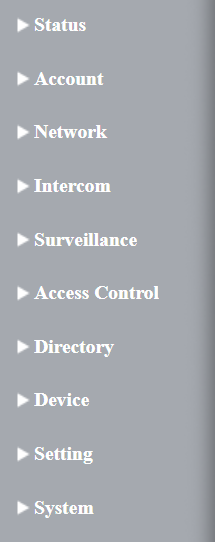
Status: This section gives you basic information such as product information, network information, account information, etc.
Account: This section concerns the SIP account, SIP server, proxy server, transport protocol type, audio & video codec, DTMF, etc.
Network: This section mainly deals with DHCP & static IP settings, RTP port settings, device deployment, etc.
Intercom: This section covers intercom settings, call logs, etc.
Surveillance: This section covers motion detection, RTSP, MJPEG, ONVIF, and live streaming.
Access Control: This section covers input control, relay, card settings, private PIN code, Wiegand connection, etc.
Directory: This section is for user management.
Device: This section includes LED, audio, and SD card settings.
Setting: This section includes time & language, action settings, door settings, and schedule for access control.
System: This section covers device security settings, password modification, device reboot and reset, etc.
Introduction to Quick Start Module
The Quick Start module allows you to configure the device’s core features on a single interface, instead of switching between different interfaces.
You can redirect to the feature detail interface by clicking Details in the upper right corner.
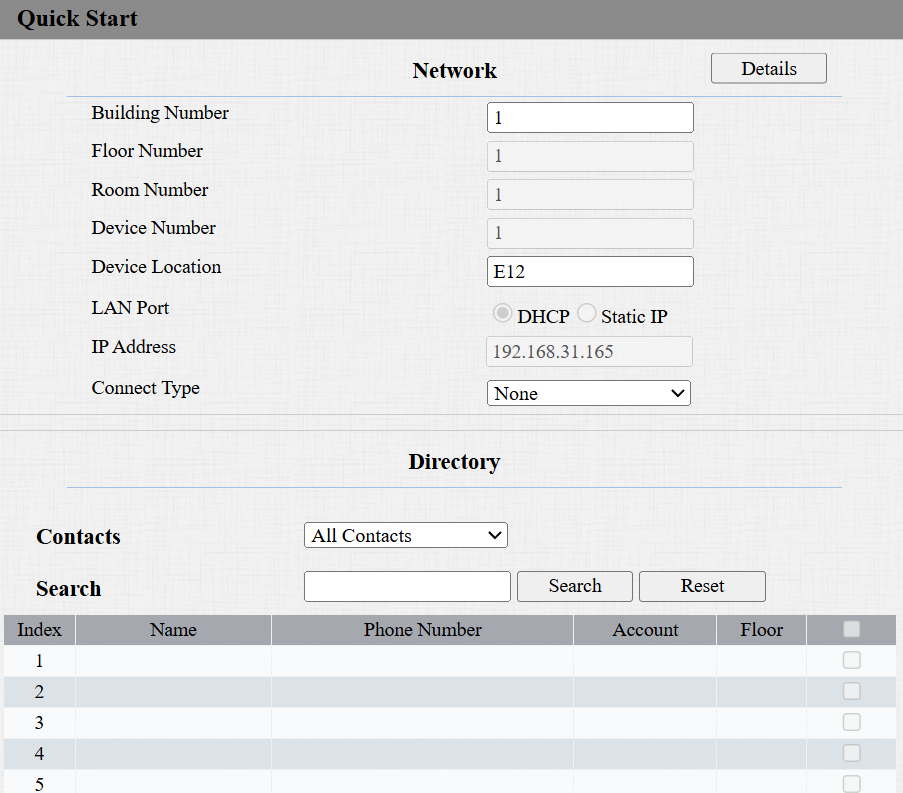
Network: Display the location information of the device.
Device Location: Enter the device’s location to distinguish it from others. By default, it is [the device name_the last 4 characters of its MAC address].
Connect Type: It is automatically set up according to the actual device connection with a specific server in the network, such as SDMC, Cloud, or None.
Directory: Display all local contacts.
Username: Set a username for authentication in HTTP command URLs.
Password: Set a password for authentication in HTTP command URLs.