Language
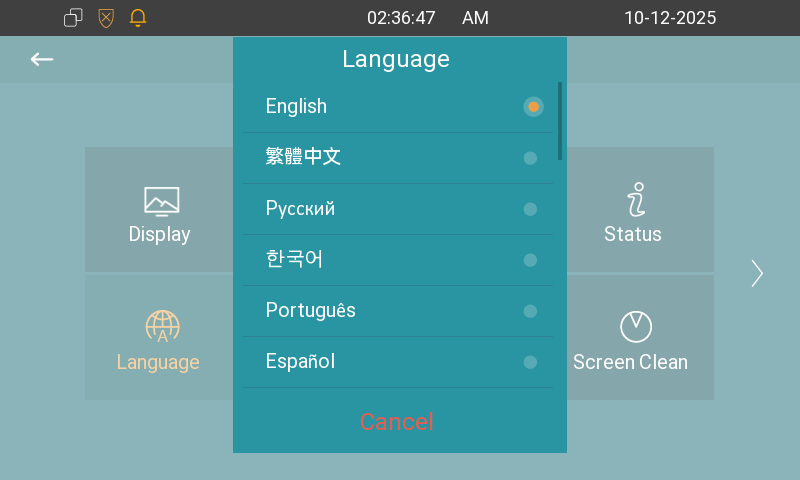
To select the desired language, go to Settings > Language screen.
The device supports the following languages:
English, Traditional Chinese, Russian, Korean, Portuguese, Spanish, Italian, Dutch, French, German, Hebrew, Turkish, Polish, Japanese, Slovene, Simplified Chinese, Norwegian, Vietnamese, Lithuanian, Czech, Ukrainian, Slovak, and Arabic.
Time
Set up time on the Settings > Time screen.
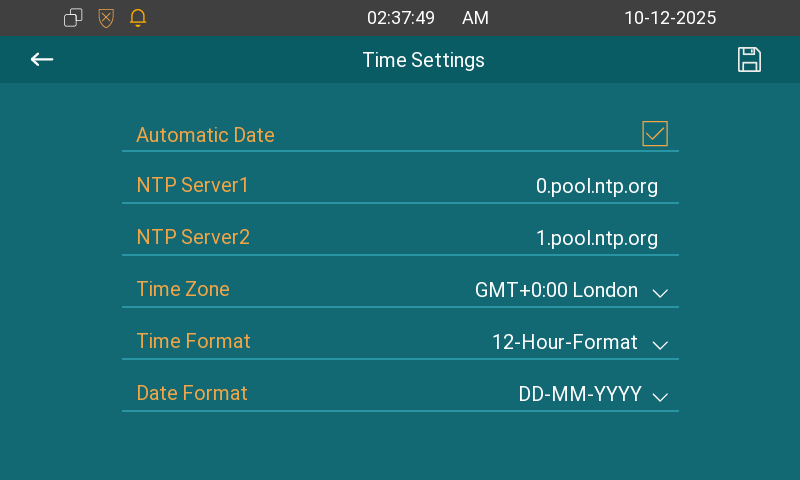
Automatic Date: The automatic date is switched on by default, which allows the date & time to be automatically set up and synchronized with the default time zone and the Network Time Protocol(NTP) server. You can also set it up manually by switching off the automatic date and entering the time and date.
NTP Server 1/2: Enter the NTP server address. NTP server 2 is the backup.
Time Zone: Select the specific time zone depending on where the device is used. The default time zone is GMT+0:00.
Time Format: Select a 12-hour or 24-hour time format.
Date Format: Select the date format from the available options.