Set up the volumes on the device Settings > Sound screen.
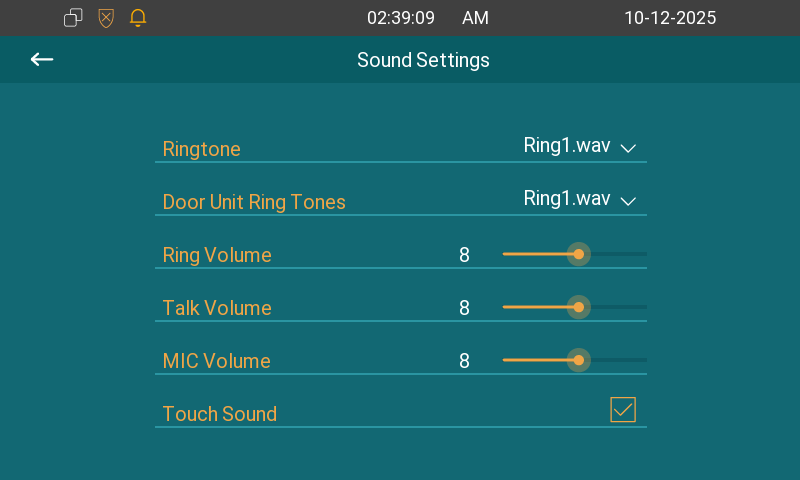
Ringtone: The ringtone for incoming calls.
Door Unit Ring Tones: The tone sounds when the indoor monitor receives calls from a door phone.
Ring Volume: The incoming call ringtone volume.
Talk Volume: The speaker volume during the call.
MIC Volume: The microphone volume.
Touch Sounds: The icon tapping sound.
You can configure the doorbell sound and select the local relay to be triggered along with the doorbell on the Settings > Doorbell screen.
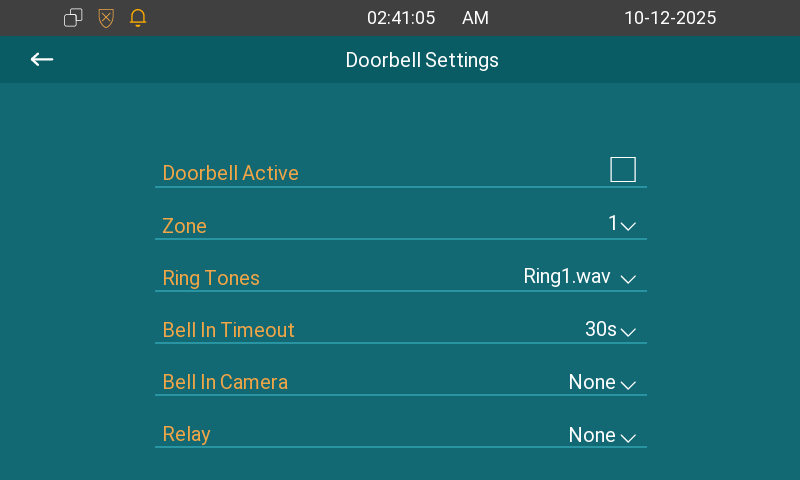
Zone: Select the zone (IO port) used for the doorbell connection.
Ring Tones: Select the doorbell sound.
Bell In Timeout: Set the doorbell duration(from 10 seconds to 5 minutes).
Bell In Camera: Select the camera to be triggered along with the doorbell.
Relay: Select the local relay to be triggered along with the doorbell.