LED Setting on Card Reader Area
You can enable or disable the LED lighting on the card reader area. You can also set a specific time to turn on the light.
To set it up, go to Device > Light interface.
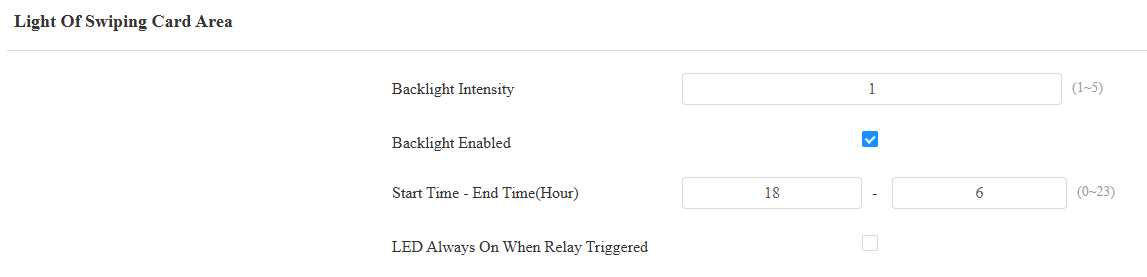
Backlight Intensity: Adjust the backlight intensity; the bigger the value, the brighter the backlight.
Start Time - End Time (Hour): Select the time span for the LED lighting to be valid, e.g., if the time span is from 18-22, it means the LED light will stay on during the time span from 6:00 pm to 10:00 pm in one day (24 hours).
LED Always On When Relay Triggered: Disabled by default. If enabled, the LED stays on when the relay is kept activated. Its brightness follows the Backlight Intensity setting.
Light Blink Control
You can disable all light blinking effects for a scheduled time, including network connection, door opening, and TOF trigger indications.
To set it up, go to Device > Light interface.
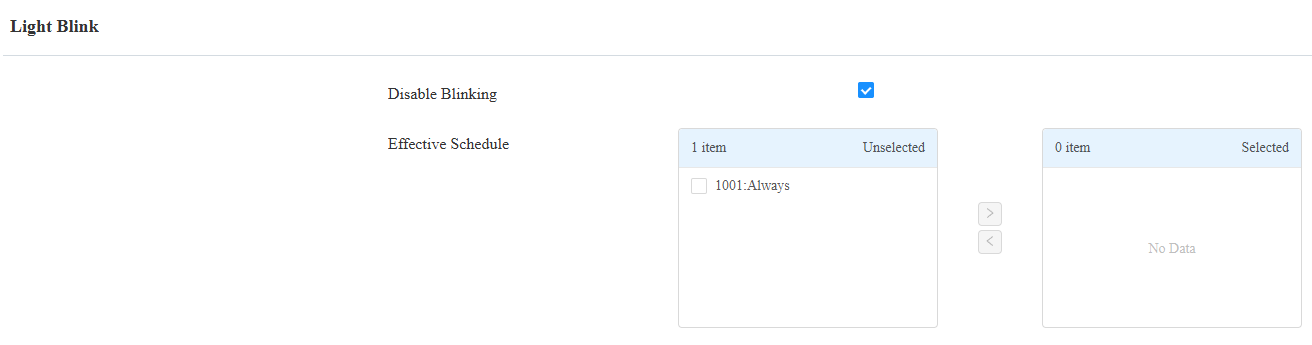
Disable Blinking: The feature is disabled by default.
Effective Schedule: Apply the schedule to the feature by moving it from the left to the right box.