Infrared LED Setting
Infrared LED is mainly designed to reinforce the light for facial recognition at night or in a dark environment.
Set it up on the Intercom > LED Setting > LED Setting interface.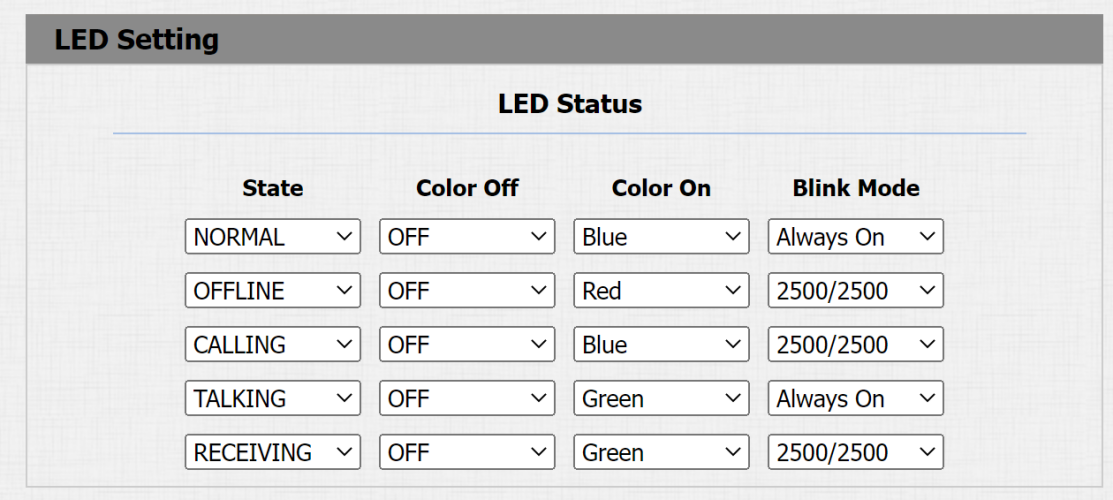
Device Status: There are five statuses, Normal, Offline, Calling, Talking, and Receiving. The status cannot be changed.
Color: Select from Red, Green, Blue, and Yellow.
Display Mode: Set the different flashing frequencies.
LED Control
You can enable or disable the LED on the Intercom > LED Setting interface.

Photoresistor Setting
You can set the minimum and maximum photoresistor value to automatically control the ON-OFF of the infrared fill light.
To set it up, go to the Intercom > Advanced interface.

Photoresistor Setting: If the photoresistor value is less than the minimum threshold, turn off the infrared fill light. If the photoresistor value is greater than the maximum threshold, turn it on.
Now: Click Read to obtain the current photoresistor value.