The device has an indicator light installed on the top surface. The light colors vary by the state the device is currently in. You can change light colors and states that represent the device status on the Phone > Display interface.
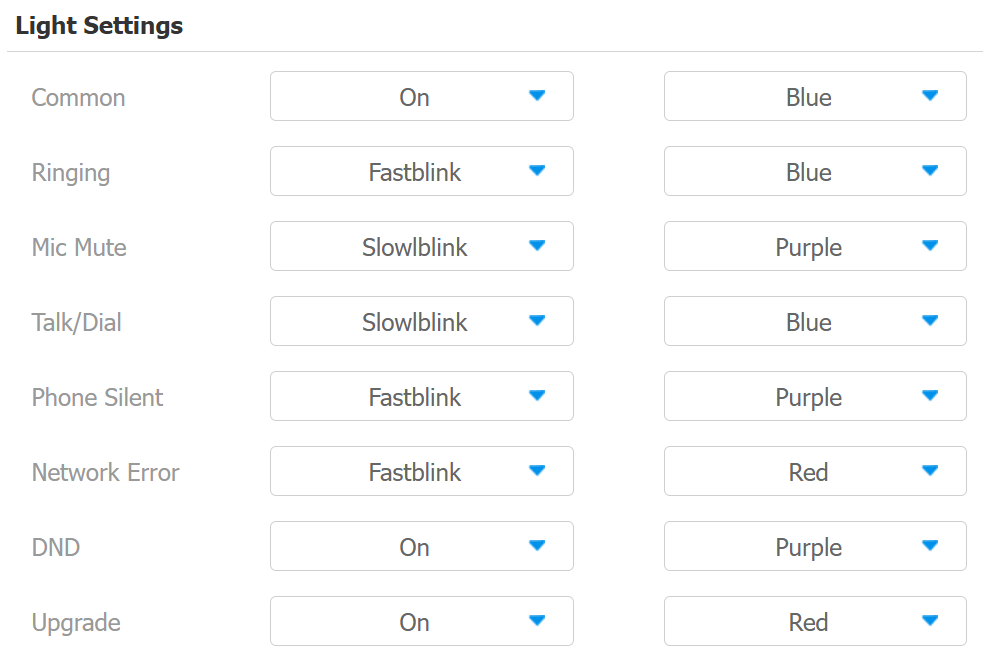
Status: Select from On, Off, Fastblink, and Slowblink.
Color: Select from Red, Blue, and Purple.
The default indicator light status:
Color | Indicator Light Status | Color Code |
|---|---|---|
Blue | A solid blue light | Normal status |
A fast blinking blue light | Ringing | |
A slowly blinking blue light | During a call or calling | |
Purple | A solid purple light | Do Not Disturb is on |
A solid purple light | The handle is picked up | |
A fast blinking purple light | Mute ringing | |
A slowly blinking purple light | Mute MIC | |
Red | A solid red light | Rebooting or upgrading |
A fast blinking red light | Network error |
Note
The default indicator light priority:
DND > Network error > Mute ringing = Mute MIC > Ringing = During a call = Calling > The handle is picked up = Normal status
Among the states with the same priority, the indicator light of the latest state will be on.