Infrared LED Setting
Infrared LED is mainly designed to reinforce the light at night or in a dark environment.
On the Web
Set it up on the web Device > Light > LED interface.
Mode:
Auto: Turn on the infrared LED automatically based on the minimum and maximum photoresistor value.
Always On: Enable the infrared LED.
Always Off: Disable the infrared LED.
Schedule: Turn on the infrared LED based on the schedule. Specify the Start Time and End Time when this option is selected. Beyond the schedule, the device adopts Auto mode.
Photoresistor Setting: Set the minimum and maximum photoresistor value to automatically control the ON-OFF of the LED fill light(25 to 120 by default). The higher the value, the brighter the light is. If the photoresistor value is less than the minimum threshold, turn on the fill light. If it is greater than the maximum threshold, turn it off.
On the Device
Set up the LED on the Setting > Basic Setting > Display > LED Setting screen.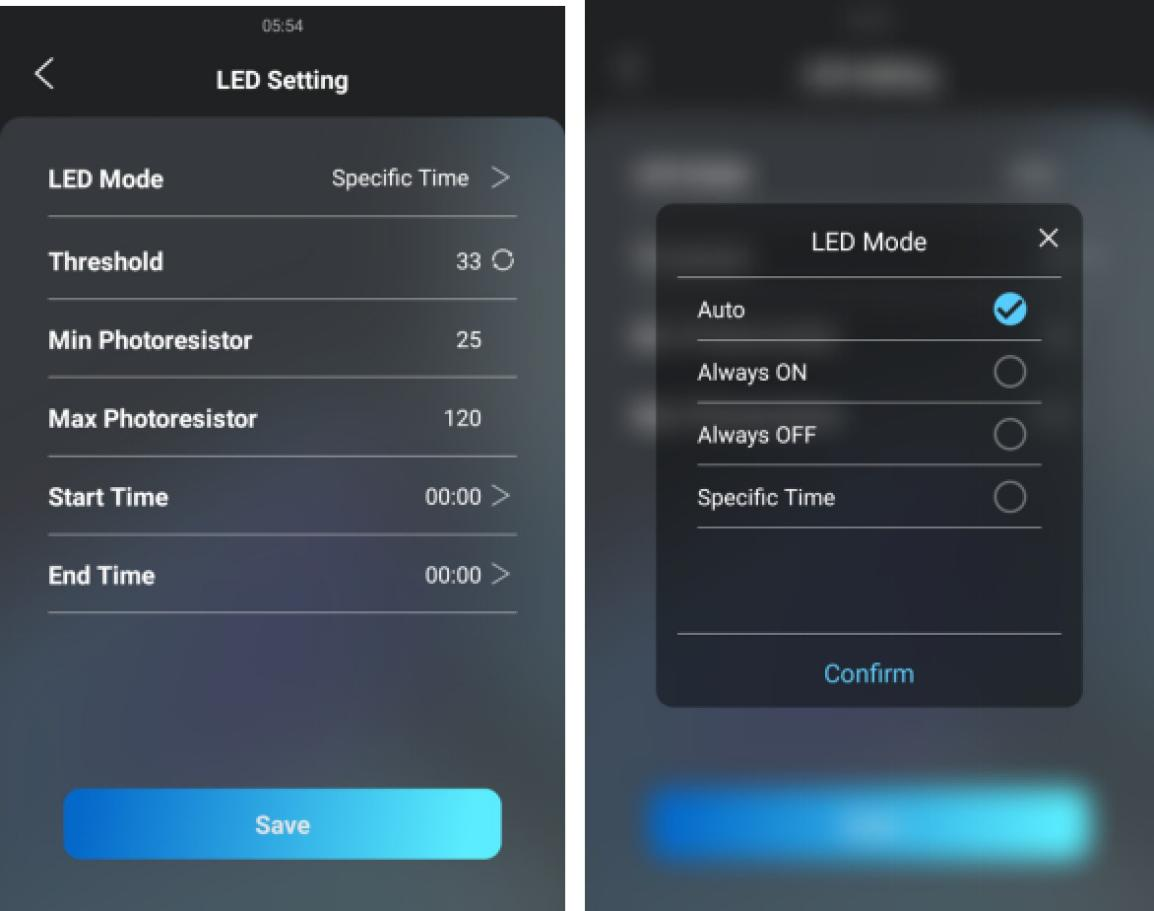
LED Mode:
Auto: Turn on the infrared LED automatically based on the minimum and maximum photoresistor value.
Always On: Enable the infrared LED.
Always Off: Disable the infrared LED.
Specific Time: Turn on the infrared LED based on the schedule. Specify the Start Time and End Time when this option is selected.
Threshold: The current light intensity indicated by the photo-resistor value. The higher the value, the brighter the light is. The default photo-resistor value (Threshold) is 33. You can tap the circle icon several times to obtain the actual photo-resistor value in a specific environment (the value fluctuation is about 5), and the value is the basis of configuring the minimum and maximum photo-resistor values.
Min/Max Photoresistor: Set the minimum and maximum photoresistor value to automatically control the ON-OFF of the LED fill light(25 to 120 by default). If the photoresistor value is less than the minimum threshold, turn on the fill light. If it is greater than the maximum threshold, turn it off.
Card Reader LED Control
You can enable or disable the LED lighting on the card reader area. You can also set a specific time to turn on the light.
Set it up on the web Device > Light > LED Of Swiping Card Area interface.
Start Time- End Time (H): Enter the time for the LED lighting to be valid, e.g., if the time is set from 8-0 (Start time- End time), it means the LED light will stay on during the time from 8:00 am to 12:00 pm during one day (24 hours).
LCD Screen Brightness
You can set up the backlight brightness so that users can better see the screen in an environment with high or low light intensity.
On the Web
Set it up on the web Device > Light > LCD Backlight Brightness interface.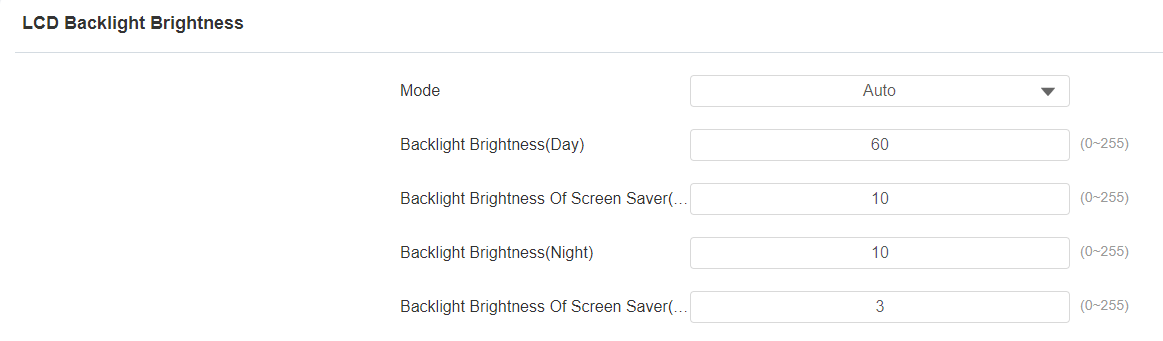
Mode:
Manual: Set the backlight brightness value manually.
Auto: The screen backlight brightness will be adjusted automatically.
Note
The backlight brightness has two automatic modes, Day and Night. They are determined by the photoresistor.
If the current value is between the minimum and maximum photoresistor, the device is in Day mode.
If the current value is higher than the maximum photoresistor, the device is in Night mode.
Backlight Brightness (Day): Select the brightness value from 0-255. The default value is 200. The larger the value, the brighter the screen.
Backlight Brightness Of Screen Saver (Day): Adjust the backlight for the screensaver in the daytime with the value ranging from 0-255.
Backlight Brightness (Night): Select the brightness value from 0-255. The default value is 200. The larger the value, the brighter the screen.
Backlight Brightness Of Screen Saver (Night): Adjust the backlight for the screensaver in the nighttime with the value ranging from 0-255.
On the Device
You can set the backlight brightness on the device Setting > Basic Setting > Display > LCD Setting screen.
LED White Light
White light LED is mainly used to reinforce the lighting for the QR code access and for the greater visibility of the visitors when seeing their images from indoors in a dark environment.
Set it up on the web Device > Light > White Light interface.
Mode: Select Auto or OFF. If you select Auto, the white light will turn on for 5 minutes for facial recognition and QR code scan.