You can summon a lift via the lift control feature.
Configure Lift Control
To enable and set the Lift icon on device web Phone > Lift > Lift Control interface.
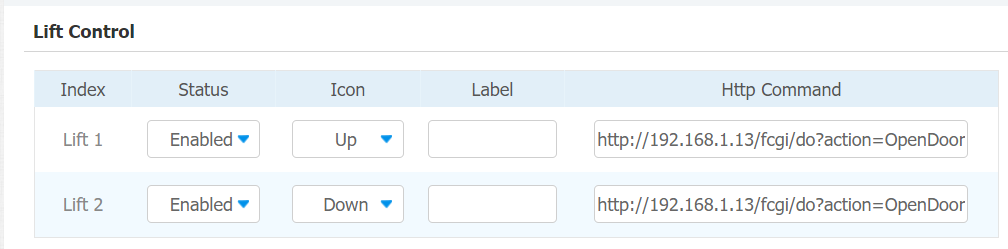
Parameter Set-up:
-
Status: click to enable or disable the lift button.
-
Icon: click to select icon for the button.
-
Label: enter the title for the button.
-
HTTP Command: select http:// or https:// for head of http command and enter http command.
Configure Lift Control Prompt
When the lift controller receives the HTTP command, it will give feedback on the current lift status with a prompt.
To do this configuration on web Phone > Lift > Hints interface. Click Edit icon to save the configuration.
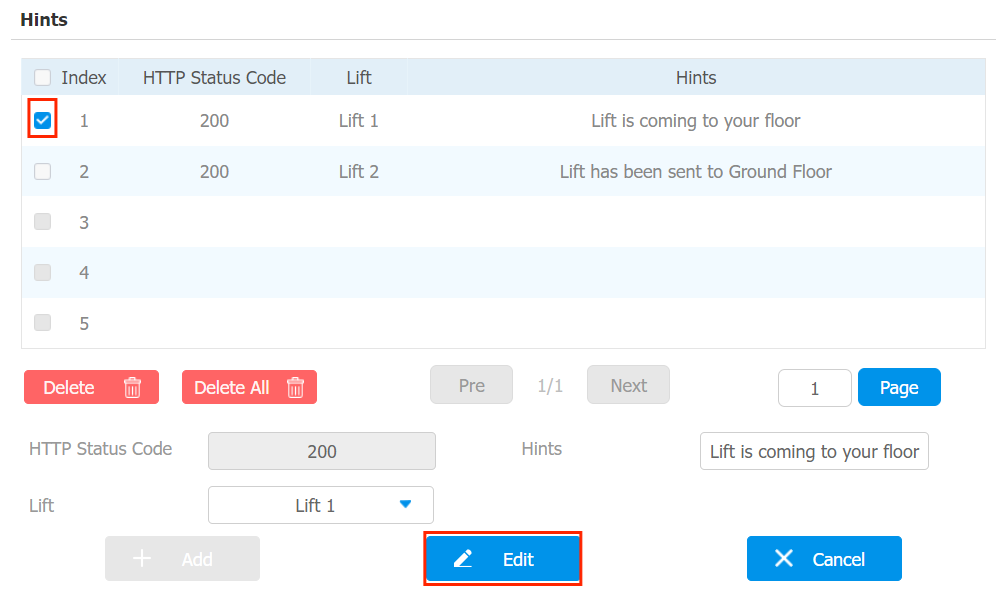
If there are huge amounts of prompts that need to be added, you can click Export tab to export a template on the same page. After editting the file, import it to the web.
