Network Status
Check the network status on the web Status > Info interface.
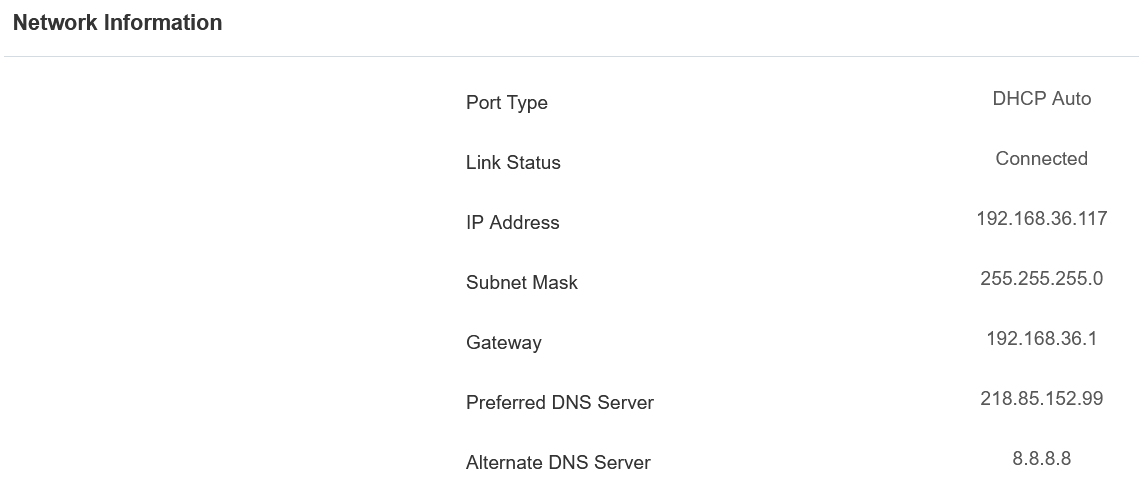
Device Network Configuration
To ensure normal functioning, make sure that the device has its IP address set correctly or obtained automatically from the DHCP server.
To set it up, go to Network > Basic interface.
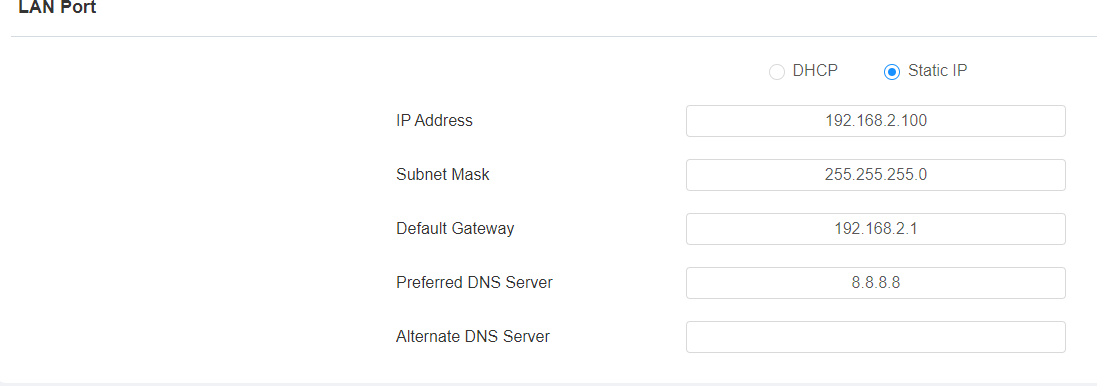
DHCP: DHCP mode is the default network connection. If the DHCP mode is selected, then the device will be assigned by the DHCP server with an IP address, subnet mask, default gateway, and DNS server address automatically.
Static IP: When static IP mode is selected, the IP address, subnet mask, default gateway, and DNS server address have to be manually configured according to the actual network environment.
IP Address: Set up the IP address when the static IP mode is selected. To access the device’s web settings with the IP, your computer should be on the same local network as the device.
Subnet Mask: A subnet mask tells your device which IP addresses are part of your local network and which ones are not. For example, if the subnet mask is 255.255.255.0, it means that devices with similar starting IPs (like 192.168.1.x) are in the same network.
Default Gateway: The gateway is like a bridge between your device and other networks, such as the internet. Usually, it’s the IP address of your router.
Preferred/Alternate DNS Server: Set up the preferred or alternate Domain Name System(DNS) server according to the actual network environment. The preferred DNS server is the primary server, while the alternate DNS server is the secondary one. The secondary server is for backup.
Web Server
This function manages device website access. The access controller supports two remote access methods: HTTP and HTTPS (encryption).
Set it up on the web Network > Advanced > Web Server interface.

Protocol: HTTP and HTTPS are enabled by default.
HTTP/HTTPS Port: Specify the web server port for accessing the device web interface via HTTP/HTTPS.
TR069
TR-069 (Technical Report 069) provides the communication between Customer-Premises Equipment (CPE) and Auto-Configuration Servers (ACS). It includes both a safe auto configuration and the control of other CPE management functions within an integrated framework. For door phones, the administrators can manage all the devices on a common TR-069 Platform. IP phones can be easily and securely configured on the TR-069 platform to make mass deployment more efficient.
To set it up, navigate to the web Network > Advanced > TR069 interface.
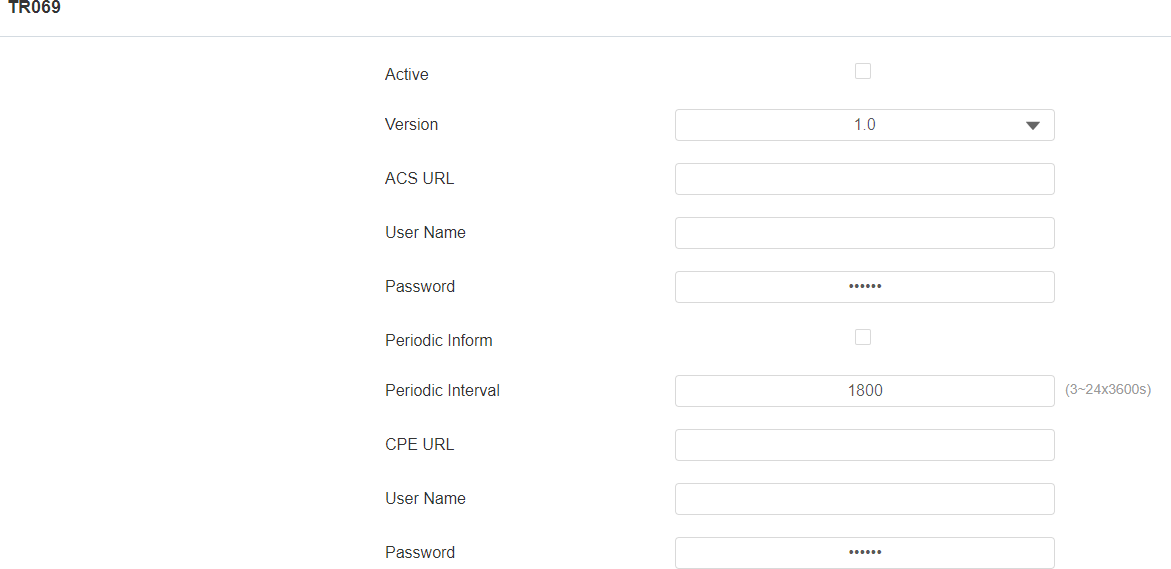
Version: Select the TR069 version.
ACS URL: Set the URL of the ACS server, for example, http://192.168.1.47:8080/openacs/acs
User Name: Set the ACS server username for authentication.
Password: Set the ACS server password for authentication.
Periodic Inform: Allow the device to send requests to the ACS server for automatic configuration and update.
Periodic Interval: Set the time interval for the device to send the request to the ACS server for the automatic configuration and update.
CPE URL: Set the device URL, for example, http://192.168.1.48:8882/
User Name: Set the device authentication username.
Password: Set the device authentication password.
SNMP
Simple Network Management Protocol(SNMP) is a protocol for managing IP network devices. It allows network administrators to monitor devices and receive alerts for attention-worthy conditions. SNMP provides variables describing system configuration, organized in hierarchies and described by Management Information Bases (MIBs).
To set it up, navigate to the web Network > Advanced> SNMP interface.

Port: Set a specific port for the data transmission from 1024-65535.
Trusted IP: Enter the third-party IP address.