The parameter setting interface “Page x--Air Quality display”, as shown in Figure 2.4.7, is used to configure air quality display. It allows for the display settings of AQI, temperature, humidity, PM2.5, PM10, VOC, CO2, illuminance, and wind speed. Each interface can display up to 4 data items.
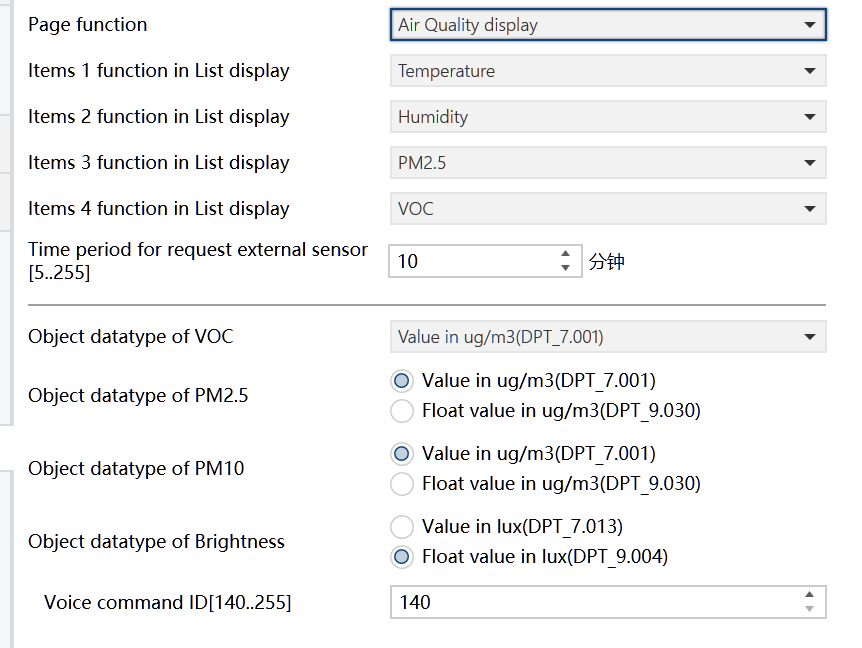
Figure2.4.7: Page x--Air Quality display interface
Items x(x=1..4) function in List display
Set the content to be displayed in the list, allowing for a maximum of 4 items.
Options:
Disable
Temperature
Humidity
PM2.5
PM10
CO2
VOC
AQI
Brightness
Wind speed
Detected by external sensors, these values are transmitted to the device for display. If not received, no data can be displayed on device screen.
Here are the display ranges of each item:
Temperature: -40~80 ℃
Humidity: 0~100 %
PM2.5: 0~999 ug/m3
PM10: 0~999 ug/m3
CO2: 0~4000 ppm
VOC: 0~999 ug/m3 or 0~4000 ppm
AQI: 0~500
Brightness:0~5000 lux
Wind speed:0~50 m/s
Time period for request external sensor [5.. 255]min
Set the time interval for the device to send read requests to external sensors.
Options: 5.. 255
Object datatype of VOC
Set the data type of VOC.
Options:
Value in ug/m3(DPT_7.001)
Float value in ug/m3(DPT_9.030)
Float value in ppm(DPT_9.008)
Object datatype of PM2.5
Set the data type of PM2.5.
Options:
Value in ug/m3(DPT_7.001)
Float value in ug/m3(DPT_9.030)
Object datatype of PM10
Set the data type of PM10.
Options:
Value in ug/m3(DPT_7.001)
Float value in ug/m3(DPT_9.030)
Object datatype of Brightness
Set the data type of Brightness object.
Options:
Value in lux(DPT_7.013)
Float value in lux(DPT_9.004)
Voice command ID[140 to 255]
Not applicable for HyPanel.