The parameter setting interface “Page x--Floor heating”, as shown in Figure 2.4.8, configures the floor heating actuator control settings.
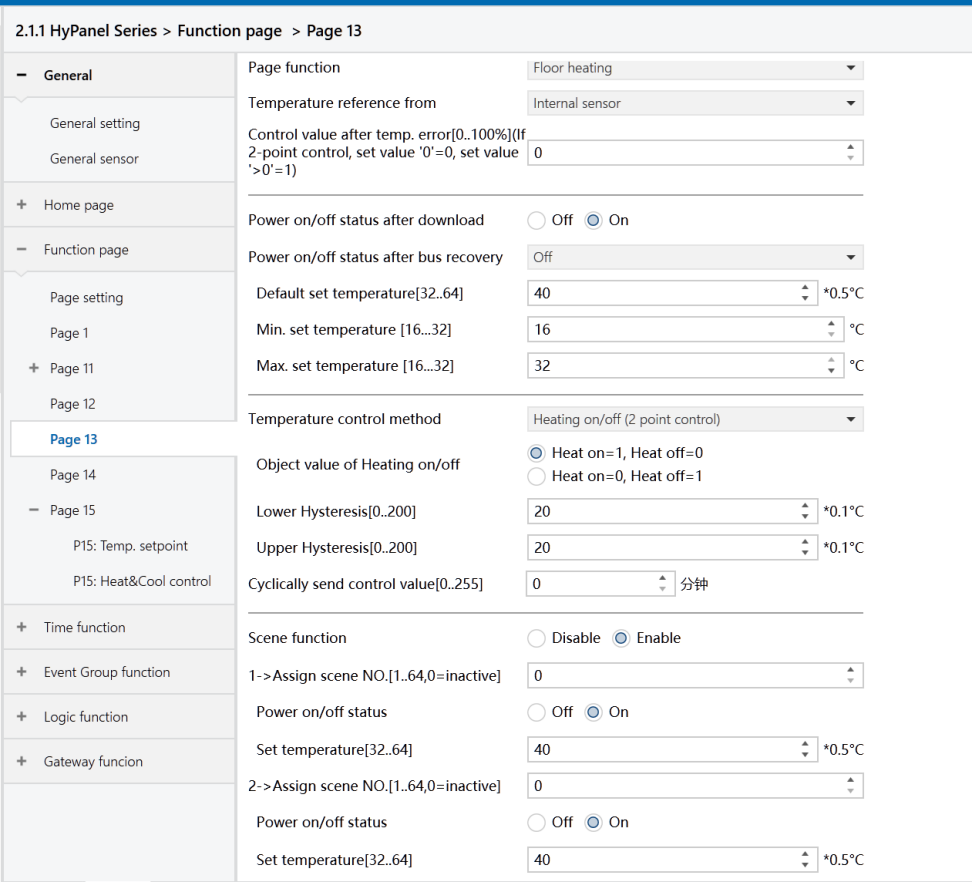
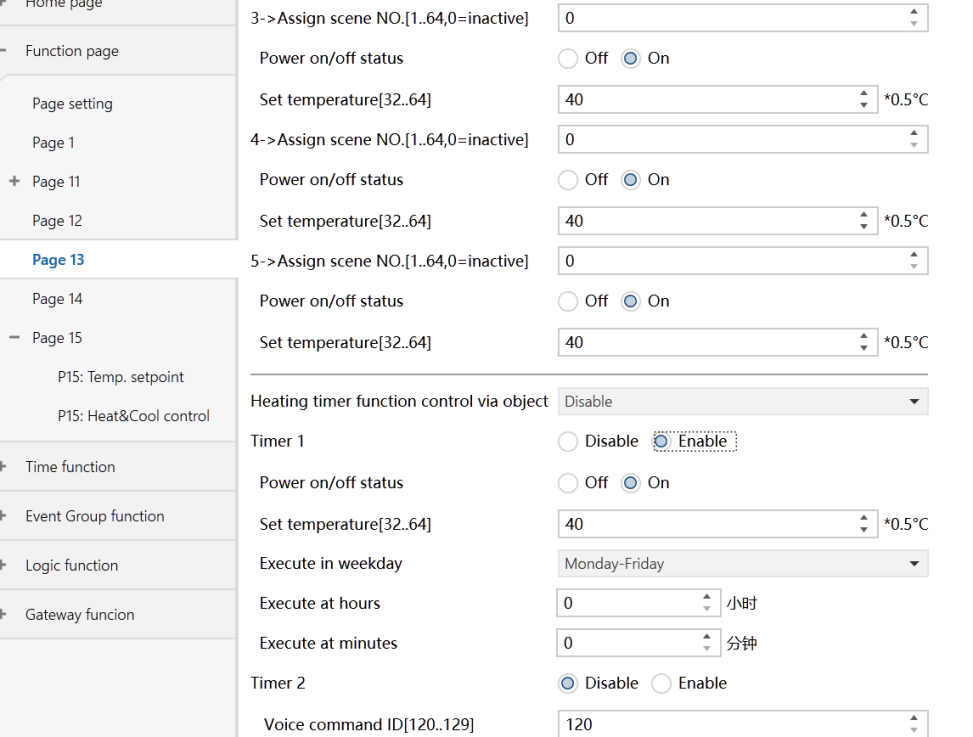
Figure2.4.8: Page x--Floor heating interface
Temperature reference from
Set the source of temperature reference for the floor heating function.
Options:
Internal sensor
External sensor
Internal and External sensor combination
Note
Temperature settings of floor heating are similar to that of HVAC function. For more details, please refer to Section 2.4.3.
Power on/off status after download
Set the power on/off status of the floor heating interface after downloading application.
Options:
Off
On
Power on/off status after bus recovery
Set the on/off status of the floor heating interface after bus power is restored.
Options:
On: When power is restored, the device will be in the powered-on state, and the interface will be operational. The device will determine the current control status by computing based on the control mode.
Off: When power is restored, the device will be in the powered-off state. Other icons in the interface are not operational except for timing and on/off icon.
Before power off: Upon power restoration, the device returns to its status prior to power off. If it is powered on, the device will output the heating control status according to the internal computing.
Default set temperature[32.. 64]*0.5℃
Set the initial temperature when floor heating is activated.
Options: 32.. 64
Min./Max. set temperature[16.. 32]℃
Specify the range of set temperature. The minimum value must be set lower than the maximum value. If the set temperature exceeds the defined limits, it will be automatically adjusted to fit within the specified range.
Options: 16.. 32
Voice command ID[120.. 129]
Not applicable for HyPanel.
Temperature control method
Set the temperature control method. Different control types are Applicable for controlling different temperature controllers.
Options:
Heating on/off (use 2-point control)
Heating PWM (use PI control) PWM
Heating continuous control (use PI control)
When the parameter “Temperature control method” is set to “Heating on/off (use 2-point control)”, the following parameters are visible:
In two-point control, heating is turned off when the temperature exceeds one certain set temperature; It is on when it falls below another set temperature.
- Object value of Heating on/off
Define the trigger values for heating on/off.
Options:
Heat on=1, Heat off=0
Heat on=0, Heat off=1
- Lower Hysteresis [0.. 200]*0.1℃
- Upper Hysteresis [0.. 200]*0.1℃
Set the lower/upper hysteresis values for the set temperature of floor heating.
Options: 0..200
Note
Heating stops once the actual temperature (T) exceeds the setpoint temperature plus the upper hysteresis value.
Heating starts when the actual temperature (T) falls below the setpoint temperature minus the lower hysteresis value.
For example, with a lower hysteresis of 1°C and an upper hysteresis of 2°C, and a setpoint temperature of 16°C:
Heating stops if T exceeds 18°C.
Heating starts if T falls below 15°C.
Heating maintains its current state if T is between 15°C and 18°C.
When the parameter “Temperature control method” is set to “Heating PWM (use PI control)” or “Heating continuous control(use PI control)”, the following parameters are visible.
In the PWM switch control, floor heating cyclically switches the valve based on the control value.
In the Continuous control, floor heating regulates the opening and closing of the valve based on the control value.
- Invert control value
Set whether the control value is sent normally or inverted before being sent to the bus to accommodate the valve type.
Options:
No
Yes: The control value is inverted before being sent to the bus.
- PWM cycle time [1.. 255] min
This parameter is exclusively accessible when the "Temperature Control Method" is configured as "Heating PWM (use PI control)". It defines the cycle time for the control object to periodically transmit switching control values. The object sends on/off telegrams depending on the duty cycle of the control value.
For instance, with a set cycle time of 10 minutes and a control value of 80%, the object will send an "on" telegram for 8 minutes and an "off" telegram for 2 minutes in each cycle. This cycle persists continuously. If the control value is changed, the duty ratio of the object's on/off telegram will adjust accordingly, while the cycle time remains constant.
Options: 1.. 255
- Heating speed
Set the response speed of the heating PI controller. Different response speeds are applicable for different environments.
Options:
Hot water heating (5K/150min)
Underfloor heating (5K/240 min)
Electrical heating (4K/100min)
User defined
- Proportional range[10.. 100]*0.1℃ (P value)
- Reset time[0.. 255]min (I value)
These parameters are visible when the “Heating speed” is set to “User defined”.
They are used to set the control values of PI controller. For more details about 2-point and PI control methods, please refer to Section 2.4.3.
Cyclically send control value [0 ..255]min
Set the time cycle for cyclically sending control values to the bus.
Options: 0.. 255
Scene function
Configure the scene functions of the floor heating, with 5 scenes available for setting.
Options:
Disable
Enable
- x->Assign scene NO. [1.. 64,0=inactive], x=1~5
Set the scene number.
Options: 0.. 64,0=inactive
- Power on/off status
Set the power on/off status of scene x for the floor heating interface.
Options:
Off
On
- Set temperature[32..64]*0.5℃
This is visible when “On” is selected in “Power on/off status”. It specifies the set temperature for scene x.
Options: 32 .. 64
Heating timer function control via object
Set whether to enable the timer function of floor heating through the object. There are 8 timers available for setting.
Options:
Disable
Disable=0/Enable=1: 0 disables the timer, 1 enables the timer.
Disable=1/Enable=0: 1 disables the timer, 0 enables the timer.
When the last two options are selected, the object used to disable/enable the timer function becomes visible.
When selecting the timer function to be enabled/disabled via the object, the default state is not enabled after programming or resetting. It will exit the timing function when the system is turned off or recalling a scene function configured by floor heating.
Timer x, x=1~8
Enable timer x.
Options:
Disable
Enable
- Power on/off status
sets the on/off status of timer x on the floor heating interface.
Options:
Off
On
- Set temperature [32.. 64]*0.5℃
This is visible when the “Power on/off status” is set to “On”. It configures the set temperature for timing x.
Options: 32.. 64.
- Execute in weekday/at hours(h)/at minutes(min)
Set the time point for timer x. When the time point is reached, the action of timer x is executed.
Options:
Week
Monday
Tuesday
Wednesday
Thursday
Friday
Saturday
Sunday
Monday - Friday
Saturday - Sunday
Monday - Sunday
Hours: 0.. 23
Minutes: 0.. 59