The parameter setting interface “Page x--Background Music”, as shown in Figure 2.4.5, configures the background music settings.
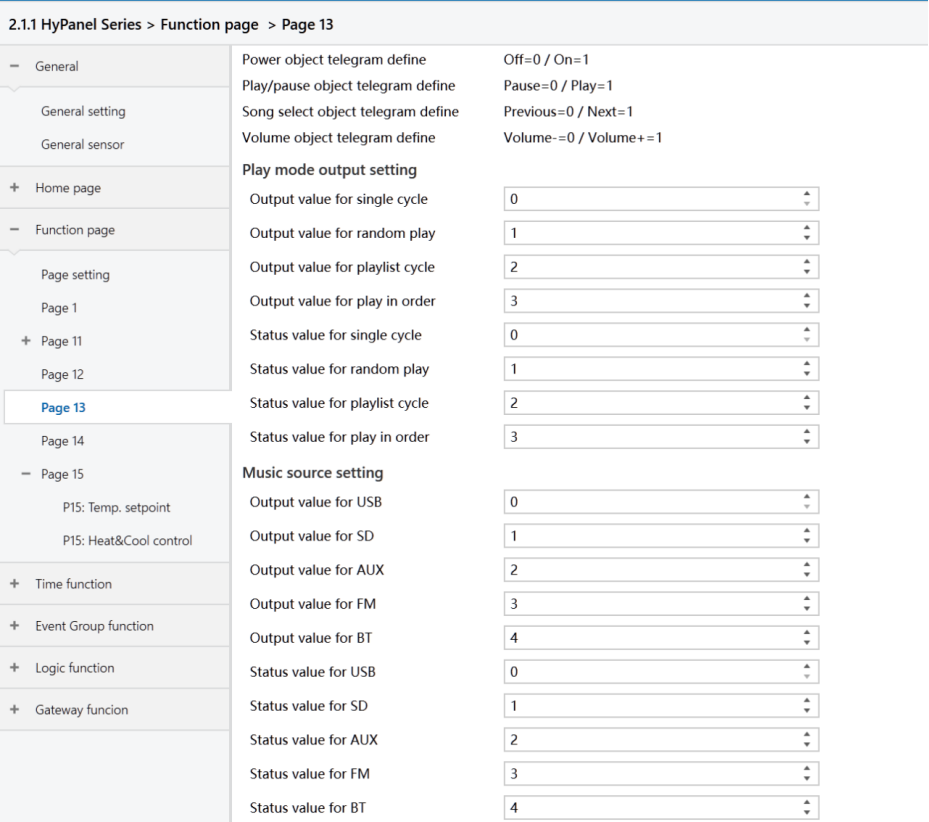
Figure2.4.5: Page x--Background Music interface
Power object telegram define
Play/pause object telegram define
Song select object telegram define
Volume object telegram define
These parameters defined the object values of background music commands.
The following parameters define telegrams and feedback values sent when switching to various playback modes.
- Output value for single cycle/random play/playlist cycle/play in order
Set the command values for each playback modes.
Options: 0 ~ 255
- Status value for single cycle/random play/playlist cycle/play in order
Define the status feedback values for each play mode. The device updates the icon status based on the received feedback value.
Options: 0 ~ 255
The following parameters define telegrams and feedback values sent when switching to each audio source.
- Output value for USB/SD/AUX/FM/BT
Set the command values for enabling each audio source.
Options: 0 ~ 255
- Status value for USB/SD/AUX/FM/BT
Set the feedback value for each audio source. The device updates the icon status based on the received feedback values.
Options: 0 ~ 255
Voice command ID[130.. 139]
Not applicable for HyPanel.