Parameter setting Interface “Page x--Air Conditioner”, as shown in Figure 2.4.4, configures basic control parameters for air conditioners. It is mainly applicable to two types of air conditioning controls: IR split units and gateway Integrate.
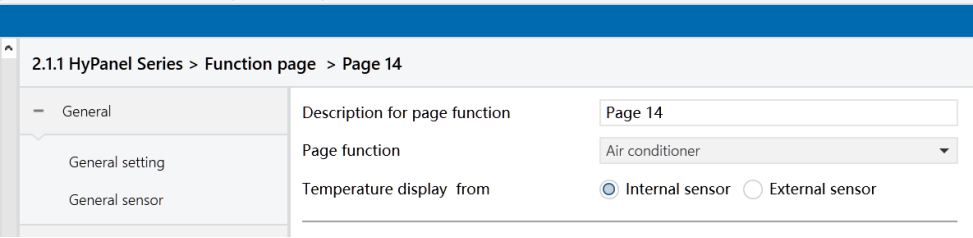
Figure2.4.4-1: Page x--Air conditioner interface
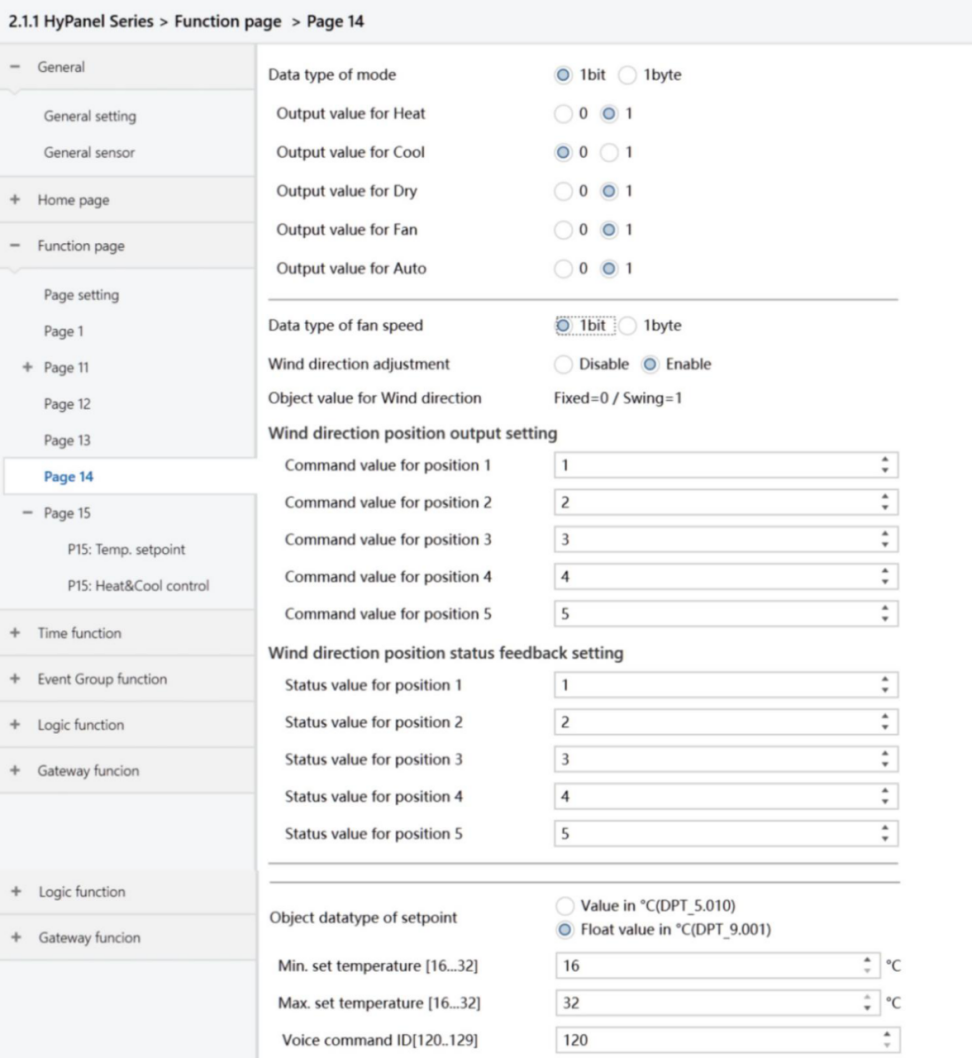
Figure2.4.4-2: Page x - Air conditioner - 1bit ctrl interface
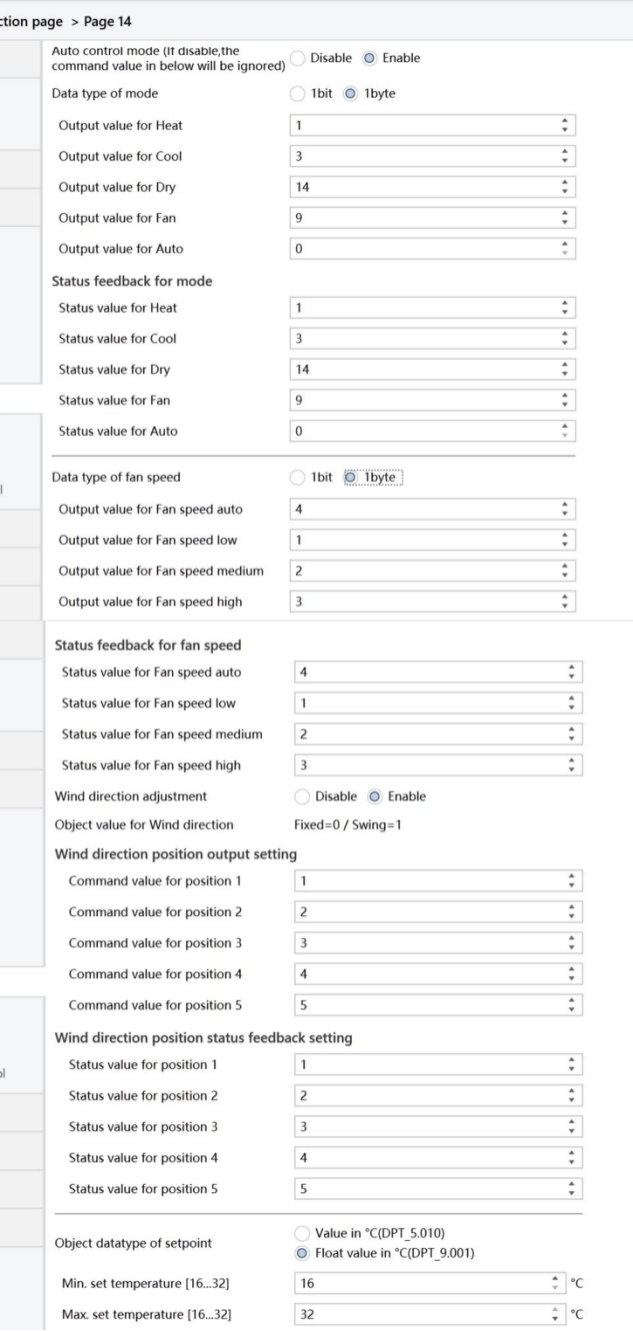
Figure2.4.4-3: Page x--Air conditioner -1byte ctrl interface
Temperature display from
Set the reference source for the ambient temperature displayed in the air conditioning (AC) interface.
Options:
Internal sensor
External sensor
Note
The temperature setting parameters for the air conditioner closely resemble those of HVAC functionality, except for temperature measurement options that don't include combined sensors. For further details, please see Section 2.4.3.
Auto control mode(if disable,the command value in below will be ignored)
Enable or disable the auto control mode of air conditioners.
Options:
Disable: The Auto mode is unavailable on the AC interface, and the following command values will be ignored.
Enable: The Auto mode is available on the AC interface.
Data type of mode
Define the communication object type for controlling AC modes.
Options:
1bit
1byte
Output value for Heat/Cool/Dry/Fan/Auto
Visible when the air conditioner mode object type is “1 byte” or “1 bit”, defining the specific values sent when switching to different modes.
Options: 0 ~ 255
Options: 0 / 1
The following parameters are visible when the “Data type of mode” is “1 byte”.
- Status value for Heat/Cool/Dry/Fan/Auto
Set status feedback values for each mode. The device updates the mode icon status based on the received feedback value.
Options: 0 ~ 255
Data type of fan speed
Set the data type for fan speed.
Options:
1bit
1byte
The following parameters are visible when “Data type of fan speed” is “1 byte”.
- Output value for fan speed auto/low/medium/high
Define the value sent when switching to each fan speed.
Options: 0 ~ 255
- Status value for fan speed auto/low/medium/high
Set the status feedback values for each fan speed. The device updates the fan speed icon status based on the received feedback value.
Options: 0 ~ 255
Wind direction adjustment
Sets whether to enable the wind direction adjustment function.
Options:
Disable
Enable: When selected, the following parameters become visible.
- Object value for Wind direction
Describe the object value of the wind direction adjustment. When the wind direction is fixed, the object “Wind direction fixed/swing, In/Out” sends telegram “0”; when the direction is set to swing, the object sends a telegram of "1". When the wind direction is fixed, there are 5 position options.
Wind direction position output setting
The following parameter configures the value sent by the object "Wind direction position, Out" when switching wind direction positions.
- Command value for position 1/2/3/4/5
Define the command values of the 5 wind direction positions.
Options: 0 ~ 255
Wind direction position status feedback setting
The following parameter sets the status feedback values for each wind direction.
- Status value for position 1/2/3/4/5
Set the status feedback values for each wind direction. The device updates the wind direction position icon status based on the received feedback value.
Options: 0 ~ 255
Object datatype of setpoint
Set the data type of the temperature setpoint.
Options:
Value in ℃(DPT_5.010)
Float value in ℃(DPT_9.001)
Min. /Max. set temperature [16..32]℃
Specify the range of temperature setpoints. The minimum value must be set lower than the maximum value. If the set temperature exceeds the defined limits, it will be automatically adjusted to fit within the specified range.
Voice command ID[120.. 129]
Not applicable for HyPanel.