The Energy Metering parameter settings interface, shown in Figure 2.4.10, configures the display of energy metering values, including current, voltage, power, and energy consumption. Each interface supports up to 4 display items.
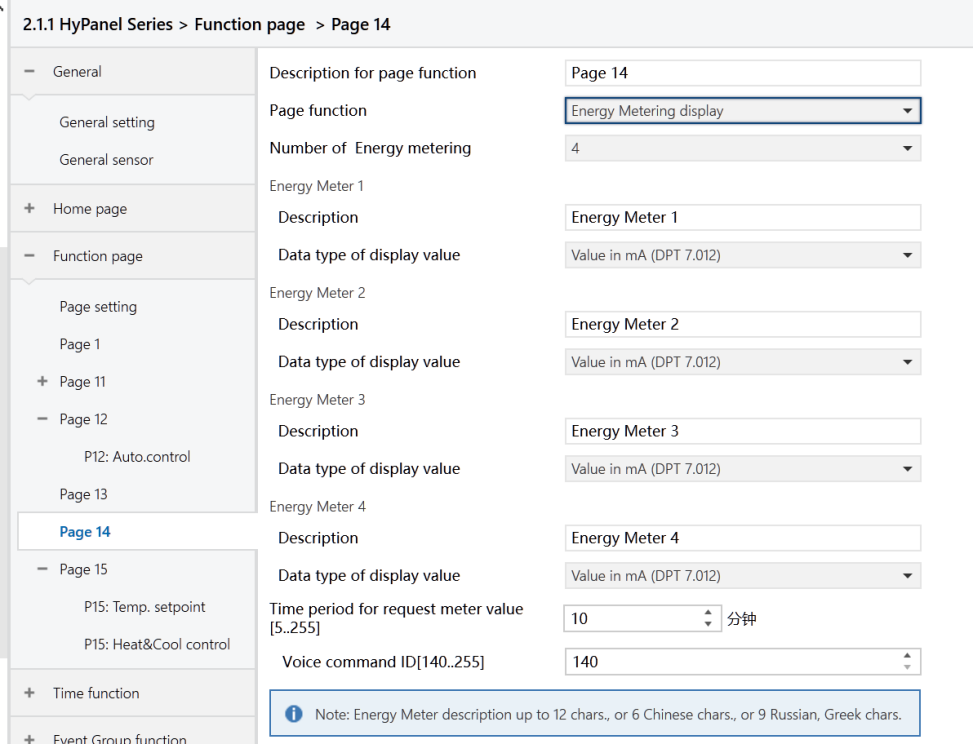
Figure: Page x -- Energy Metering display interface
Number of Energy metering
Set the number of items to be displayed on the energy page, with a maximum of 4 display items.
Options: 1/2/3/4.
Energy Meter x[x=1 to 4]
- Description
Name the energy data item.
- Data type of display value
Set the data type of the energy display item.
Options:
Value in mA (DPT 7.012): For mA current which is integer value
Float value in mA (DPT 9.021): For mA current which is floating point value
Float value in A (DPT 14.019): For A current which is floating point value
Float value in mV (DPT 9.020): For mV voltage which is floating point value
Float value in V (DPT 14.027): For V voltage which is floating point value
Float value in W (DPT 14.056): For W power which is floating point value
Float value in kW (DPT 9.024): For kW power which is floating point value
Value in Wh (DPT 13.010): For Wh energy which is integer value
Value in kWh (DPT 13.013): For kWh energy which is integer value
- Time period for request meter value[5.. 255]Min
Set the time period for the device to request meter value readings from the external metering device.
Options: 5 .. 255
- Voice command ID[14.. 255]
Not applicable for HyPanel.