When the auto operation is activated, the ventilation system will automatically adjust the fan speed based on the control values. The parameters visible are available when the ventilation system's automatic operation is enabled. The parameter setting interface is displayed as below.
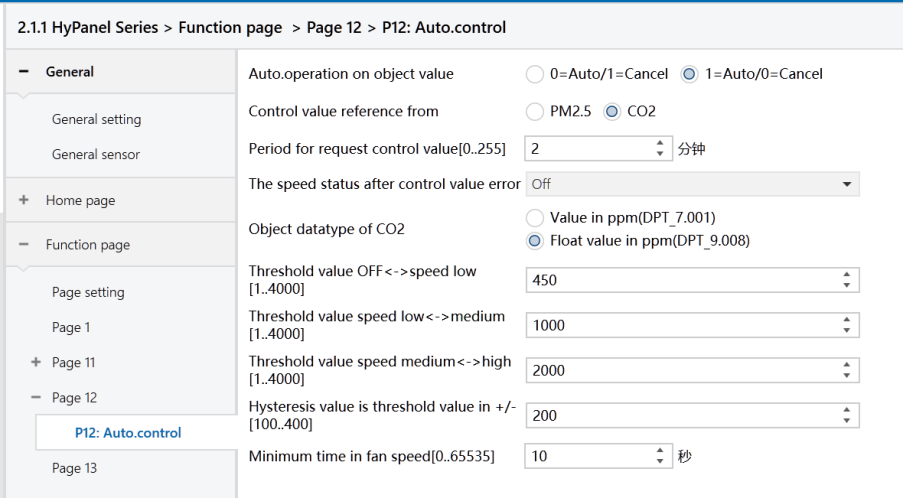
Figure: Page x:Auto.Control_CO2 interface
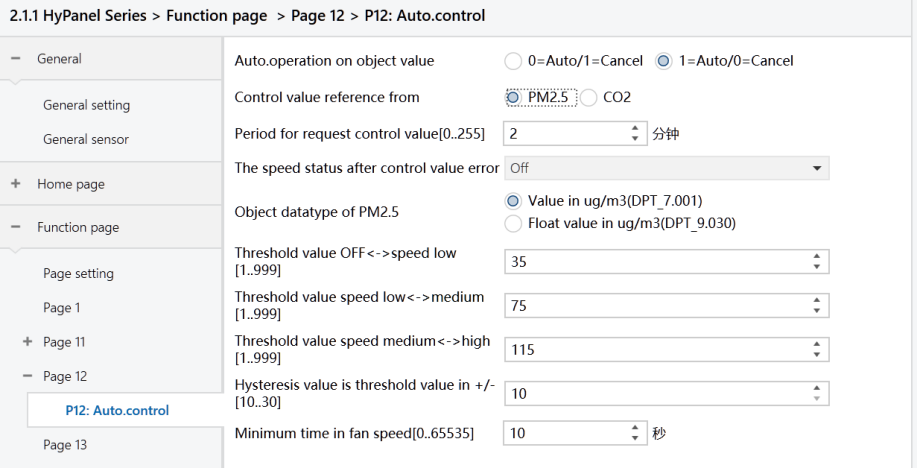
Figure: Page x:Auto.Control_CO2 interface
Auto. operation on object value
Set the telegram value for activating automatic operation.
Options:
0=Auto/1=Cancel: Activate automatic operation when the object “Automatic function, In/Out” receives a telegram value of 0 and cancels automatic operation when it receives 1.
1=Auto/0=Cancel: Activates automatic operation when the object “Automatic function, In/Out” receives a telegram value of 1 and cancels automatic operation when it receives 0.
Note
After power-on, automatic operation is not activated by default.
Control value reference from
Set the source of the control value.
Options:
PM2.5
CO2
Period for request control value [0.. 255] Min
Set the time period for the device to send control value read requests to external sensors.
Options: 0.. 255
The speed status when the control value error
Set the default fan speed when a control value error occurs.
Options :
Off
Low
Medium
High
Note
If attempts to read control values from external sensors yield no response, it will be considered a sensor malfunction and a control value error.
Object datatype of PM2.5
Select the type for PM2.5, which determines the object type and should be chosen according to the type of PM2.5 sensor in use.
Options:
Value in ug/m3(DPT_7.001)
Float value in ug/m3(DPT_9.030)
DPT_7.001: Applicable for integer values
DPT_9.030: Applicable for floating-point values
Object datatype of CO2
Set the data type for CO2, which determines the object type and should be chosen according to the type of CO2 sensor in use.
Options:
Value in ppm(DPT_7.001)
Float value in ppm(DPT_9.008)
DPT_7.001: Applicable for integer values
DPT_9.008: Applicable for floating-point values
Threshold value OFF<-- >speed Low[1.. 999]/ [1.. 4000]
Defines the threshold value for turning off the fan and running at low speed.
If the control value is greater than or equal to the threshold value, the fan will run at low speed. If the control value is less than this threshold value, the fan will be turned off.
Options: 1.. 999 / 1 .. 4000
Threshold value speed low<-- >medium[1.. 999]/ [1.. 4000]
Define the threshold value for switching to the medium-level fan speed. If the control value is greater than or equal to the threshold value, the fan will run at medium speed.
Options: 1.. 999 or 1.. 4000
Threshold value speed medium<-- >high[1 .. 999]/ [1 .. 4000]
Define the threshold value for switching to the high-level fan speed.
If the control value is greater than or equal to this threshold value, the fan runs at high speed.
Options: 1 .. 999 or 1 to 4000
Note
The controller evaluates thresholds in ascending order. The correct execution of the function is guaranteed only under this condition:
First check → OFF <-> Low fan speed threshold → Low fan speed <-> Medium fan speed threshold → Medium fan speed <-> High fan speed threshold.
Hysteresis value is threshold value in +/- [10.. 30]/[100.. 400]
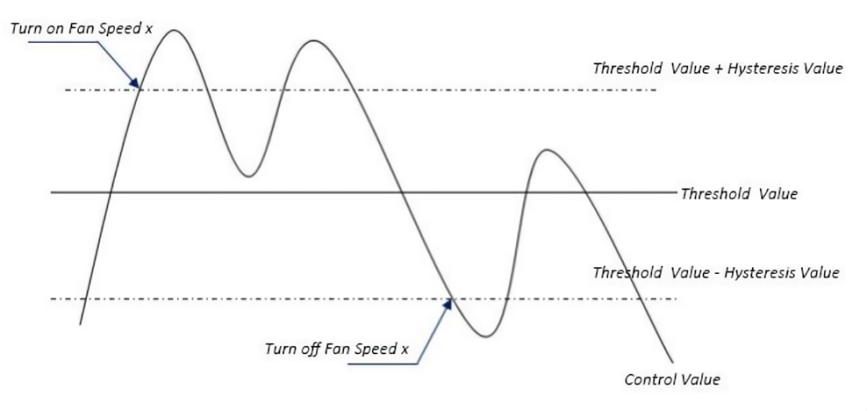
Specify the hysteresis value for the threshold, which helps prevent unnecessary fan actions when the control value fluctuates near the threshold.
Options: 10.. 30 / 100.. 400
For instance, with a control value of PM2.5, a hysteresis value of 10, and a threshold value of 35, the upper threshold limit would be 45(threshold value+hysteresis value), and the lower threshold limit would be 25(threshold value-hysteresis value).
When the control value falls between 25 and 45, the fan's operation state remains unchanged. Changes occur only when the control value is below 25, or equals 45 or higher.
Note
When hysteresis is enabled and there is overlapping of thresholds, the fan's action is as follows:
(1)Hysteresis determines the control point for fan speed transition.
(2)New fan speed is determined by control value and threshold without considering hysteresis.
For example, with PM2.5:
OFF <-> Low fan speed threshold is 20.
Low <-> Medium fan speed threshold is 40.
Medium <->High fan speed threshold is 70.
Hysteresis is set to 10.
a.When the fan speed increases from OFF
The OFF status changes when the control value reaches 30 (≥20+10).
If the received control value is 41, the fan speed goes to Medium (41 falls between 40 and 70, and hysteresis is not considered). In this case, the Low speed is bypassed.
If the received control value is 39, the fan speed will be Low (39 falls between 20 and 40, and hysteresis is not considered).
b.When the fan speed decreases from the high-level:
The high-speed status changes when the control value is at 60 (<70-10).
If the received control value is 39, the fan speed becomes Low (39 falls between 20 and 40, and the hysteresis is not considered at this point). In this case, the Medium speed is bypassed.
(3)When the control value is 0, the fan must be OFF status.
Minimum time in fan speed [0.. 65535]s
Specify the minimum time interval for the fan to maintain its current speed before speed changes, ensuring a minimum operating time for each fan speed. The fan must wait for this duration before changing its speed. If it runs at the current speed for longer than the set minimum time, it can quickly switch to another speed.
Options: 0.. 65535 (0: No minimum running time, but the delay in switching fan speed should be considered.)
Note
This minimum time setting only applies to Auto mode.