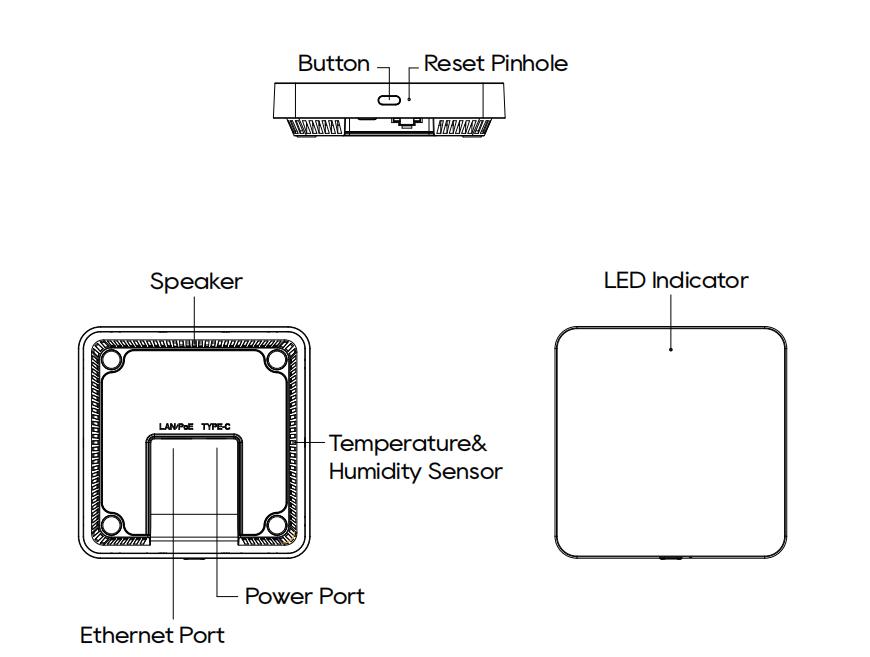
1.1. Key Capabilities
Supports up to 128 sub-devices, including Zigbee and Matter devices.
Supports Wi-Fi 6 on 2.4 GHz and 5 GHz, as well as Ethernet connectivity.
Supports Zigbee 3.0, Bluetooth 5.3, infrared control with 360° coverage and IR learning, and Matter over IP.
Built-in temperature and humidity sensors for use in automations.
Supports Power over Ethernet (PoE) or 5 V DC / 2 A USB-C power.
Supports desktop or wall-mounted installation.
Supports five G32 gateways in one home for lightweight multi-area deployments.
1.2. LED Status and Controls
LED
LED Status | Description |
Solid yellow | Starting up |
Flashing yellow | Not added to a family; waiting for pairing |
Solid green | Added to a family; operating normally |
Slow flashing green (once) | Device detected |
Solid red | Malfunction |
Button
Action | Description |
Press and hold for 3-10 seconds, then release | Reboot the gateway. |
Press and hold for more than 10 seconds | Reset the network settings and enable Bluetooth. |
Reset Pinhole
Action | Description |
Press and hold for 2 seconds, then release. | Restores factory settings and clears all configurations. |