Client Certificate Setting
Certificates ensure communication integrity and privacy. To use the SSL protocol, you need to upload the right certificates for verification.
Web Server Certificate
It is a certificate sent to the client for authentication when the client requests an SSL connection with the Akuvox door phone. Please upload the certificates in accepted formats.
To upload Web Server Certificate, go to Security > Advanced > Web Server Certificate.
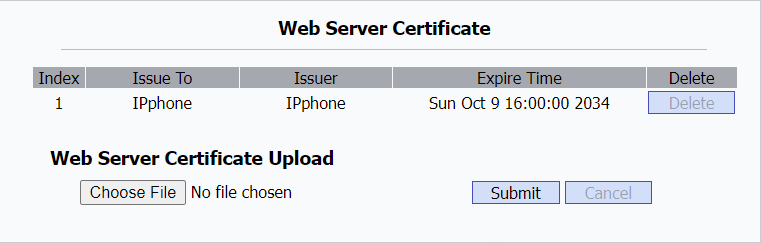
Client Certificate
This certificate verifies the server to the Akuvox door phone when they want to connect using SSL. The door phone verifies the server's certificate against its client certificate list.
To upload and configure client certificate, go to Security > Advanced > Client Certificate.
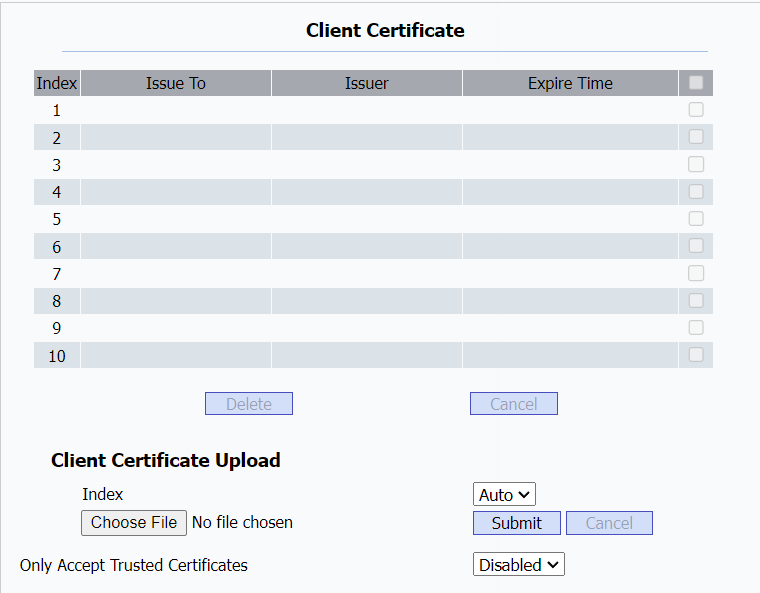
Parameters Set-up:
- Index: To select the desired value from drop-down list of Index. If you select Auto, the uploaded certificate will be displayed in numeric order. If you select the value from 1 to 10, the uploaded certificate will be displayed according to the value that the user selected.
- Select File: Click Choose File to upload the desired certificate (*.pem only).
- Only Accept Trusted Certificates: If select Enabled, as long as the authentication success, the phone will verify the server certificate based on the client certificate list. If select Disabled, the phone will not verify the server certificate no matter whether the certificate is valid or not.
Voice Encryption
Secure Real-time Transport Protocol (SRTP) is a protocol derived from the Real-time Transport Protocol (RTP). It enhances the security of data transmission by providing encryption, message authentication, integrity assurance, and replay protection.
To enable this feature for SIP calls, go to Account > Advanced > Encryption.

Parameters Set-up:
- Voice Encryption(SRTP): To select among Disabled, Optional or Compulsory for SRTP. If it is Optional or Compulsory, the voice during the call is encrypted, and you can grab the RTP packet to analyze.
To enable this feature for IP calls, go to Phone > Call Feature > Others.
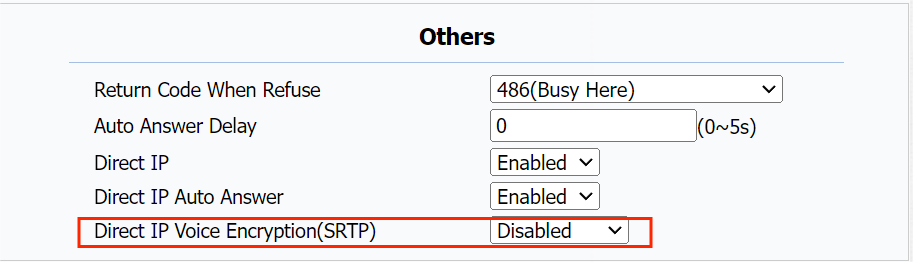
Parameters Set-up:
- Direct IP Voice Encryption(SRTP): To select among Disabled, Optional or Compulsory for SRTP.
Prevent SIP Hacking
Internet phone eavesdropping is a network attack that allows unauthorized parties to intercept and access the content of the communication sessions between intercom users. This can expose sensitive and confidential information to the attackers. SIP hacking protection is a technique that secures SIP calls from being compromised on the Internet.
To enable this feature, go to Account > Advanced > Prevent SIP Hacking.
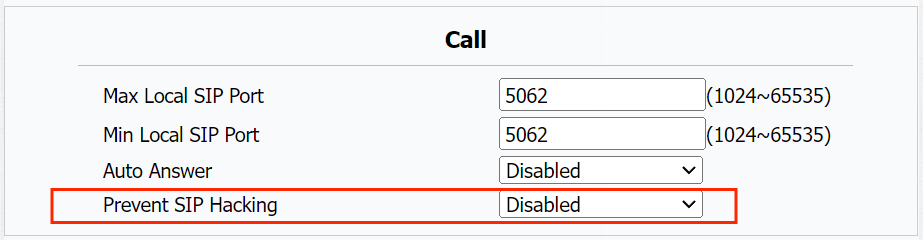
User Agent
User agent is used for identification purpose when you are analyzing the SIP data packet.
If user agent is blank by default, users can see the company name Akuvox, model number and firmware version from PCAP.
To configure user agent, go to Account > Advanced > User Agent.

Parameters Set-up:
- User Agent: To customize SIP account information to identify the device, which can be viewed by capturing SIP packets.
Device Web Interface Security
Modify Web Interface Password
To change the default web password, go to Security > Basic > Web Password Modify.
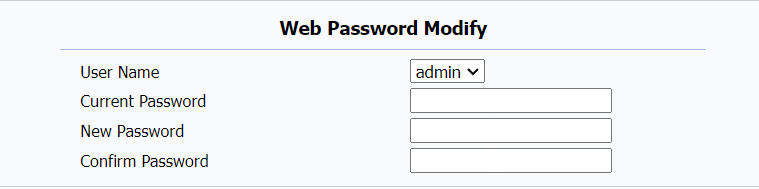
Parameters Set-up:
- User Name: To modify either the admin or user password.
- Current Password: Enter the old password for web interface login. It is admin by default.
- New Password: Enter the new password.
- Confirm Password: Enter the new password again and make sure it is the same with the one you entered in the New Password box.
Configure Web Interface Automatic Logout
You can set up the web interface's automatic log-out timing, requiring re-login by entering the user name and the passwords for security purposes or for the convenience of operation.
To change the time value, go to Security > Basic > Session Time Out.

Parameters Set-up:
- Session Time Out Value: The range is from 60 to 14400 seconds.