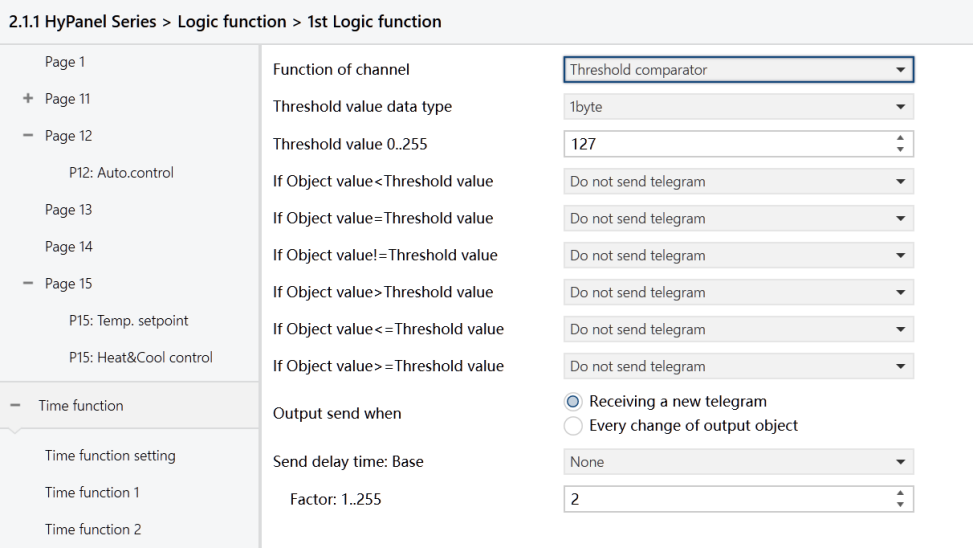
Figure: Logic function_Threshold comparator interface
Threshold value data byte
Set the data type for the threshold value.
Options:
4bit
1byte
2byte
4byte
Threshold value 0 .. 255
Set the threshold value, which is determined by the data type.
4bit: 0 ..15
1byte: 0 .. 255
2byte: 0 .. 65535
4byte: 0 .. 4294967295
If Object value<Threshold value
If Object value=Threshold value
If Object value!=Threshold value
If Object value>Threshold value
If Object value<=Threshold value
If Object value>=Threshold value
These parameters are used to set the logic result to be sent when the input is less than, equal to, not equal to, greater than, less than or equal to, or greater than or equal to the set threshold value.
Options:
Do not send telegram: Not to select this option
Send value “0”: When the condition is met, it sends a telegram “0”.
Send value “1”: When the condition is met, it sends a telegram “1”.
Note
In cases of conflicting options among parameters, the value to be sent will be based on the condition specified in the last parameter.
For example, if the parameter “If Object value=Threshold value" is set to "Send value 0," and parameter “If Object value<=Threshold value" is set to "Send value 1," when the object value equals the threshold value, the logic result will send the value “1”.
Output send when
Set the conditions for sending the logical operation result to the bus.
Options:
Receiving a new telegram: Result sent upon each reception of a new logical input value.
Every change of output object: Result sent only when it changes.
Note
When conducting the initial logical operation, the result will be sent even if it remains unchanged.
Send delay time
Set the delay time for sending the logical operation result to the bus, calculated as Delay time = Base x Factor. If the “Base” is set to "None", there is no delay.
Base:
None
0.1s
1s
2s
5s
10s
25s
Factor: 1 .. 255