The parameter window labeled "Time function x (x: 1~16)," as shown in Figure 5.4.2, sets the values sent by each timer and their corresponding durations. Parameters for each time function are uniform. Below is an example of setting parameters for one timer.
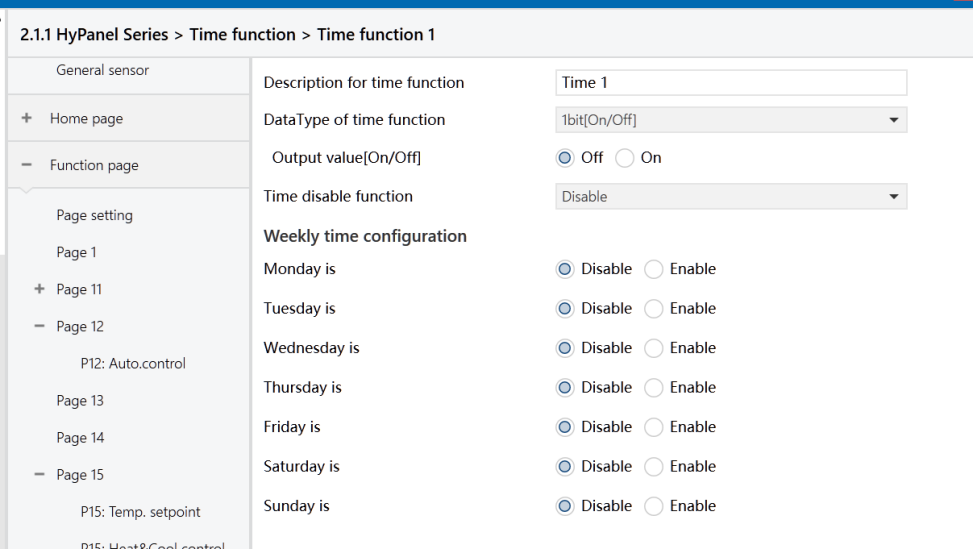
Figure: Time function x interface
Description for time function
Set the name of timer x, with a maximum of 12 characters (up to 6 Chinese characters supported).
Data Type of time function
Set the data type of the value sent when the timer x reaches its programmed timing.
Options:
1bit [On/Off]
1byte unsigned value
1byte [scene control]
2byte unsigned value
Output value/ scene No.[...]
Set the telegram value sent when timer x reaches its programmed timing. The range of values is determined by the setting in the previous parameter.
Time disable function
Set whether the timer function can be disabled or enabled via object, or set the trigger value for disabling/enabling the timer.
Options:
Disable
Disable=0/Enable=1
Disable=1/Enable=0
Weekly time configuration
The following parameters set the time for timer x. establish the timing for timer x. Once the specified time is reached, the action associated with timer x is triggered and executed.
-Monday/Tuesday/Wednesday/Thursday/Friday/Saturday/Sunday is
Enable/Disable timer x for a specific day of the week.
Options:
Disable
Enable
- Hours at / Minutes at
Set the specific time for timer x.
Options:
Hours: 0 ~ 23
Minutes: 0 ~ 59