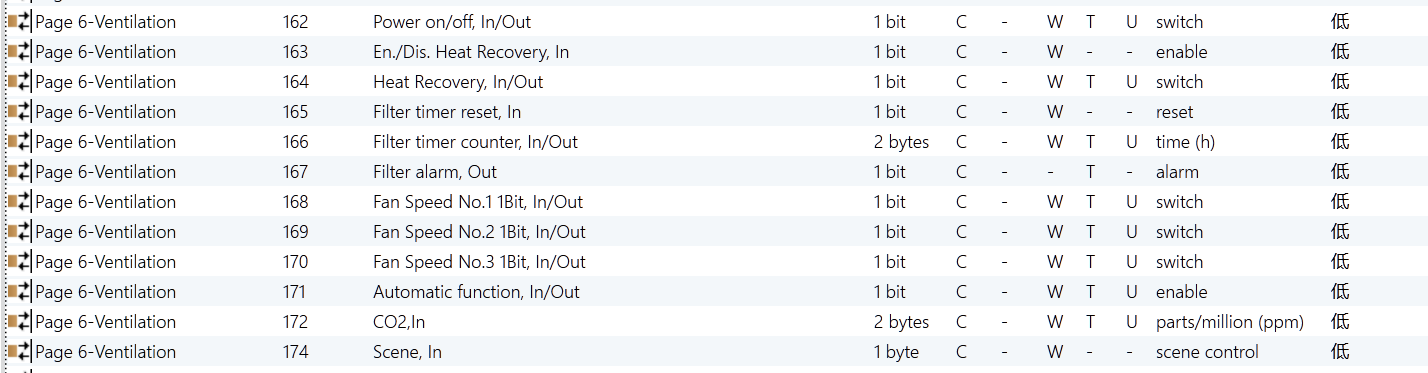




Figure 3.3.8 Ventilation system function Communication Object
No. | Object function | Name | Type | Flags | DPT | |||||||||
162 | Power on/off,In/Out | Page x-Ventilation | 1bit | C,W,T,U | 1.001 switch | |||||||||
This object is used to send power on/off telegrams for ventilation control and receive control status feedback. - Telegram values 1: Ventilation control interface on, interface operable 0: Ventilation control interface off, interface not operable | ||||||||||||||
163 | En./Dis. Heat Recovery,In | Page x-Ventilation | 1bit | C,W | 1.003 enable | |||||||||
This object is used to disable/enable the heat recovery function of the ventilation system. The specific values are defined by parameters. When disabled, the heat exchange is turned off and cannot be controlled. | ||||||||||||||
164 | Heat Recovery, In/Out | Page x-Ventilation | 1bit | C,W,T,U | 1.001 switch | |||||||||
This object is used to send control commands to turn on/off the heat recovery, and it can also receive status feedback values. -Telegram values 1: On 0: Off | ||||||||||||||
165 | Filter time reset, In | Page x-Ventilation | 1bit | C,W | 1.015 reset | |||||||||
This object is used to reset the filter time. After resetting, the duration of filter usage restarts counting. - Telegram values 1: Reset | ||||||||||||||
166 | Filter time counter, In/Out | Page x-Ventilation | 2byte | C,W,T,U | 7.001 pluses | |||||||||
This object is used to count the filter usage time in hours. Changes in the count value are transmitted to the bus, and this time can also be adjusted via the bus. | ||||||||||||||
167 | Filter alarm, Out | Page x-Ventilation | 1bit | C,T | 1.005 alarm | |||||||||
When the filter usage time exceeds the set value, this object triggers an alarm to remind the user to replace the filter. - Telegram values 1: Alarm | ||||||||||||||
168 | Fan speed, Out | Page x-Ventilation | 1byte | C,T | 5.010 percentage(0..100%) | |||||||||
When the wind speed type is set to "1 byte," this object becomes visible. It sends control telegrams for the wind speed to the bus. The specific telegram values for each wind speed level are defined by parameters. | ||||||||||||||
169 | Status of Fan speed, In | Page x-Ventilation | 1byte | C,W,T,U | 5.010 percentage(0..100%) | |||||||||
When the wind speed type is “1byte”, this object is visible. It receives feedback of the wind speed. The specific telegram values for each wind speed level are defined by parameters. | ||||||||||||||
168 | Fan Speed No.1 1Bit, In/Out | Page x-Ventilation | 1bit | C,W,T,U | 1.001 switch | |||||||||
169 | Fan Speed No.2 1Bit, In/Out | Page x-Ventilation | 1bit | C,W,T,U | 1.001 switch | |||||||||
170 | Fan Speed No.3 1Bit, In/Out | Page x-Ventilation | 1bit | C,W,T,U | 1.001 switch | |||||||||
When the wind speed type is 1”bit”, these three communication objects are visible. The wind speed is controlled by three objects simultaneously, with each wind speed level corresponding to specific telegram values defined by parameters. They can receive feedback, with feedback values needing to correspond to the parameter-defined values to update the display on the screen. | ||||||||||||||
171 | Automatic function, In/Out | Page x-Ventilation | 1bit | C,W,T,U | 1.003 enable | |||||||||
This object is used to enable the automatic operation function. By default, automatic operation is disabled after power recovery or programming. It can be disabled by turning off the device, manually adjusting the fan speed, or activating a scene. Specific values for enabling or disabling automatic operation are defined by parameters. | ||||||||||||||
172 | CO2, In | Page x-Ventilation | 2byte | C,W,T,U | 9.008 parts/million(ppm) 7.001 pulses | |||||||||
This object is used to receive the input of CO2 values from the bus and update the display accordingly. The unit is ppm. - Range: 0 ... 4000 If the automatic operation control value is set to CO2, the ventilation system in automatic mode adjusts fan speed based on CO2 concentration. The object's data type is determined by parameters. | ||||||||||||||
173 | PM2.5, In | Page x-Ventilation | 2byte | C,W,T,U | 9.030 concentration(ug/m3) 7.001 pulses | |||||||||
This object is used to receive the input of PM2.5 values from the bus, updating the display accordingly. The unit is ug/m3. - Range: 0 ... 999 If the control value for automatic operation is set to PM2.5, the ventilation system in automatic mode adjusts fan speed based on PM2.5 concentration. The object's data type is determined by parameters. | ||||||||||||||
174 | Scene, In | Page x-Ventilation | 1byte | C,W | 18.001 scene control | |||||||||
This communication object is used to invoke scene control for the ventilation system. Parameter settings range from 1 to 64, correlating to actual telegram values from 0 to 63. | ||||||||||||||
Table 3.3.8 Ventilation system function Communication Object Table