Parameter setting interface "General" as shown in Figure 5.2, the configured basic parameters are valid for all DALI devices of the gateway.
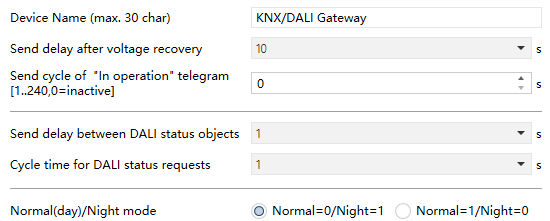
Fig.5.2 “General” Interface
Parameter “Device Name(max.30 char)”
This parameter is used to input the device name (up to 30 characters).
Parameter “Send delay after KNX bus recovery”
This parameter defines the time delay for sending status telegrams after the bus recovery reset. Only when the delay complete can the device send status telegrams to the bus. In a project with multiple gateways installed, different settings for this parameter can prevent all devices from sending status telegrams at the same time.
Options:
Immediately
5s
10s
...
60s
This delay time does not include the initialization time of the device. This delay begins when the device is initialized.
After the bus voltage is recovery, the initialization time of the device startup increases with the increase of the connected DALI device. When the device is connected to 128 ECGs, the device startup initialization time will be completed within 2 minutes (excluding initialization time of KNX DALI gateway).
NOTE:
This parameter only affects the status telegrams sent to the bus, and does not affect the operation executed. The operation is completed and may be executed after the device is initialized.
Parameter “Send cycle "In operation" telegram (1..240, 0=inactive)”
This parameter sets the interval at which the device periodically sends a telegram through the bus to indicate that the device application layer is operating normally. When set to "0", the object "In operation" will not send a telegram. If the setting is not "0", the object "In operation" will send a telegram with logic "1" to the bus for the set time period.
Options: 0...240s, 0=inactive
The cyclic telegram is monitored by the external device. If the external device does not receive the telegram within the monitoring time, the device is considered to be faulty or the bus transmission is interrupted. In order to reduce the bus load as much as possible, the maximum time interval should be selected according to actual needs.
NOTE:
The time interval is counted from the completion of the device initialization, regardless of the bus power-on delay transmission.
Parameter “Send delay between DALI status objects”
This parameter defines the delay between sending DALI status telegrams, that is, the interval between each status telegram transmission, which can prevent excessive bus load, for example, broadcast switch control.
Options:
No delay
0.5s
1s
2s
...
10s
All status telegrams sent to the bus are affected by this parameter setting, such as switch status, brightness status, DALI failure status, and so on.
Parameter “Cycle time for DALI status requests”
This parameter sets the time period for sending DALI device (brightness, failure) request. In order to analyze ECG and light failures, and to figure out the actual brightness status of the light, failure request telegram and brightness query telegram must be sent periodically to the ECG on the DALI bus.
Options:
No request
0.5s
1s
2s
...
10s
For example, if it is set to 1s and 64 ECGs are connected, the complete process of scanning the ECG and the light takes 64s (each ECG and failure type is 1s), so it may take about 1 minute before identifying that a failure occurs.
This setting mainly affects the DALI bus, where a longer cycle can reduce the bus load. However, it may not be possible to immediately detect faults on DALI devices. Similarly, detecting new devices or recovering devices also takes longer.
NOTE:
If “No request” is set, the gateway will not request ECGs’ status, that is, the gateway will not recognize the ECG and light failure or actual working status, so it is recommended to select this option in special cases.
Parameter “Normal(day)/Night mode”
This parameter for setting object value of normal/night mode.
Options:
Normal=0/Night=1
Normal=1/Night=0
NOTE:
This function is associated with driving the opening brightness value. Different brightness values can be set for normal and night. It affects the execution of the ECG's night control mode. If it is normal mode, the gateway does not execute the night mode of the ECG/group.