Fig.5.4 “ECG/Group Template setting” Interface
Parameter “Number of templates”
This parameter sets the number of parameter-setting templates for ECG and group operations, with a maximum of 8 templates.
5.4.1 Parameter Window “Template X(X=1~8)”
Figure 5.4.1 shows the “Template X” interface, where group and ECG control action behaviors are configured. A total of 8 templates are available.
If the group and ECG control actions are set to follow the ECG configuration, the action behaviors will be determined by the DCA tool settings.
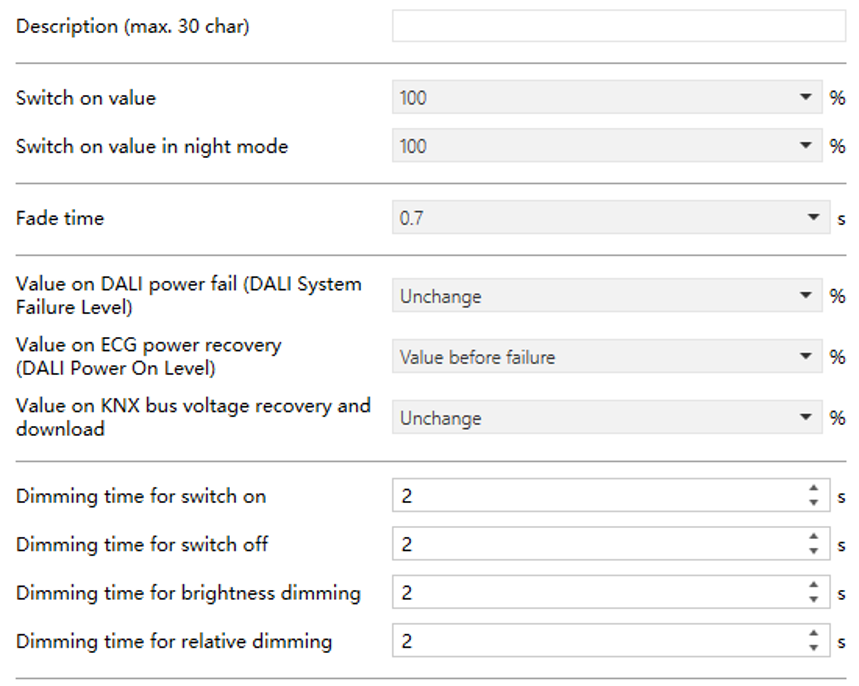
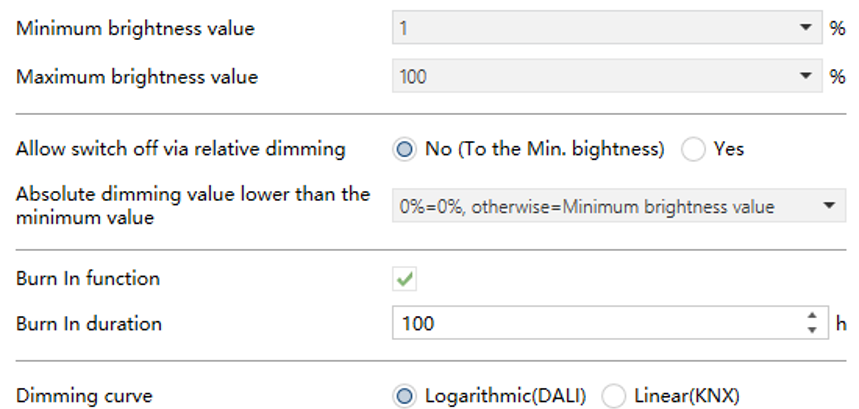
Fig.5.4.1 “Template X”(X=1~8) Interface
Parameter “Description (max.30 char)”
This parameter is used to input the parameter setting templates name (up to 30 characters).
Parameter “Switch on value”
This parameter defines the brightness value of "Switch on".
Options:
1%
2%
...
100%
Last brightness value: The value of the brightness before the light is turned off. Defaults to 50% when uncertain.
TIP:
For ECG/Group with separate Normal/Night modes, this parameter defines the switching value for Normal mode. If no distinction is made, this value applies to both modes.
Parameter “Switch on value in night mode”
This parameter defines the brightness value of "Switch on" in night mode.
Options:
Disable: No distinction between Normal and Night modes; the switch-on brightness remains the same as in Normal mode.
1%
2%
...
100%
Last brightness value: Restore the brightness level before the lights were last turned off. Defaults to 10% if the previous value is unavailable.
Parameter “Fade time”
This parameter sets the fade time of the DALI driver adjust brightness, colour temperature, and colour.
Options:
0s
0.7s
1.0s
1.4s
2.0s
...
90.5s
Parameter “Value on DALI power fail (DALI System Failure Level)”
This parameter sets the brightness level of the light when the DALI bus loses power. The value is stored in the ECG, which automatically applies it after power loss.
Options:
0%
1%
2%
...
100%
Unchange: Maintain the brightness level prior to DALI bus power loss; the light brightness remains the same.
Parameter “Value on ECG power recovery (DALI Power On Level)”
This parameter defines the brightness value of the light after ECG power-on reset. This value will be saved in the ECG, and the ECG will output the brightness value when the ECG is powered on and reset.
Options:
0%
1%
2%
...
100%
Value before failure: Restore the brightness to the level before the ECG lost power.
Parameter “Value on KNX bus voltage recovery and download ”
This parameter defines the brightness level of lights after KNX bus voltage recovery or after downloading parameters.
Options:
0%
1%
2%
...
100%
Unchange: The brightness remains at its current level.
Value before failure: Restore the brightness to the state before KNX bus voltage failure.
NOTE:
To ensure correct restoration, the brightness must be stable for at least 2 seconds before the KNX bus failure or download. For downloads, the brightness value before the download will be applied.
Parameter “Dimming time for switch on/off”
This parameter defines the dimming time of the light brightness. That is, the dimming time of the brightness from 0% to 100% or 100% to 0%.
Options: 0...255s
Parameter “Dimming time for brightness dimming”
This parameter sets the duration for dimming the brightness to a new level.
Options: 0...255s
Parameter “Dimming time for relative dimming”
This parameter defines the dimming time for relative dimming.
Options: 1...255s
Parameter “Minimum brightness value”
This parameter defines the minimum control brightness value of the light, which refers to the minimum brightness value controllable by the DALI Gateway for lights.
Options:
0%
1%
2%
...
49%
Parameter “Maximum brightness value”
This parameter defines the maximum control brightness value of the light, which refers to the maximum brightness value controllable by the DALI Gateway for lights.
Options:
50%
51%
52%
...
100%
NOTE:
Any control command with brightness is limited to the minimum and maximum brightness value output.
Parameter “Allow switch off via relative dimming”
This parameter defines whether to allow the light to be switched off by relative dimming .
Options:
No(To the Min.brightness): Not allowed, only dim down to minimum brightness.
Yes: When the brightness is dim down to the minimum brightness value, the light is turned off directly.
Parameter “Absolute dimming value lower than the minimum value”
This parameter sets the behavior when the absolute dimming value lower than the minimum value.
Options:
0%=0%, otherwise=Minimum brightness value: Output at the minimum brightness value. if it is 0%, the light is turned off.
To be the minimum brightness value: Output at the minimum value, even if it is 0%.
To be 0%: Turn off the light.
Parameter “Burn In function”
This parameter enables or disables the burn-in function. During burn-in, the light operates at maximum brightness, and the ECG or group cannot be controlled individually.
If the gateway powers off during burn-in, the mode does not resume automatically; it must be restarted via an object.
When burn-in ends normally (time completed or stopped via object), the device will either switch on/off or return to its previous brightness, depending on the settings, and individual control is restored..
NOTE:
During burn-in, colour can still be adjusted and can be triggered or stopped via the channel A/B burn-in object.
- Parameter “Burn In duration”
After the burn in function is enabled, this parameter is visible and is used to set the duration of the burn in phase of the DALI device.
Options: 1...255h
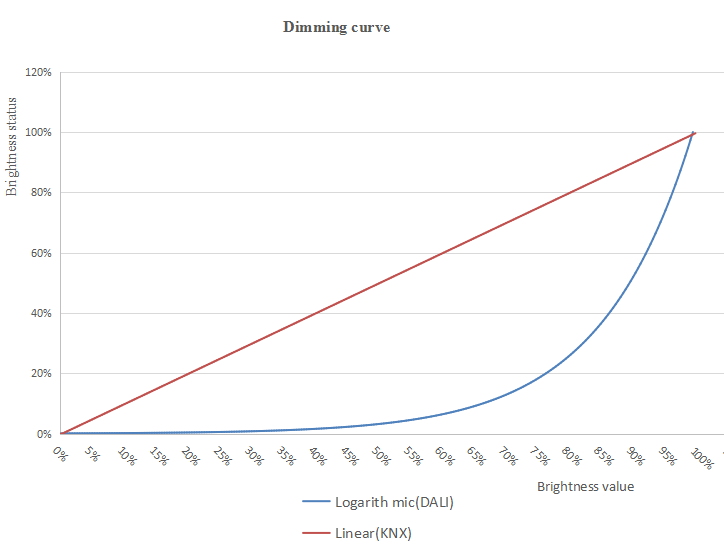
Parameter “Dimming curve ”
This parameter sets the dimming curve type that the DALI device operates on when this template is selected.
Options:
Logarithmic(DALI)
Linear(KNX)
For example, if the driver currently uses a logarithmic curve: Selecting Logarithmic requires no adjustment, and selecting Linear simulates a linear dimming effect through fitting.
This function works similarly to the dimming curve setting in broadcast control.