The “Temperature sensor” interface is shown in Figure 5.5.1, is used to configure temperature-related functions of the panel.
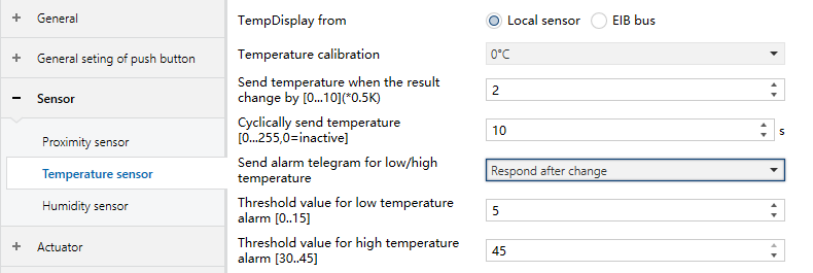
Figure 5.5.1 “Temperature sensor” Interface
TempDisplay from
Defines the source of the displayed and measured temperature value.
Options:
Local sensor: Temperature is obtained from the local sensor.
EIB bus: Temperature is obtained from the KNX bus.
Temperature calibration
Sets the temperature offset value.
Actual output temperature = measured temperature + calibration value.
The measured temperature is taken from the source selected above.
Options:
-5℃
-4.5℃
...
4.5℃
5℃
Send temperature when the result change by [0…10] (0.5K)
Defines the temperature change threshold for sending the current temperature value to the bus.
If set to 0, this function is disabled.
Options: 0...10
Cyclically send temperature [0…255, 0=inactive]
Defines the cyclic transmission interval of the temperature value to the bus. If set to 0, cyclic transmission is disabled.
Options: 0...255
Send alarm telegram for low/high temperature
Defines how temperature alarm telegrams are handled.
Options:
No respond
Respond after read only: Alarm status is displayed only after a read request from the bus.
Respond after change: Alarm telegram is automatically sent when the threshold is triggered.
Threshold value for low temperature alarm [0…15]
Sets the low-temperature alarm threshold in °C.
Options: 0...15
Threshold value for high temperature alarm [30…45]
Sets the high-temperature alarm threshold in °C.
Options: 30...45