The parameter interface “Logic” (Figure 5.8.1) is used to enable logic functions. A total of 8 logic channels are available.
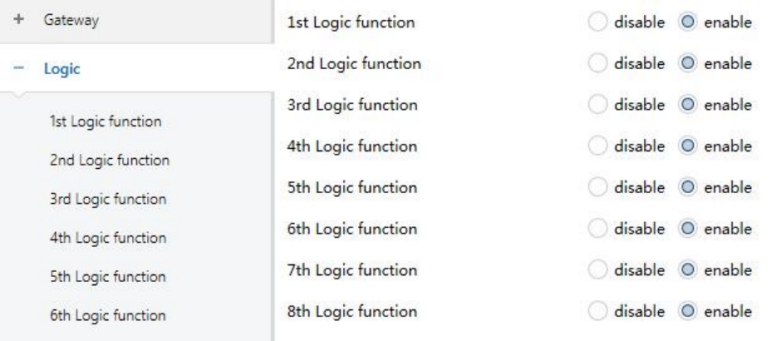
Figure 5.8.1 "Logic disable/enable" Interface
Function of channel
Defines the logic function for the selected channel.
Options:
Disable
AND
OR
NAND
NOR
XOR
Threshold comparator
Format convert
NOTE:
The parameters and communication objects for AND / OR / NAND / NOR / XOR are identical except for the logic operation. The following describes one example.
5.8.1 “AND/OR/NAND/NOR/XOR” Function
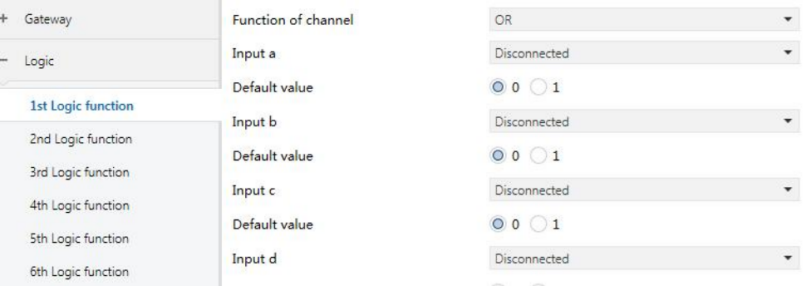
Figure 5.8.2 “Logic AND/OR/NAND/NOR/XOR" Interface
Input a/b/c/d/e/f/g/h
Defines how each input participates in the logic operation.
Options:
Disconnected: Input not used.
Normal: Input value used directly.
Inverted: Input value is inverted before processing.
Default value
Sets the initial value of the input.
Options:
0
1
Result is inverted
Defines whether the logic result is inverted.
Options:
No: Output directly.
Yes: Invert the result before output.
Read input object value after bus voltage recovery
Defines whether a read request is sent to logic input objects after bus recovery or programming.
Options:
No
Yes
Output send when
Defines when the logic result is sent.
Options:
Receiving a new telegram: Sent whenever an input telegram is received.
Every change of output object: Sent only when the result changes.
NOTE:
First calculation always sends result even if unchanged.
Send delay time
Defines the delay before sending the logic result.
Delay = Base × Factor.
Base options:
None: No delay is applied.
0.1s
1s
…
25s
Factor options:
1...255
5.8.2 “Threshold Comparator” Function
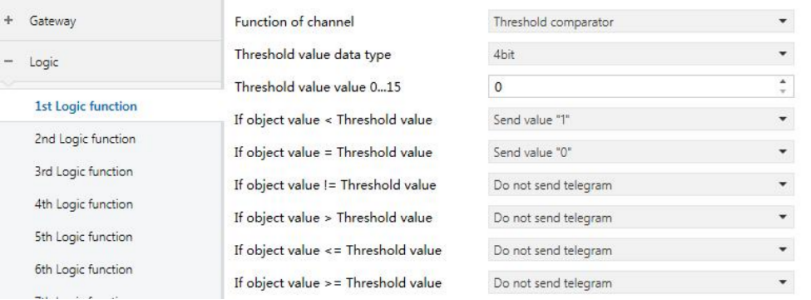
Figure 5.8.3 “Logic Threshold Comparator" Interface
Threshold value data byte
Defines the data type of the threshold.
Options:
4bit
1byte
2byte
4byte
Threshold value …
Defines the threshold value. The threshold value range is based on the data type.
Options:
4bit: 0...15
1byte: 0...255
2byte: 0...65535
4byte: 0...4294967295
If Object value < Threshold value
If Object value = Threshold value
If Object value ≠ Threshold value
If Object value > Threshold value
If Object value ≤ Threshold value
If Object value ≥ Threshold value
Each condition defines the value to be sent when met.
Options:
Do not send telegram: Ignore the parameter with this option and does not include it in the logical operation.
Send value "0"
Send value "1":
NOTE:
When the condition is met, a telegram with value 0 or 1 is sent.
If multiple parameter conditions conflict, the value defined by the last matched condition takes precedence.
For example, if “If Object value = Threshold value” is set to Send value “0” and “If Object value ≤ Threshold value” is set to Send value “1”, then when the object value equals the threshold, the logic result sent will be “1”.
Output send when
Defines when the logic result is sent.
Options:
Receiving a new telegram: Sent whenever an input telegram is received.
Every change of output object: Sent only when the result changes.
NOTE:
First calculation always sends result even if unchanged.
Send delay time
Defines the delay before sending the logic result.
Delay = Base × Factor.
Base options:
None: No delay is applied.
0.1s
1s
…
25s
Factor options:
1...255
5.8.3 “Format convert” Function
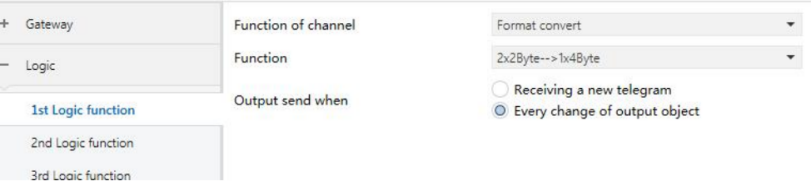
Figure 5.8.4 "Logic Format convert" Interface
Function
Defines source and target data format conversion.
Options:
2x1bit --> 1x2bit
8x1bit --> 1x1byte
1x1byte --> 1x2byte
2x1byte --> 1x2byte
2x2byte --> 1x4byte
1x1byte --> 8x1bit
1x2byte --> 2x1byte
1x4byte --> 2x2byte
1x3byte --> 3x1byte
3x1byte --> 1x3byte
Output send when
Defines when the logic result is sent.
Options:
Receiving a new telegram: Sent whenever an input telegram is received.
Every change of output object: Sent only when the result changes.
NOTE:
First calculation always sends result even if unchanged.