SIP Call Configuration
بروتوكول بدء الجلسة (SIP) هو بروتوكول إرسال إشارات يستخدم لبدء وصيانة وإنهاء المكالمات.
تستخدم مكالمة SIP SIP لإرسال واستقبال البيانات بين أجهزة SIP، ويمكن أن تستخدم الإنترنت أو شبكة محلية لتقديم اتصال عالي الجودة وآمن. بدء مكالمة SIP يتطلب حساب SIP، وعنوان SIP لكل جهاز، وتكوين إعدادات SIP على الأجهزة.
SIP Account Registration
كل جهاز يحتاج إلى حساب SIP لإجراء واستقبال مكالمات SIP.
تدعم أجهزة الاتصال الداخلي Akuvox تكوين حسابين SIP، يمكن تسجيلهما تحت خادمين مستقلين.
انقر هنا لعرض مثال تسجيل حساب SIP.
Register SIP accounts on the web Account > Basic > SIP Account interface.
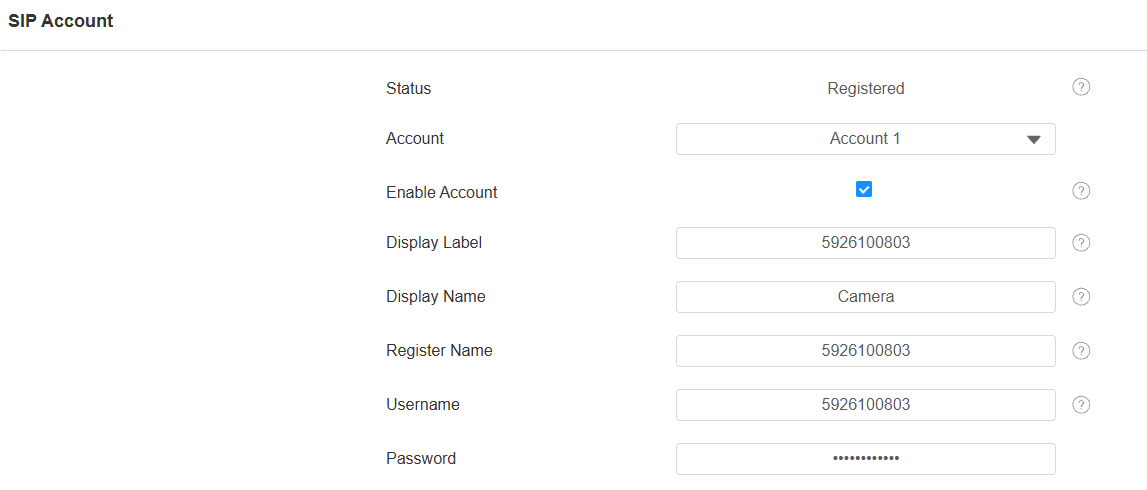
Account 1/Account 2: The device supports 2 SIP accounts.
- Account 1 is the default account for call processing. Also, it will be utilized when the Akuvox SmartPlus cloud service is activated.
- The system switches to Account 2 if Account 1 is not registered.
- To designate the account to be used for outgoing calls, select the account number for contacts or dial plan prefixes in their settings.
Tip
When the device is connected to the SmartPlus Cloud, the display label, register name, and username will show its SIP number.
Display Label: The label of the device.
Display Name: The designation for Account 1 or 2 to be shown on the device itself on the calling screen.
Register Name: Same as the username from the PBX server.
Username: Same as the username from the PBX server for authentication.
Password: Same as the password from the PBX server for authentication.
SIP Server Configuration
تمكن خوادم SIP الأجهزة من إنشاء وإدارة جلسات الاتصال مع أجهزة الاتصال الأخرى باستخدام بروتوكول SIP. يمكن أن تكون خوادم طرف ثالث أو PBX مدمج في شاشة Akuvox الداخلية.
Set it up on the web Account > Basic interface.
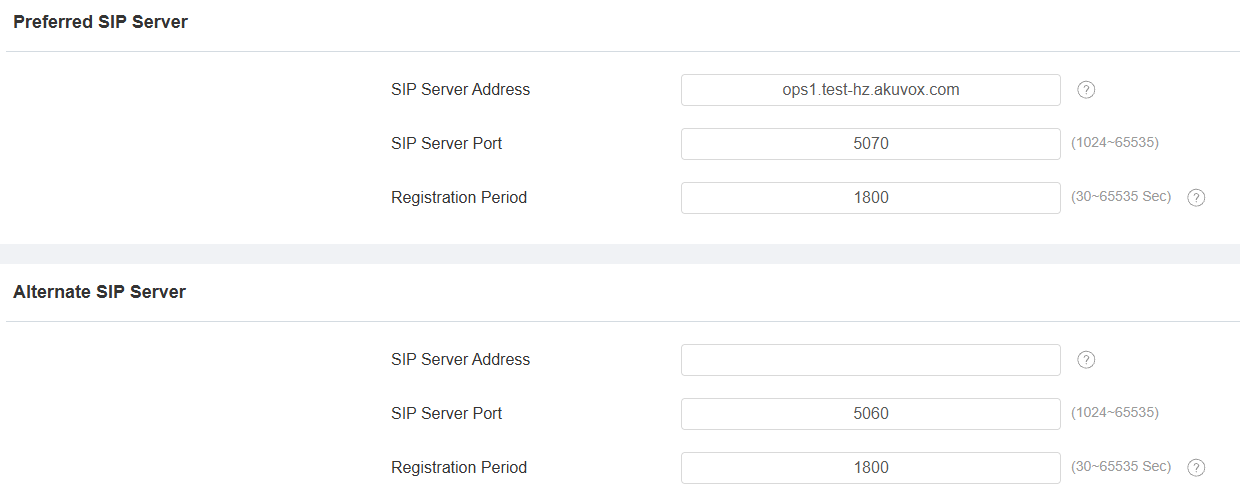
SIP Server Address: Enter the server’s IP address or its domain name.
SIP Server Port: Specify the SIP server port for data transmission.
Registration Period: Define the time limit for SIP account registration. Automatic re-registration will initiate if the account registration fails within this specified period.
Outbound Proxy Server
يستخدم خادم بروكسي صادر لاستقبال جميع رسائل الطلبات التي تبدأ وتوجيهها إلى خادم SIP المخصص لإنشاء جلسة استدعاء عبر نقل بيانات عبر المنافذ.
Set it up on the web Account > Basic > Outbound Proxy Server interface.
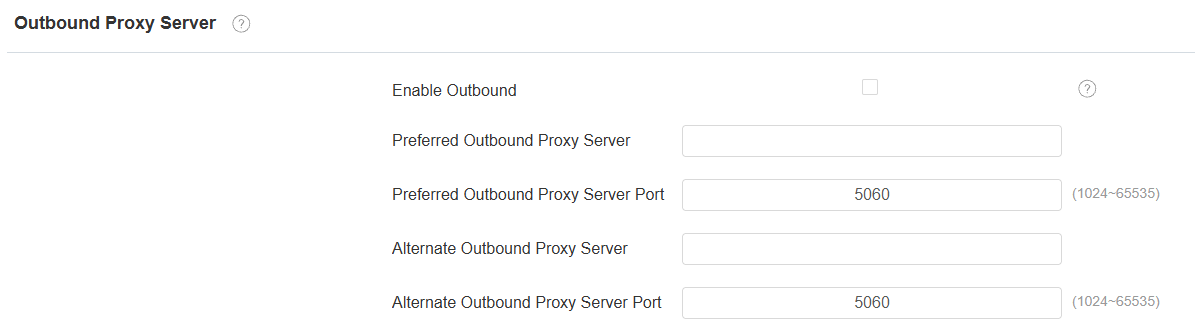
Preferred Outbound Proxy Server: Enter the SIP proxy IP address.
Preferred Outbound Proxy Server Port: Set the port for establishing a call session via the outbound proxy server.
Alternate Outbound Proxy Server: Enter the SIP proxy IP address to be used when the main proxy malfunctions.
Alternate Outbound Proxy Server Port: Set the proxy port for establishing a call session via the backup outbound proxy server.
Data Transmission Type
SIP messages can be transmitted in three data transmission protocols: UDP (User Datagram Protocol), TCP (Transmission Control Protocol), and TLS (Transport Layer Security). In the meantime, you can also identify the server from which the data comes.
Set up the data transmission type on the web Account > Basic > Transport Type interface.

UDP: An unreliable but very efficient transport layer protocol. It is the default transport protocol.
TCP: A less efficient but reliable transport layer protocol.
TLS: An encrypted and secure transport layer protocol. Select this option if you wish to encrypt the SIP messages for enhanced security or if the other party’s server uses TLS. To use it, you need to upload certificates for authentication.
SIP Hacking Protection
التنصت عبر الهاتف عبر الإنترنت هو هجوم شبكي يسمح للأطراف غير المصرح له باعتراض والوصول إلى محتوى جلسات الاتصال بين مستخدمي الإنتركم. هذا قد يكشف معلومات حساسة وسرية للمهاجمين. حماية اختراق SIP هي تقنية تؤمن مكالمات SIP من الاختراق على الإنترنت.
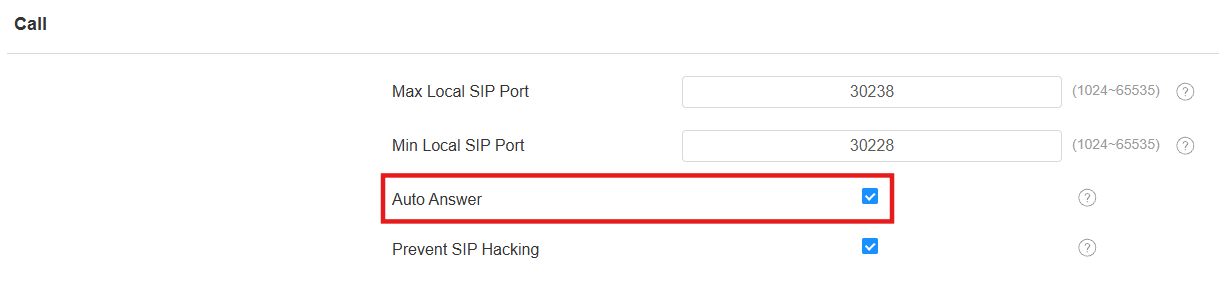
Set it up on the Account > Advanced > Call interface.
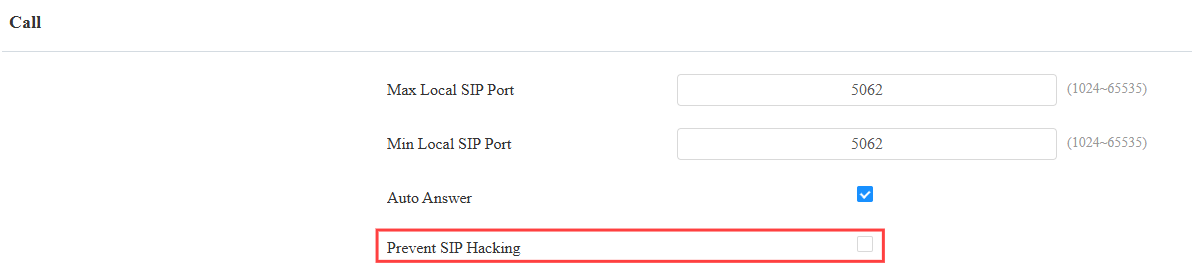
Prevent SIP Hacking: Activate this feature to only receive calls from contacts in the whitelist. This protects users’ private and secret information from potential hackers during SIP calls.
Call Auto-answer
Auto-answer feature allows the device to automatically pick up incoming calls without any manual intervention.
Enable the feature on the web Account > Advanced > Call interface.