IP Call Configuration
An IP call is a direct call between two intercom devices using their IP addresses, without a server or a PBX. IP calls work when the devices are on the same network.
To set up the direct IP call feature, navigate to the web Phone > Call Feature > Others interface.
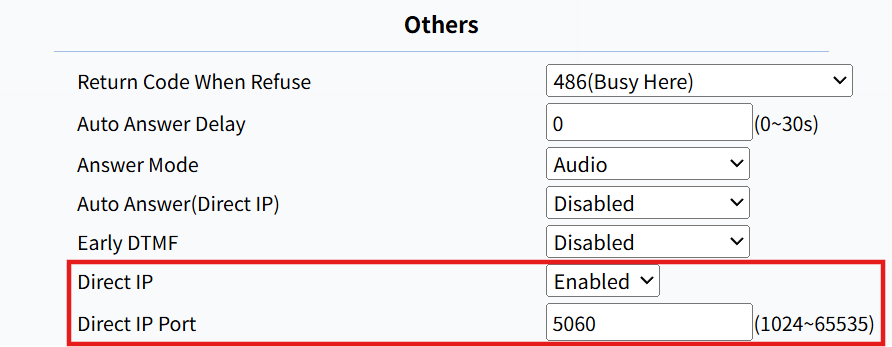
Port: Set the port for direct IP calls. The default is 5060, with a range from 1024 to 65535. If you enter a value within this range other than 5060, ensure consistency with the corresponding device for data transmission.
SIP Call Configuration
Session Initiation Protocol(SIP) is a signaling transmission protocol used for initiating, maintaining, and terminating calls.
A SIP call uses SIP to send and receive data between SIP devices, and can use the internet or a local network to offer high-quality and secure communication. Initiating a SIP call requires a SIP account, a SIP address for each device, and configuring SIP settings on the devices.
SIP Account Registration
Each device needs a SIP account to make and receive SIP calls.
Akuvox intercom devices support the configuration of two SIP accounts, which can be registered under two independent servers.
Click here to view the SIP account registration example.
Navigate to the web Account > Basic interface.
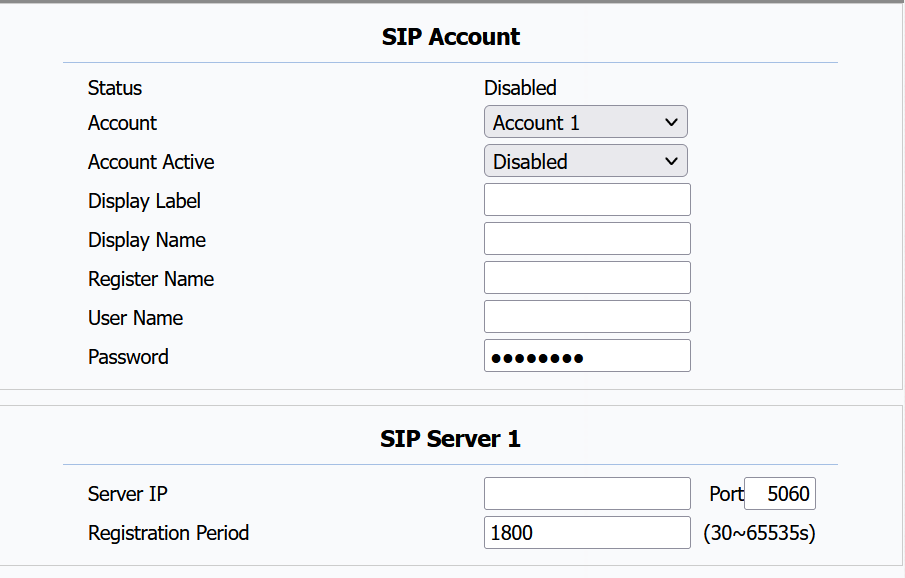
Status: Indicate whether the SIP account is registered or not.
Account: The device supports 2 SIP accounts. Choose the account for configuration.
- Account 1 is the default account for call processing. Also, it will be utilized when the Akuvox SmartPlus Cloud service is activated.
- The system switches to Account 2 if Account 1 is not registered.
- To designate the account to be used for outgoing calls, select the account number for contacts or dial plan prefixes in their settings.
Display Label: The label of the device.
Display Name: The designation for Account 1 or 2 to be shown on the device itself on the calling screen.
Register Name: Same as the username from the PBX server.
User Name: Same as the username from the PBX server for authentication.
Password: Same as the password from the PBX server for authentication.
Server IP: Specify the SIP account registration server port. The default is 5060. You can find the port information on the indoor monitor’s PBX screen or from third-party server providers.
Registration Period: Set up the SIP account registration period. SIP re-registration will start automatically if the account registration fails during the registration period. The default registration period is 1800, ranging from 30-65535s.
SIP accounts can also be set up on the device  > Account Manager screen. Tap Account 1 or Account 2 to configure it.
(1).png "image(770)(1).png")
Configure SIP Ports for SIP Calls
You can set up a SIP port range for making SIP calls on the web Account > Advanced > Call interface.

Max Local SIP Port: The maximum SIP port ranges from 1024 to 65535. The default port value is 5062.
Min Local SIP Port: The minimum SIP port ranges from 1024 to 65535. The default port value is 5062.
Outbound Proxy Server
An outbound proxy server is used to receive all initiating request messages and route them to the designated SIP server in order to establish a call session via port-based data transmission.
Set it up on the web Account > Basic > Outbound Proxy Server interface.
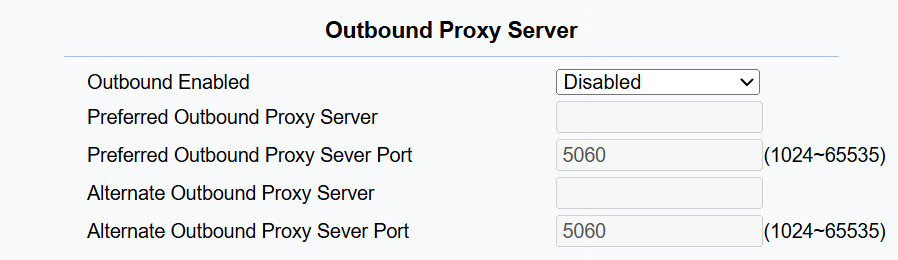
Preferred Outbound Proxy Server: Enter the SIP proxy IP address.
Preferred Outbound Proxy Server Port: Set the port for establishing a call session via the outbound proxy server.
Alternate Outbound Proxy Server: Enter the SIP proxy IP address to be used when the main proxy malfunctions.
Alternate Outbound Proxy Server Port: Set the proxy port for establishing a call session via the backup outbound proxy server.
Data Transmission Type
Akuvox intercom devices support four data transmission protocols: User Datagram Protocol(UDP), Transmission Control Protocol(TCP), Transport Layer Security(TLS), and DNS-SRV.
Set it up on the web Account > Basic interface.

UDP: An unreliable but very efficient transport layer protocol. It is the default transport protocol.
TCP: A less efficient but reliable transport layer protocol.
TLS: An encrypted and secure transport layer protocol. Select this option if you wish to encrypt the SIP messages for enhanced security or if the other party’s server uses TLS. To use it, you need to upload certificates for authentication.
DNS-SRV: A DNS service record defines the location of servers. This record includes the hostname and port number of the server, as well as the priority and weight values that determine the order and frequency of using the server.