Akuvox door phones can be integrated with third-party systems through the HTTP API. This allows external platforms or devices to interact with the door phone and trigger actions remotely.
For example, a smart home control panel or third-party automation system can send an HTTP command to the door phone to trigger the relay and unlock the door.
To ensure secure communication, the door phone supports multiple authorization modes for HTTP API access. This article explains how to configure the authorization settings on the device web interface.
Applicable models:
All door phones support this feature.
This article takes R29 as an example.
Use the device’s IP to log in to its web interface. The default username and password are admin.
Go to the Setting > HTTP API interface.
Enable the feature and select the authorization mode.
If Allowlist is selected, enter the IP address of the third-party device that is allowed to access the API.
If Basic or Digest is selected, enter the username and password for authentication. The third-party system must include these credentials in the HTTP request header.
Authorization Mode | Description |
|---|---|
None | No authentication is required. Recommended only for testing or demo environments. |
Allowlist | Only devices with specified IP addresses can access the API. Suitable for LAN deployments. |
Basic | Authentication is performed using username and password. The credentials are encoded using Base64 in the HTTP request header. Data is transmitted in clear text. |
Digest | An enhanced authentication method compared with Basic. It uses MD5 encryption to protect credentials during transmission. |
Normal | Reserved for Akuvox internal development use. |
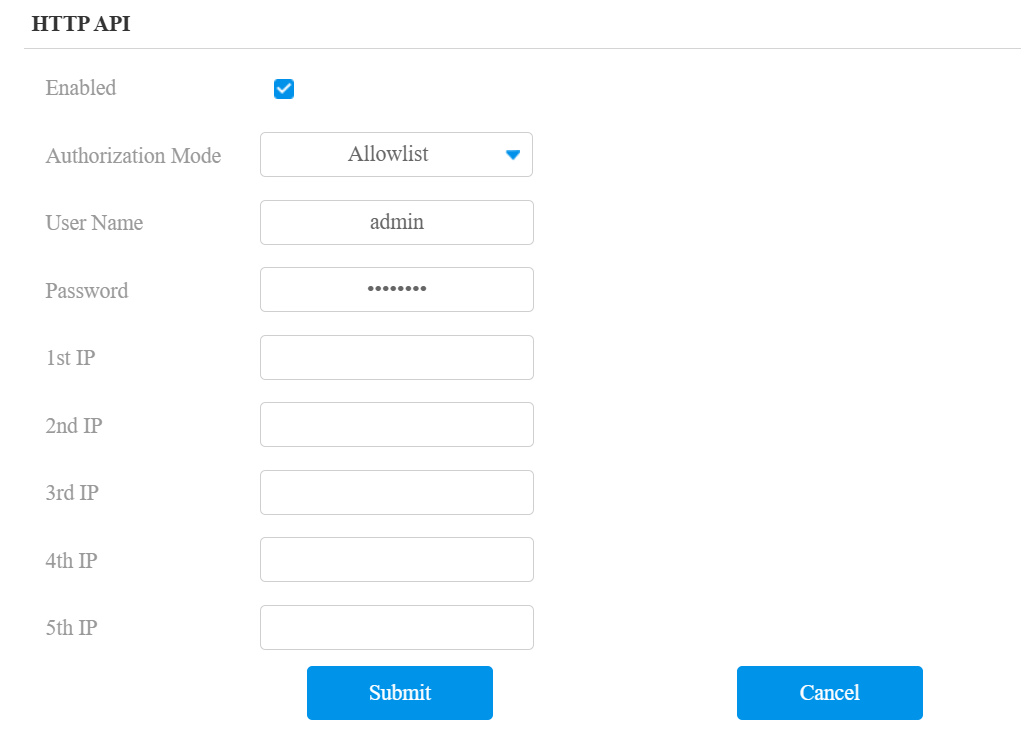
Submit the setting.