The White Light LED is used to enhance illumination around the device in low-light environments. When enabled, the device automatically turns on the white light during face recognition or QR code scanning, allowing users to clearly see their position and improving recognition accuracy.
This feature is especially useful in environments with poor lighting.
Applicable models:
E18, E16, A05, A15, DB01, S535, S538, S539, X910, X916, X915, and R29.
The configuration steps below use R29 as an example. The interface may vary slightly across different models.
Use the device IP to log in to its web interface. The default username and password are admin.
Go to the Device > Light interface.
Enable the feature.
Set the Limit Backlight Value. It is the ambient brightness threshold that determines when the white light should be activated.
When the environment brightness is lower than this value, the white light will turn on during scanning.
When the environment brightness is higher than this value, the white light will remain off.
Set the white light PWM value.
PWM (Pulse Width Modulation) controls the intensity of the LED.
Higher PWM value → Brighter white light
Lower PWM value → Dimmer white light
For example, if the white light setting remains the same, increasing the PWM value will produce a brighter illumination.
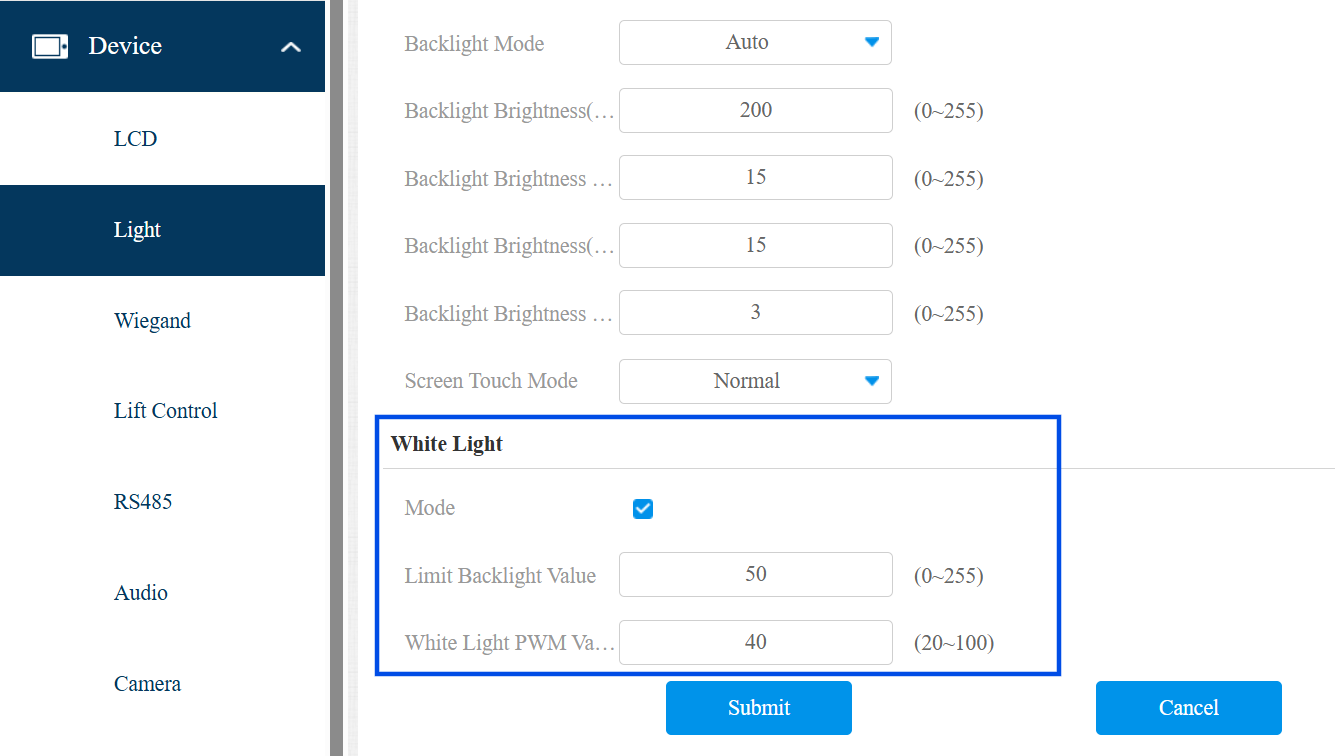
Submit the setting.