The interlock feature restricts door opening. A door can only be opened when all other doors are closed in situations with multiple doors.
.jpg)
Note
The following device models with specific firmware versions or higher support this feature:
A094: 92.30.10.117
A095: 95.30.10.110
A094
Use the device IP to log into its web interface. The initial username and password are admin.
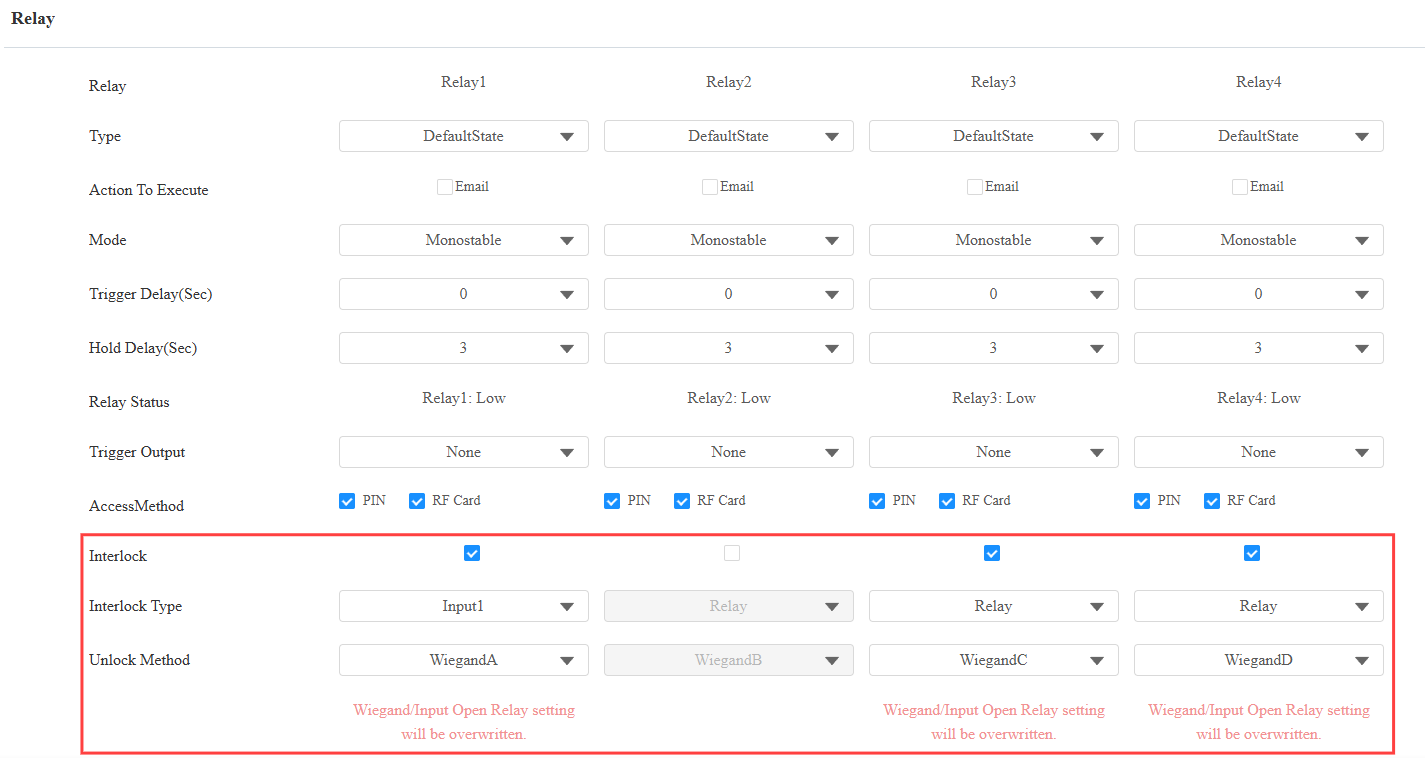
Go to Intercom > Relay interface. Turn on the Interlock switch for target relays. The relay without the Interlock switch enabled will not be constrained by its rules.
Select the Interlock Type, relay, or input.
There are two conditions for a door to be considered closed:
Relay Closed: The door lock is engaged.
Input Closed: The door magnetic sensor indicates the door is closed.
Configure this based on the actual project requirements. See the chart below for scenario references:
Type | Relay-Based Interlock | Input-Based Interlock | Mixed Use of Input and Relay |
|---|---|---|---|
Explanation | No sensors are used; the door opening is determined by whether the lock has reset. | The lock has reset, but the door is not closed. Door magnetic sensors are used to indicate whether doors are closed. | Some doors are connected to door magnetic sensors, while some simply use door locks. |
Example | Enable Interlock switches for Relays 1, 2, and 4. Set their Interlock Type to Relay. | Enable Interlock switches for Relays 2, 3, and 4.
Note: Each relay should have a different input. | Enable Interlock switches for Relays 1, 3, and 4.
Note: Each relay should have a different input. |
Result |
|
|
|
Select the unlock method. Since the relay can be opened by Wiegand or an exit button connected to an input port, specify the Wiegand and the input used.
Please note that this selection will overwrite the Wiegand and Input settings on the Device > Wiegand and Access Control > Input/Auxiliary Input interface.
Note
Emergency Action and Relay Schedule are not constrained by the Interlock rules.