Lock & Unlock
External Unlocking
PIN code
RFID card
Mechanical key
Temporary password
BelaHome app
Internal Unlocking
Rotate the thumbturn to the vertical position
Press the internal button in the lower-left corner
Use the BelaHome app
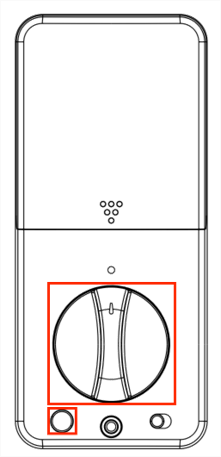
External Locking
Press the lock icon in the lower-left corner of the keypad
Automatically locks after the preset delay (with the Auto Lock enabled)
Use the mechanical keys
Internal Locking
Rotate the thumbturn to the horizontal position.
Press the internal button at the lower-left corner.
Power Management
Battery Replacement
Replace all batteries promptly in the following cases:
When the red LED flashes six times after unlocking(low battery alert)
When you receive a low battery notification (if applicable).
To replace the batteries:
Push the battery cover upward to remove it.
Replace all old batteries with new AA alkaline batteries.
Reinstall the battery cover.
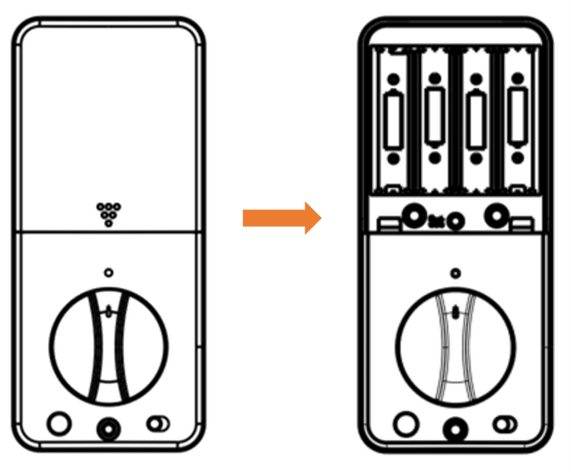
NOTE:
Do not mix battery types or old and new batteries.
Emergency Power Supply
If the batteries are critically low and the lock cannot operate, use an emergency power supply:
Press the right side of the key cover, then lift and rotate it to reveal the power port.
Connect a 5VDC power source to the lock using a USB-C cable.
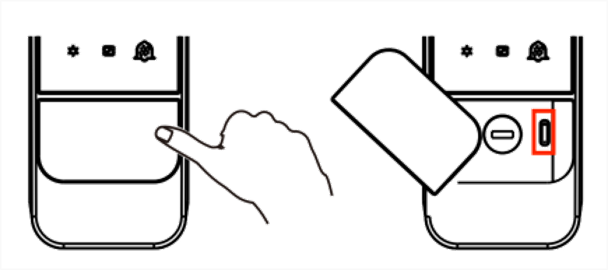
NOTE:
Use external power only in emergencies. After unlocking, disconnect the power bank and recharge or replace the batteries promptly.
Use Mechanical Keys
If the lock cannot be unlocked due to battery drain or an electronic malfunction:
Press the right side of the key cover, then lift and rotate to open it.
Insert and turn the mechanical key to unlock.
TIP:
Keep a spare key in a secure place outside your home.