Audio Codec Configuration
The door phone supports three types of Codec (PCMU, PCMA, and G722) for encoding and decoding the audio data during the call session. Each type of Codec varies in terms of sound quality. You can select the specific codec with different bandwidths and sample rates flexibly according to the actual network environment.
It is only available for SIP calls. To do the configuration on device web Account > Advanced interface.
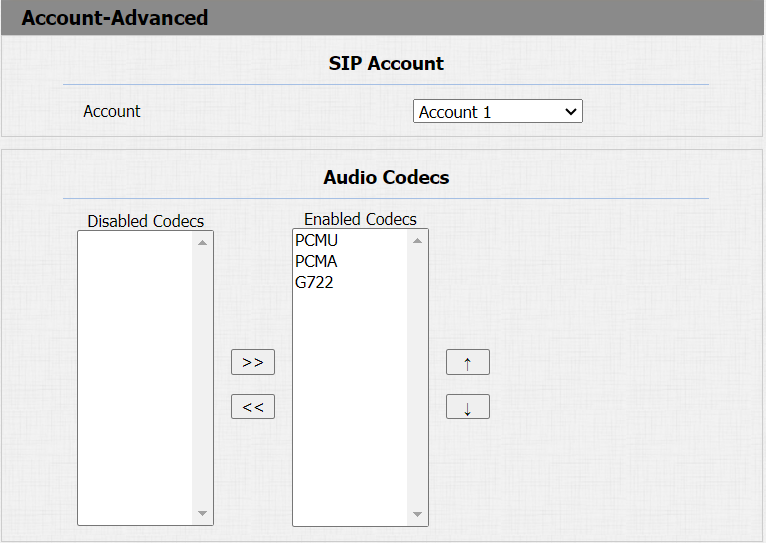
Please refer to the bandwidth consumption and sample rate for the four codecs types below:
| Codec Type | Bandwidth Consumption | Sample Rate |
|---|---|---|
| PCMA | 64 kbit/s | 8kHZ |
| PCMU | 64 kbit/s | 8kHZ |
| G722 | 64 kbit/s | 16kHZ |
Video Codec Configuration
Le téléphone de porte prend en charge le codec H264 qui offre une meilleure qualité vidéo à un débit binaire bien plus bas avec une qualité vidéo et une charge utile différentes.
To set up video codec on web Account > Advanced interface.
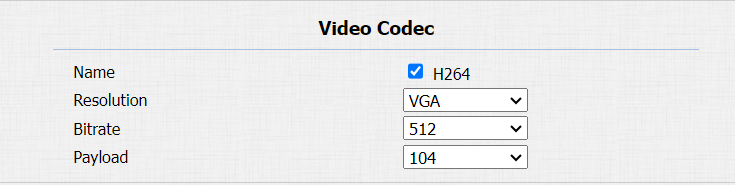
Parameter Set-up:
- Name: check to select the H264 video codec format for the door phone video stream. H264 is the video codec by default.
- Resolution: select the code resolution for the video quality among four options: CIF, VGA, 4CIF, and 720P according to your actual network environment.
- Bitrate: select the video stream bit rate (ranging from 320-2048). The greater the bit rate is, the larger the data transmitted every second in amount. Therefore the video will be clearer. While the default code bit rate is 512.
- Payload: select the payload type (ranging from 90-118) to configure the audio/video configuration file. The default payload is 104.
Configure DTMF Data Transmission
Pour accéder à la porte via le code DTMF ou d’autres applications, vous devez configurer correctement le DTMF afin d’établir une transmission de données basée sur DTMF entre l’appareil et d’autres dispositifs d’interphone.
Différences de type DTMF :
Inband | Les signaux DTMF sont transmis dans le même canal audio que les données vocales. Implémentation simple mais une distorsion du signal peut survenir avec des codecs très compressés (par exemple, G.729). |
RFC2833 | Transmet DTMF sous forme de paquets d’événements spéciaux via RTP (Real-Time Transport Protocol), appelé transmission hors bande. Fiable et non affecté par les codecs. |
Info | Envoie des signaux DTMF via le canal de signalisation SIP (Session Initiation Protocol). Séparé de la transmission vocale, garantissant la qualité audio. |
Info+Inband | Combine les méthodes Info et Inband. |
Info+RFC2833 | Combine à la fois les méthodes d’information et RFC2833. |
Info+Inband+RFC2833 | Les trois méthodes sont utilisées simultanément. |
Go to Account > Advanced > DTMF interface.

Parameter Set-up:
- Type: select DTMF mode among six options: Inband, RFC2833, Info, Info+Inband, Info+Inband+RFC2833, and Info+RFC2833 based on the specific DTMF transmission type of the third party device to be matched with as the party for receiving signal data.
- How to Notify DTMF: select among four types: Disable, DTMF, DTMF-Relay, and Telephone-Event according to the specific type adopted by the third party device. You are required to set it up only when the third-party device to be matched with adopts Info mode.
- DTMF Payload: set the payload according to the specific data transmission payload agreed on between the sender and receiver during the data transmission.