Local Relay
Un relais local est une unité externe physiquement proche et directement connectée à l’interphone. Il permet au système d’interphone de déclencher des actions, comme déverrouiller une porte, en fonction des saisies ou des autorisations de l’utilisateur.
To set it up, go to the web Device > Relay > Relay Setting interface.
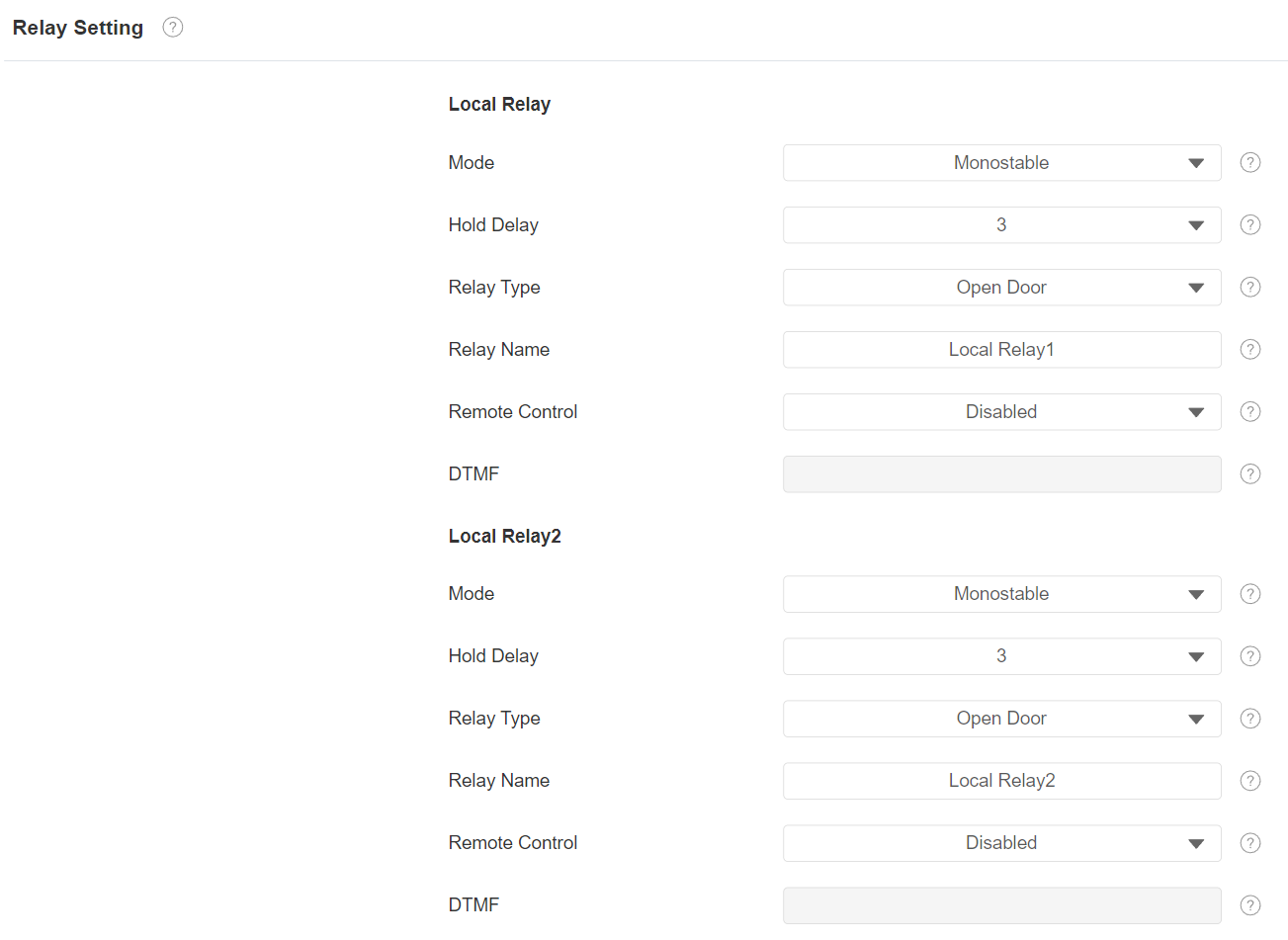
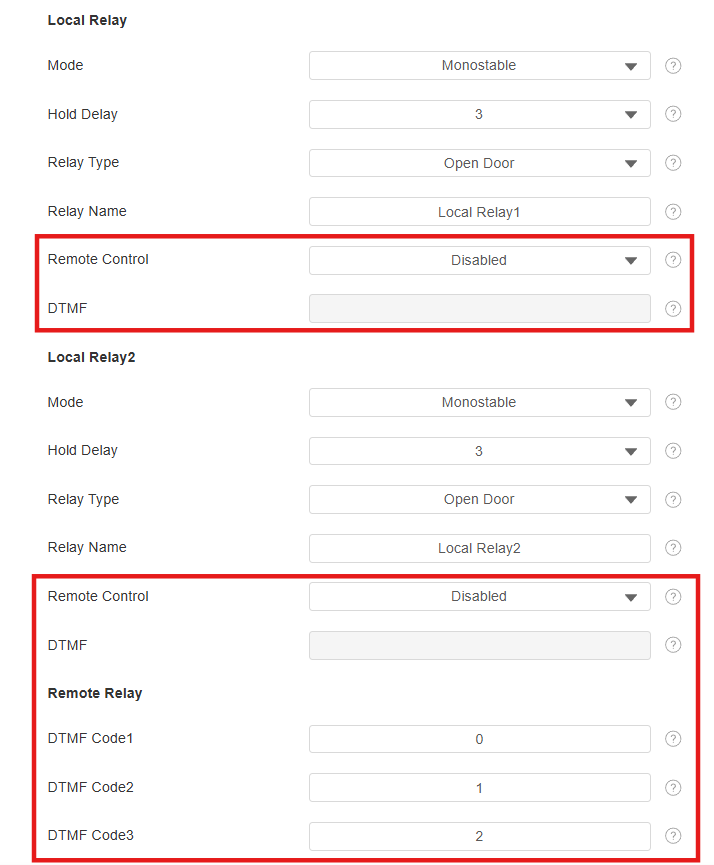
Mode: Specify the conditions for automatically resetting the relay status.
Monostable: The relay status resets automatically within the relay delay time after activation.
Bistable: The relay status resets upon triggering the relay again.
Hold Delay: Determine how long the relay stays activated. For example, if set to 5 seconds, the relay remains to be opened for 5 seconds before closing.
Relay Type:
Chime Bell: When there is a call and the relay is triggered, the chime bell will ring.
Open Door: When the unlock icon is pressed and the relay is triggered, the door will be opened.
Other Switches(Reset By Event): The relay will reset after the triggered event is dealt with.
Relay Name: Assign a distinct name for identification purposes.
Remote Control: Enable it to trigger local relay by DTMF.
DTMF: The DTMF code to trigger the local relay.
Remote Relay
Le relais à distance fait référence au relais d’un autre interphone, comme un téléphone de porte. Lors des appels, les utilisateurs peuvent saisir un code DTMF ou appuyer sur l’onglet Déverrouiller pour déverrouiller la serrure de la porte connectée au téléphone portier.
Set it up on the Device > Relay interface.
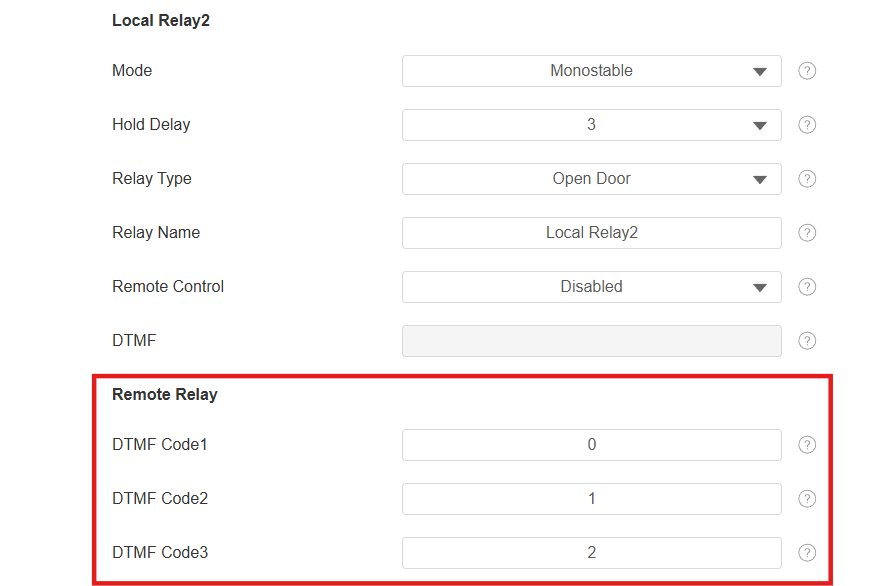
DTMF Code: Set the DTMF code for the remote relay.
Web Relay
Un relais web dispose d’un serveur web intégré et peut être contrôlé via Internet ou un réseau local. L’appareil peut utiliser un relais web pour contrôler soit un relais local, soit un relais distant ailleurs sur le réseau.
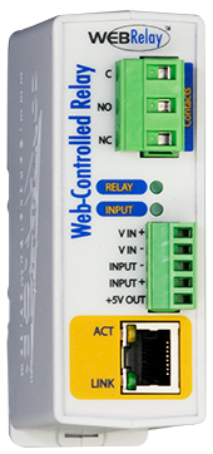
Cliquez ici pour voir comment configurer le relais web.
To set it up, go to the web Device > Relay > Web Relay interface.
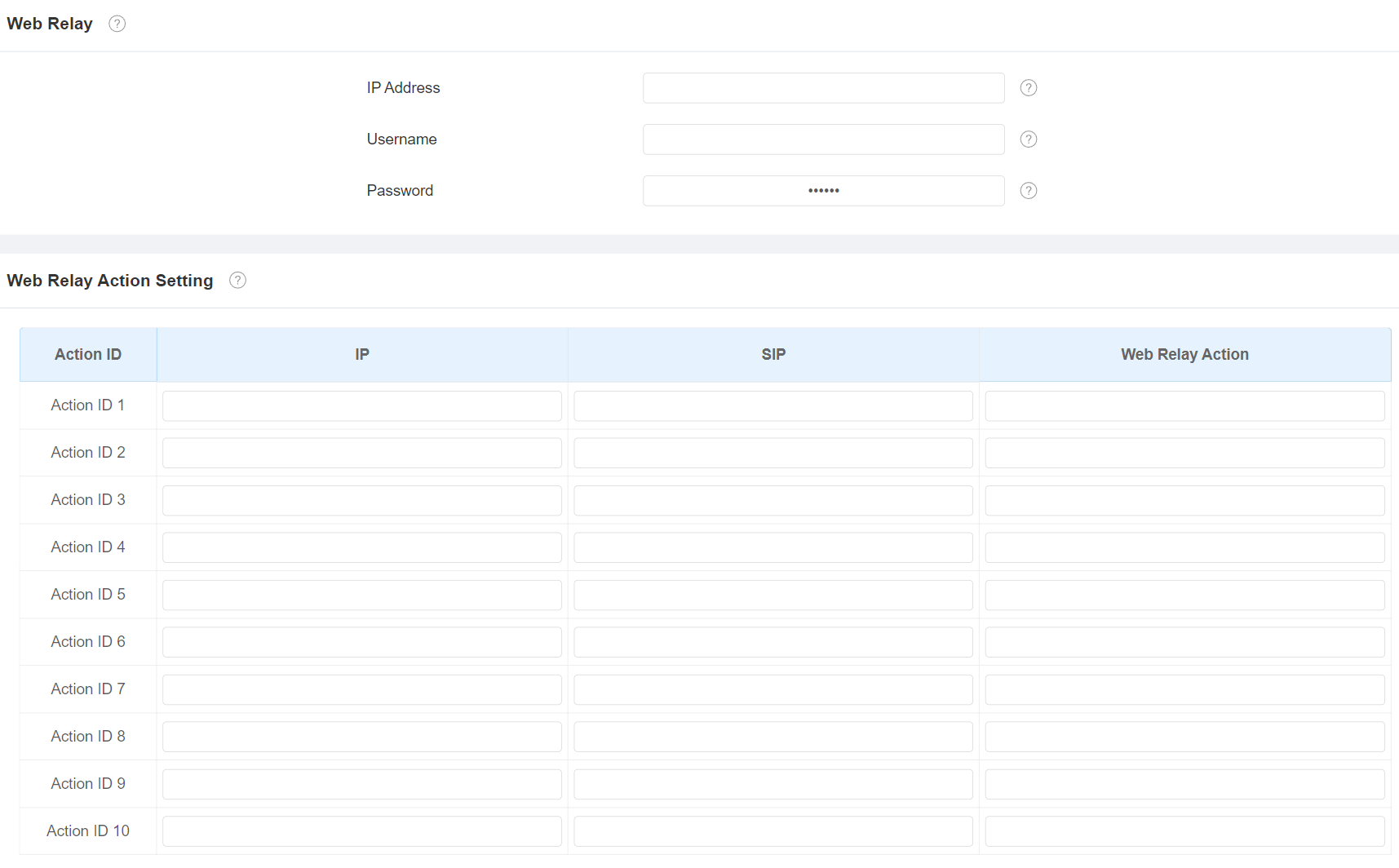
IP Address: The web relay IP address provided by the web relay manufacturer.
Username: The user name provided by the web relay manufacturer.
Password: The manufacturer-provided authentication key for the web relay. Authentication occurs via HTTP. Leaving the Password field blank indicates non-use of HTTP authentication. You can define the password using HTTP GET in the Web Relay Action field.
IP/SIP: The relay extension information, which can be an IP address or SIP account of an intercom device such as another indoor monitor, so that the specific action command will be sent when unlock is performed on the intercom device. This setting is optional.
Web Relay Action: Configure the actions to be performed by the web relay upon triggering. Enter the manufacturer-provided URLs for various actions.
Note
If the URL includes full HTTP content(e.g., http://admin:admin@192.168.1.2/state.xml?relayState=2), it doesn't rely on the IP address that you entered above. However, if the URL is simpler (e.g., "state.xml?relayState=2"), the relay uses the entered IP address.
Door-opening Configuration
Unlock by DTMF Code
La signalisation multifréquence à double ton (DTMF) est un moyen d’envoyer des signaux sur des lignes téléphoniques en utilisant différentes bandes de fréquences vocaux. Les utilisateurs peuvent utiliser la fonction DTMF pour déverrouiller la porte aux visiteurs pendant un appel en tapant soit le code DTMF sur le clavier logiciel, soit en tapotant l’onglet de déverrouillage avec le code DTMF à l’écran.
To set it up, go to Device > Relay > Relay Setting interface.
To configure the DTMF code transport format, navigate to the web Account > Advanced > DTMF interface.

Type: Select from the provided options.
DTMF Code Transport Format: There are four options, Disabled, DTMF, DTMF-Relay, and Telephone-Event. Configure it only when the third-party device that receives the DTMF code adopts the Info transport format. Info transfers the DTMF code via signaling while other transport format does it via RTP audio packet transmission. Select the DTMF transferring format according to the third-party device.
Payload: It is for data transmission identification ranging from 96-127.
Note
To open the door with DTMF, the intercom devices that send and receive the unlock command must use the same mode and code. Otherwise, the DTMF unlock may fail. See here for the detailed DTMF configuration steps.
Unlock via HTTP Command
The device supports remote door unlocking via an HTTP command. Simply enable this feature and input the HTTP command(URL) for the device. This will trigger the relay and open the door, even if the users are away from the device.
To set it up, go to the web Device > Relay > Open Relay via HTTP interface.
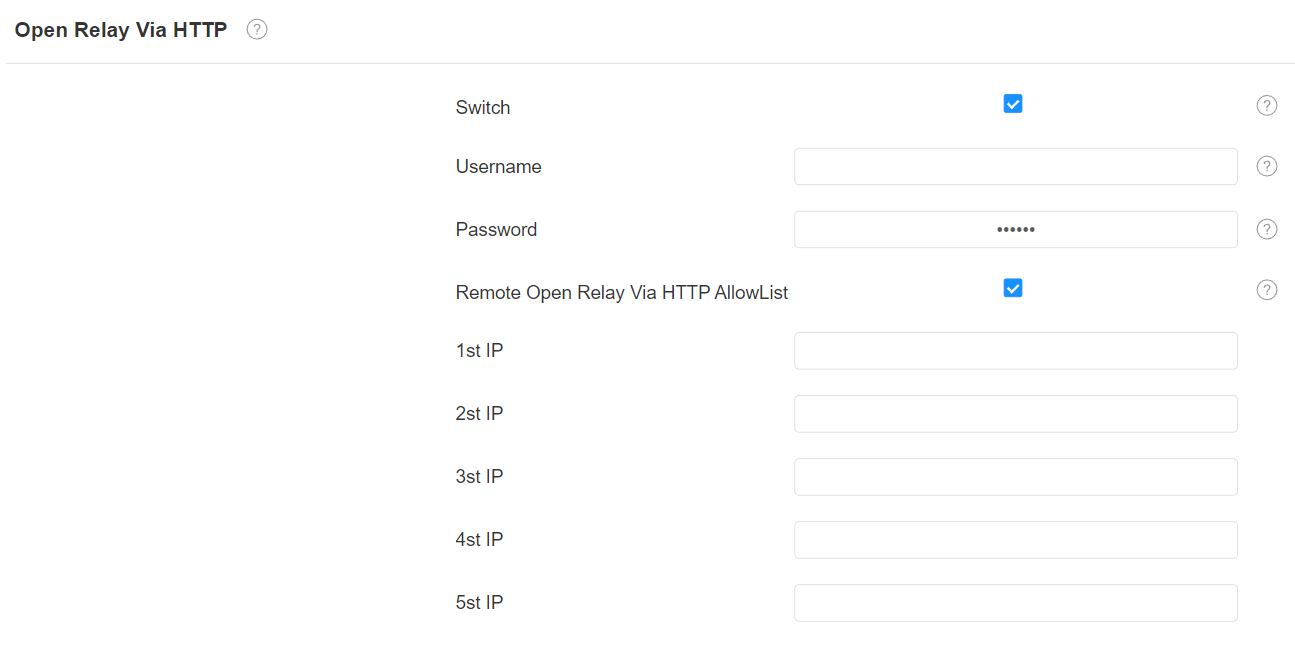
Username: Set a username for authentication in HTTP command URLs.
Password: Set a username for authentication in HTTP command URLs.
Remote Open Relay Via HTTP AllowList: Enable it and type in the IP address of the server that you allow to send the HTTP command to the indoor monitor and trigger the local relay.
Note
If you do not set up the username and password, the remote door phone can trigger the indoor monitor’s relay without authentication.
The URL format is http://{deviceIP}/fcgi/OpenDoor?action=OpenDoor&DoorNum=1.
You can also set up HTTP commands to remotely control relays connected to door phones, go to the web Device > Relay > Remote Relay By HTTP interface. Users can trigger the relay by tapping the Unlock buttons.
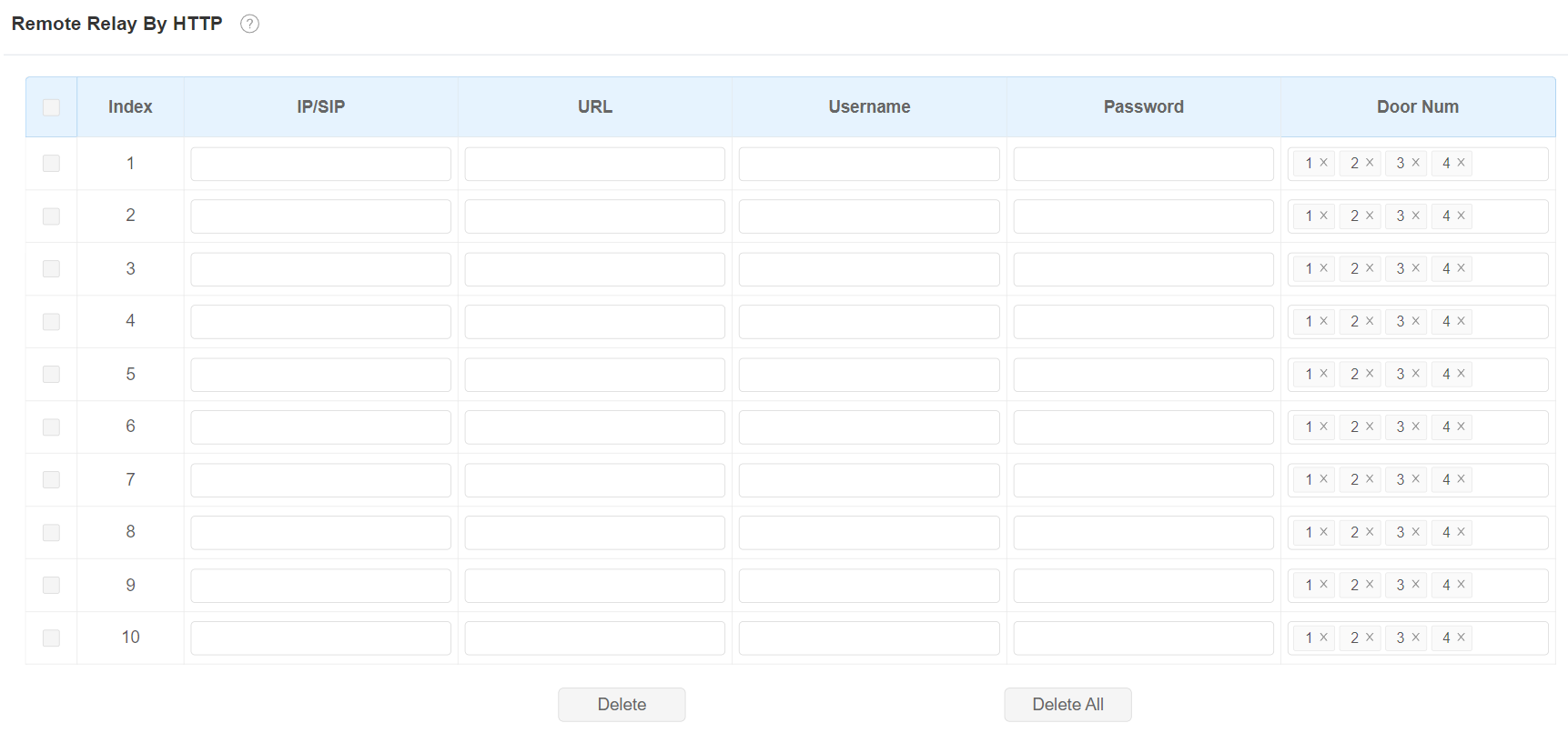
IP/SIP: Specify the IP or SIP number of the door phone.
URL: Enter the HTTP URL.
Username: Enter the username the same as that is configured on the door phone’s web interface.
Password: Enter the password the same as that is configured on the door phone’s web interface.
Tip
Here is an HTTP command URL example for relay triggering.

Note
The HTTP format for relay triggering varies depending on whether the device's high secure mode is enabled. Please refer to this how-to guide Opening the Door via HTTP Command for more information.
Unlock by the RF Key
The indoor monitor supports connecting to the Akuvox RF Key. Users can hold the pendant to open the door via the HTTP command remotely.
To set it up, go to the Device > Relay > Long Press RF Key to Unlock on Idle interface.

Type: Select from Remote Relay HTTP 1-10 which corresponds to the remote relays configured in the Remote Relay By HTTP section.
Tip
Please refer to Match and Use a Pendant for more information on using the RF Key.