Integration via Wiegand
The Wiegand feature enables the Akuvox device to act as a controller or a card reader.
Set it up on the Intercom > Wiegand interface.
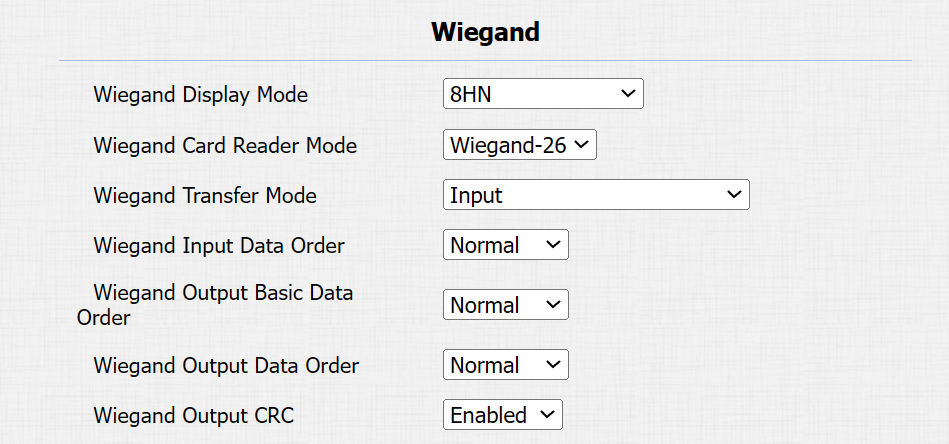
Wiegand Display Mode: Select the Wiegand card code format from the provided options: 8H10D, 6H3D5D(W26), 6H8D, 8HN, 8HR, 6H3D5D-R(W26), 8HR10D, and RAW.
Ignore Facility Code: This option is available when 6H3D5D(WG26) is selected. When enabled, the first three bits of the cards will be ignored for successful card reading.
Wiegand Card Reader Mode: The transmission format should be identical between the door phone and the third-party device.
Wiegand Transfer Mode:
Input: The device serves as a receiver.
Output: The device serves as a sender, sending the card data to a third-party device for door access.
Convert To Card No. Output: The device serves as a sender. The access data, including DTMF and RF card code, will be converted to card numbers for door access.
Wiegand Input Data Order: Set the Wiegand input data sequence between Normal and Reversed. If you select Reversed, then the input card number will be reversed.
Wiegand Output Basic Data Order: Set the sequence of the card data before going through Wiegand conversion and outputting the card code.
For example, if the card data is 0x11 0x22 0x33 0x44 and the Reversed option is selected, the data will be 0x44 0x33 0x22 0x11.
Wiegand Output Data Order: Determine the sequence of the card data after the Wiegand conversion.
For example, if the card data is 0x11 0x22 0x33 0x44 0x55, it will be 0x33 0x44 0x55 after the Wiegand conversion(e.g., Wiegand 26). If Reversed is selected, the card data is 0x55 0x44 0x33.
Wiegand Output CRC: It is enabled by default for Wiegand data inspection. Disabling it may lead to integration failure with third-party devices.
Wiegand Open Relay: Select the relay triggered by Wiegand.
Note
Click here to view more information on Wiegand settings including:
Akuvox devices work as Wiegand input/output;
Wiegand Card Reader Connection.
Integration via HTTP API
HTTP API is designed to achieve a network-based integration between the third-party device and the Akuvox device.
Set it up on the web Intercom > HTTP API interface.
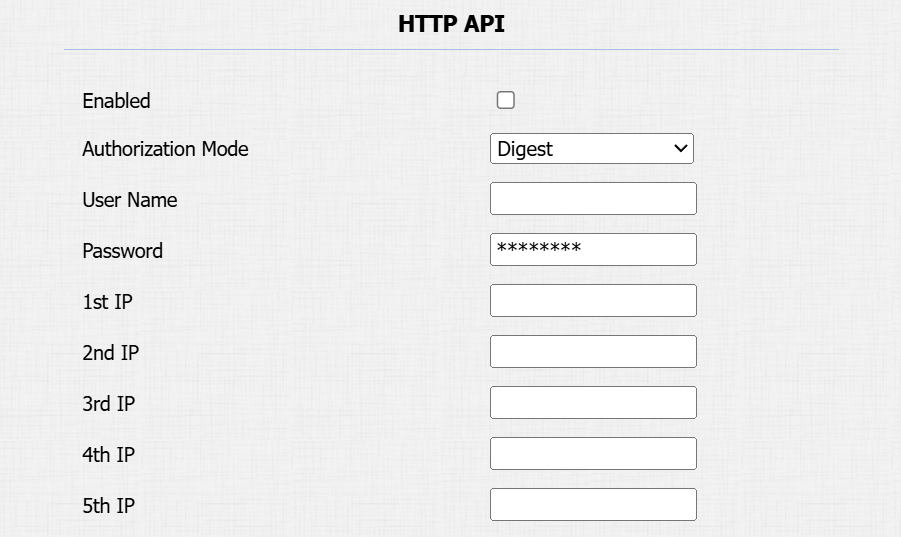
Enabled: Enable or disable the HTTP API function for third-party integration. If the function is disabled, any request to initiate the integration will be denied and return HTTP 403 forbidden status.
Authorization Mode: It is Digest by default. You are required to fill in the username and password for the authentication. In the Authorization field of the HTTP request header, use the Base64 encoding method to encode the username and password.
User Name: Enter the user name for authentication. The default is admin.
Password: Enter the password for authentication. The default is admin.
Please refer to the following description for the authentication mode:
NO. | Authorization Mode | Description |
|---|---|---|
1 | None | No authentication is required for HTTP API as it is only used for demo testing. |
2 | Normal | This mode is used by Akuvox developers only. |
3 | Allowlist | If this mode is selected, you are only required to fill in the IP address of the third-party device for the authentication. The whitelist is suitable for operation in the LAN. |
4 | Basic | If this mode is selected, you are required to fill in the username and the password for the authentication. In the Authorization field of the HTTP request header, use the Base64 encoding method to encode of username and password. |
5 | Digest | The password encryption method only supports MD5(Message-Digest Algorithm). In the Authorization field of the Http request header:WWW-Authenticate: Digest realm="HTTP API", qop="auth,auth-int", nonce="xx", opaque="xx". |
6 | Token | This mode is used by Akuvox developers only. |
Power Output Control
The device can serve as a power supply for the external relays. Click here to view the power output requirements and the wiring example.
To set it up, go to the Intercom > Relay > 12V Power Output interface.
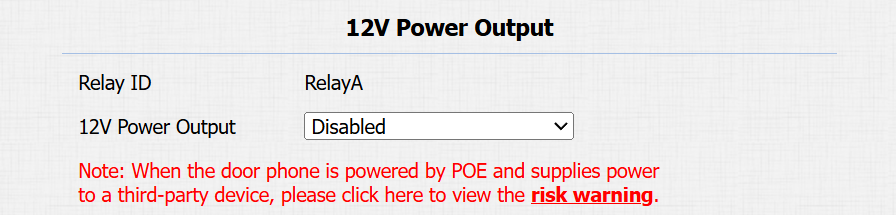
12V Power Output: To supply power for third-party devices, the door phone should be powered by a PoE or DC power connector with input not less than 12V/1.2A.
Disabled: Turn off the function.
Always: Provide continuous power.
Triggered by Open Relay: Provide power to the third-party device when Relay A is triggered via its NO and GND ports. Stop providing the power when Relay A is reset.
Timeout(Sec): Set the time(3, 5, or 10 seconds) to provide power when Triggered by Open Relay is selected.
Note
When the door phone is powered by PoE, its volume adjustment affects power supply.
If the third-party device operates at 12V and ≤0.2A, the door phone supports both Level 1 and 2 volume.
If the device operates at 12V and 0.2A–0.4A, only Level 1 is supported; Level 2 may cause a shutdown.
If the device exceeds 0.4A at 12V, it will shut down due to insufficient power.