IP Call & IP Call Configuration
An IP call is a direct call between two intercom devices using their IP addresses, without a server or a PBX. IP calls work when the devices are on the same network.
Enable or disable the direct IP call function on the web Device > Call Feature interface.
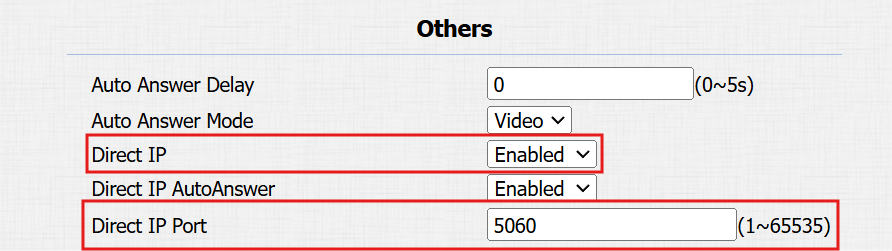
Port: Set the port for direct IP calls. The default is 5060, with a range from 1-65535. If you enter a value within this range other than 5060, ensure consistency with the corresponding device for data transmission.
SIP Call & SIP Call Configuration
Session Initiation Protocol(SIP) is a signaling transmission protocol used for initiating, maintaining, and terminating calls.
A SIP call uses SIP to send and receive data between SIP devices, and can use the internet or a local network to offer high-quality and secure communication. Initiating a SIP call requires a SIP account, a SIP address for each device, and configuring SIP settings on the devices.
SIP Account Registration
Each device needs a SIP account to make and receive SIP calls.
Akuvox intercom devices support the configuration of two SIP accounts, which can be registered under two independent servers.
Click here to view the SIP account registration example.
Register SIP account on the web Account > Basic interface.
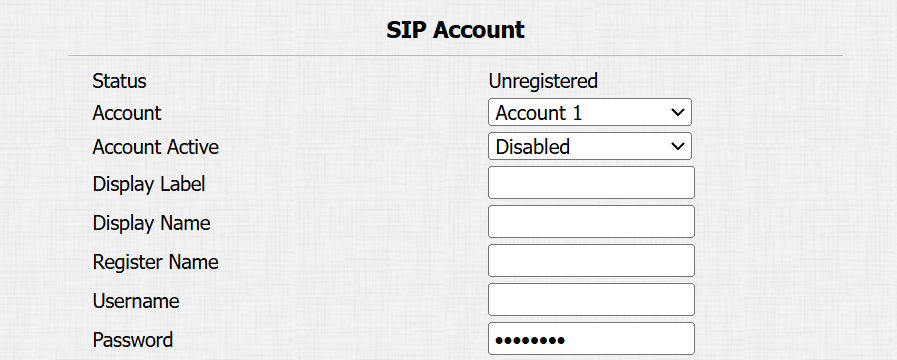
Status: Displays whether the SIP account is registered or not.
Account 1/Account 2: The door phone supports 2 SIP accounts.
- Account 1 is the default account for call processing. Also, it will be utilized when the Akuvox SmartPlus cloud service is activated.
- The system switches to Account 2 if Account 1 is not registered.
Account Active: Check to activate the registered SIP account.
Display Label: The device label to be shown on the device screen.
Display Name: The device's name to be shown on the device being called to.
Register Name: Same as the username from the PBX server.
Username: Same as the username from the PBX server for authentication.
Password: Same as the password from the PBX server for authentication.
SIP Server Configuration
SIP servers enable devices to establish and manage call sessions with other intercom devices using the SIP protocol. They can be third-party servers or built-in PBX in Akuvox indoor monitor.
To configure the SIP server, go to the web Account > Basic interface.
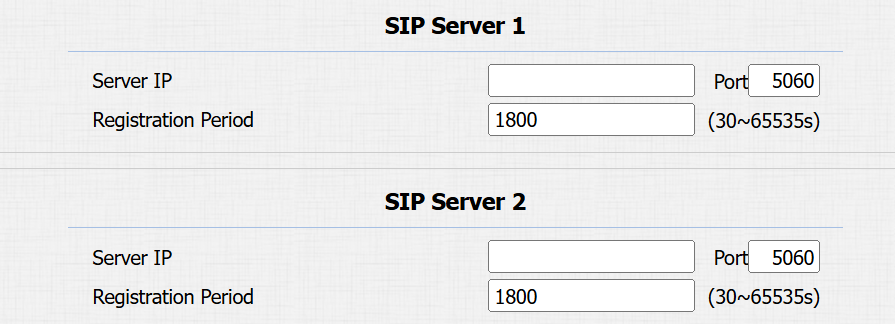
Server IP: Enter the server’s IP address or its domain name.
Port: Specify the SIP server port for data transmission.
Registration Period: Define the time limit for SIP account registration. Automatic re-registration will initiate if the account registration fails within this specified period.
Outbound Proxy Server
An outbound proxy server receives and forwards all requests the designated server. It is an optional configuration, but if set it up, all future SIP requests get sent there in the first instance.
To set it up, go to the web Account > Basic > Outbound Proxy Server interface.
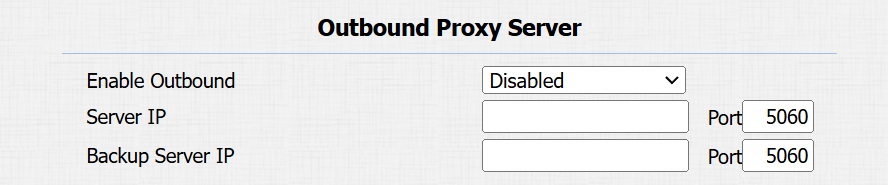
Server IP: Enter the SIP proxy IP address.
Port: Set the port for establishing a call session via the outbound proxy server.
Backup Server IP: Enter the SIP proxy IP address to be used when the main proxy malfunctions.
Port: Set the proxy port for establishing a call session via the backup outbound proxy server.
Data Transmission Type
Akuvox intercom devices support four data transmission protocols: User Datagram Protocol(UDP), Transmission Control Protocol(TCP), Transport Layer Security(TLS), and DNS-SRV.
To set it up, go to the web Account > Basic interface.

UDP: An unreliable but very efficient transport layer protocol. It is the default transport protocol.
TCP: A less efficient but reliable transport layer protocol.
TLS: An encrypted and secured transport layer protocol. Select this option if you wish to encrypt the SIP messages for enhanced security or if the other party’s server uses TLS. To use it, you need to upload certificates for authentication.
SIP Hacking Protection
Internet phone eavesdropping is a network attack that allows unauthorized parties to intercept and access the content of the communication sessions between intercom users. This can expose sensitive and confidential information to the attackers. SIP hacking protection is a technique that secures SIP calls from being compromised on the Internet.
Enable or disable this function on Account > Advanced > Call interface.
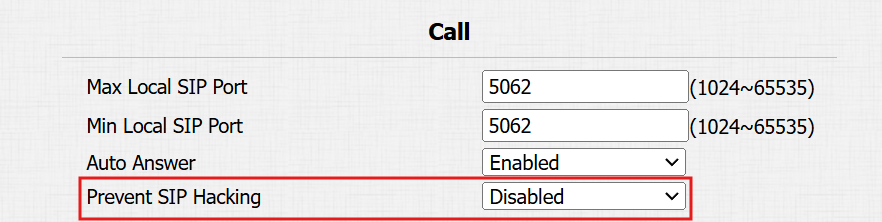
Prevent SIP Hacking: Activate this feature to only receive calls from contacts in the whitelist. This protects users’ private and secret information from potential hackers during SIP calls.