Quick Start: This section provides quick access to the device’s key settings, such as network, user, relay, etc.
Device Management:
Status: This section gives you basic information, such as product information, network information, account information, etc.
Account: This section concerns the SIP account, SIP server, proxy server, transport protocol type, audio and video codec, DTMF, etc.
Network: This section mainly deals with network connection, RTP port setting, device deployment, etc.
Device: This section includes time & language, call feature, screen display, multicast, audio intercom feature, monitor, relay, lift control, etc.
Contacts: This section allows the user to configure the local contact list stored in the device.
Upgrade: This section covers firmware upgrade, device reset & reboot, configuration file auto-provisioning, and PCAP.
Arming: This section covers the configuration, including arming zone setting, arming mode, disarm code, and alarm action.
Security: This section is for password modification, account status & session time-out configuration, as well as certificates upload.
Settings: This section includes the RTSP and power output settings.
Engineer Management: This section provides quick access to upgrading, maintaining, and debugging the device.
Introduction to Quick Start Module
The Quick Start module allows you to configure the device’s core features on a single interface, instead of switching between different interfaces.
You can redirect to the feature detail interface by clicking Details in the upper right corner.
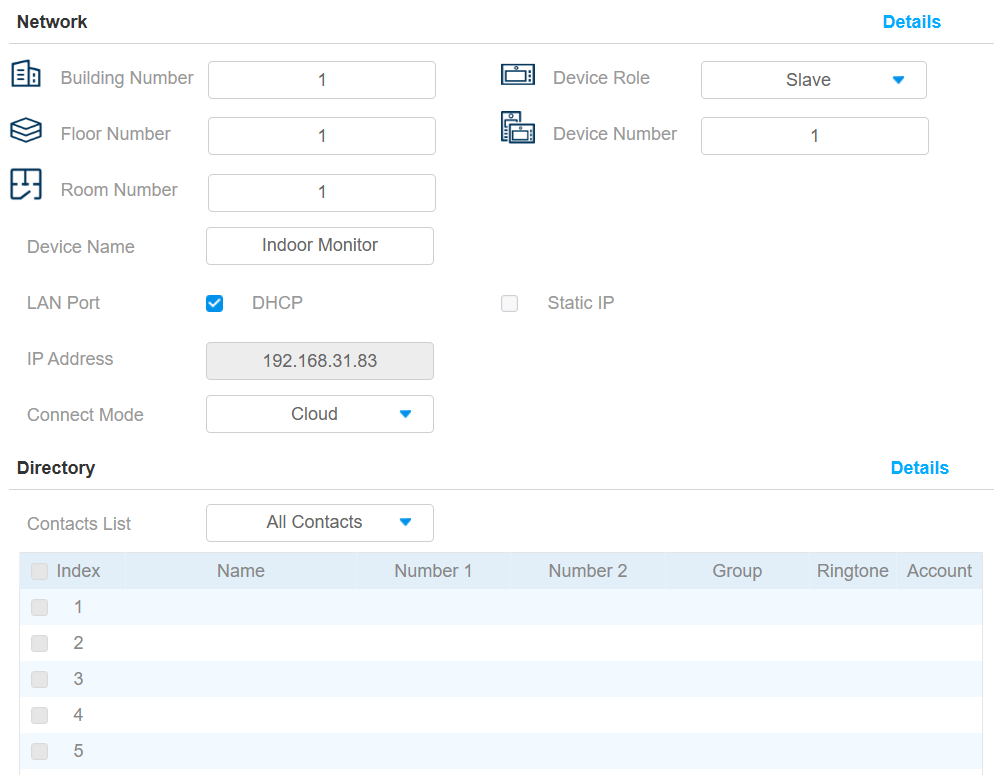
Network: Display the location information of the device.
Device Name: Enter the device’s name to distinguish it from others. By default, it is [the device name_the last 4 characters of its MAC address].
Connect Mode: It is automatically set up according to the actual device connection with a specific server in the network, such as SDMC, Cloud, or None.
Directory: Display all local contacts.
Contacts List: All Contacts displays all the contacts in the contact list. Blocklist displays the contacts in the blocklist.
Name: The contact's name to distinguish it from others.
Number 1/2: The SIP or IP number of the contact.
Group: Calls from contacts in the Blocklist will be rejected.
Ringtone: The ringtone for the incoming call from the contact.
Account: The account to make the call, Account 1 or Account 2.
Access: You can set up HTTP commands to remotely control relays connected to door phones.
IP/SIP: Specify the IP or SIP number of the door phone.
URL: Enter the HTTP URL.
Username: Enter the username the same as that is configured on the door phone’s web interface.
Password: Enter the password the same as that is configured on the door phone’s web interface.
DoorNum: Specify the door to be opened.
Tip
Here is an HTTP command URL example for relay triggering.

Note
The HTTP format for relay triggering varies depending on whether the device's high secure mode is enabled. Please refer to this how-to guide Opening the Door via HTTP Command for more information.
Door Phone: You can add video streams of door phones via RTSP.
Display Building Door Phone: Set whether to display door phones at the building gate in the monitoring list.
Display Public Door Phone: Set whether to display door phones in the public area in the monitoring list.
Device Number: The device's SIP/IP number for identification.
Device Name: The device name for identification.
RTSP Address: The RTSP address of the monitoring device. RTSP format: rtsp://Device IP address/live/ch00_0.
Username: The username of the monitoring device for authentication.
Password: The password of the monitoring device for authentication.
Display In Call: Enable it to display the monitoring video during a call.