Language
Select languages on the web Phone > Time/Lang interface.
The device supports the following web languages:
English, Simplified Chinese, Traditional Chinese, Russian, Czech, Portuguese, Spanish, Dutch, French, German, Polish, Turkish, Japanese, Vietnamese, Ukrainian, Italian, Korean, and Arabic.

The device supports the following LCD languages:
Spanish, French, Italian, Dutch, Russian, Ukrainian, Persian, Simplified Chinese, Traditional Chinese, Japanese, Czech, Norwegian, Polish, Portuguese, Slovak, Vietnamese, Turkish, Arabic, Korean, and Lithuanian.

Languages can also be set on the device by tapping  > Settings > System. Then, tap Languages & Input.
Tap Add a language to add a new language; switch the LCD language by long-pressing the desired one and moving it to the top.
(1).png "image(739)(1).png")
(1).png "image(740)(1).png")
Time
Time settings, including time zone, date and time format, and more, can be configured either on the device or the web interface.
Set it up on the web Phone > Time/Lang interface.
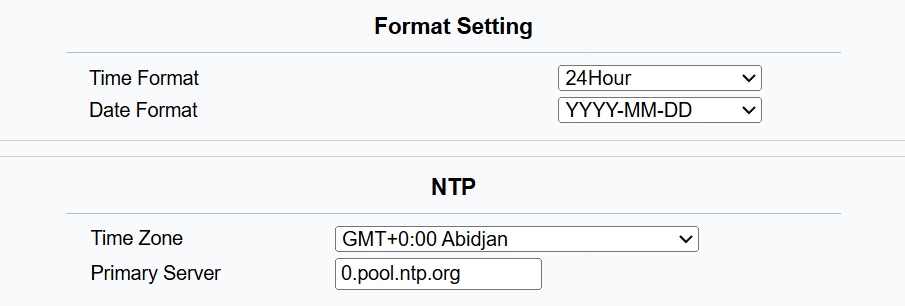
Time Format: 12-hour or 24-hour.
Date Format: Select from the available options.
Time Zone: Select the specific time zone based on where the device is used.
Primary Server: The NTP server address.
Time can also be configured on the device > Settings > System > Date & Time screen.
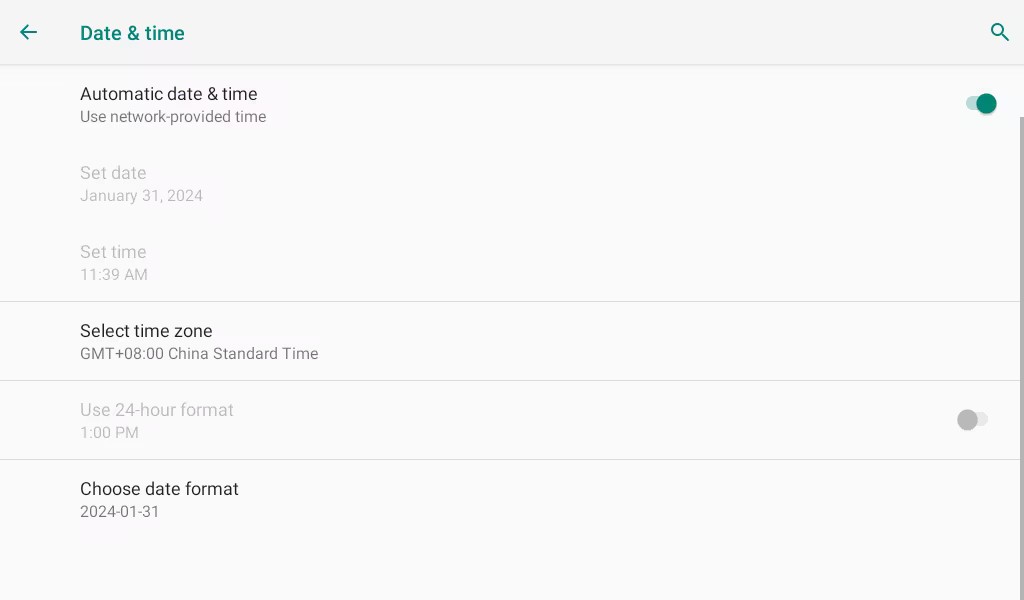
Automatic Date & Time: The automatic date is switched on by default, which allows the date & time to be automatically set up and synchronized with the default time zone and the Network Time Protocol(NTP) server. You can also set it up manually by switching off the automatic date and entering the time and date.
Select Time Zone: Select the specific time zone depending on where the device is used. The default time zone is GMT+0:00.
Choose Date Format: Select the desired date format.