The device can be connected to the Akuvox lift controller for the lift control. Users can summon the lift to go down to the ground floor when they are granted access through various types of access methods on the device.
Click here to watch a demonstration video of configuring the lift control feature.
Set it up on the Device > Lift Control interface.
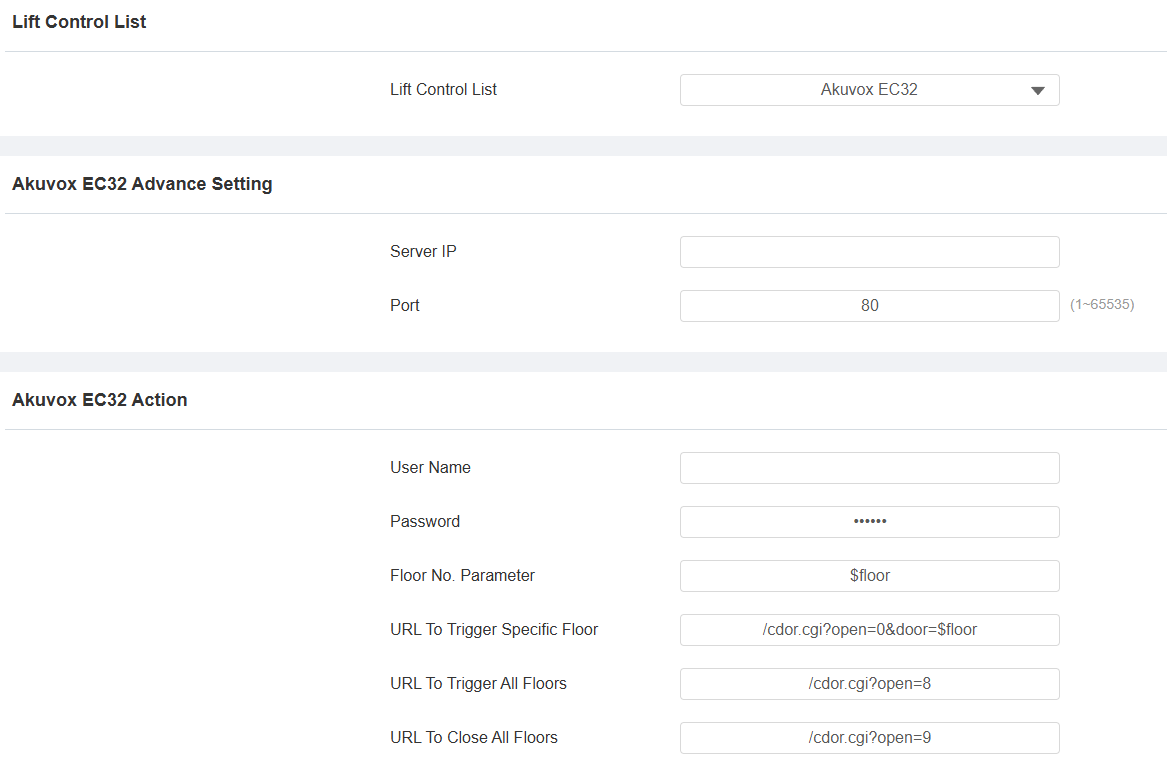
Lift Control List:
OSDP: The integration communication between the door phone and the third-party device is via OSDP protocol.
Akuvox: Integrate the door phone with the Akuvox lift controller.
KEYKING: Integrate the door phone with the KEYKING lift controller.
When Akuvox is selected, set up the following options:
Server IP: The IP address of the Akuvox lift control server.
Port: The server port of the lift controller server.
Username: The username of the lift controller for the authentication.
Password: The password of the lift controller for the authentication.
Floor NO. Parameter: Enter the floor number parameter provided by Akuvox. The default parameter string is “$floor”. You can define your parameter string if needed.
URL To Trigger Specific Floor: Enter the Akuvox lift control URL for triggering a specific floor. The URL is /cdor.cgi?open=0&door=$floor, but the string “$floor” at the end must be identical to the parameter string you defined.
URL To Trigger All Floors: Enter the Akuvox URL for triggering all floors.
URL To Close All Floors: Enter the Akuvox URL used for closing all floors, meaning all the buttons that are triggered for the corresponding floors will become invalid.