Parameter setting interface “Page x - Ventilation System”, as shown in Figure 2.4.9, mainly sets the parameters for the ventilation system controlling.
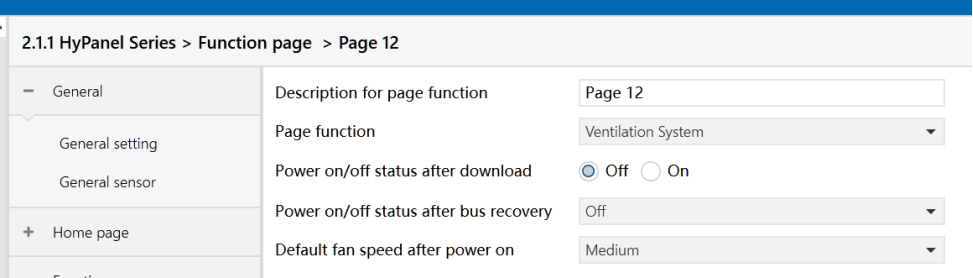
Figure2.4.9-1: Page x--Ventilation system interface
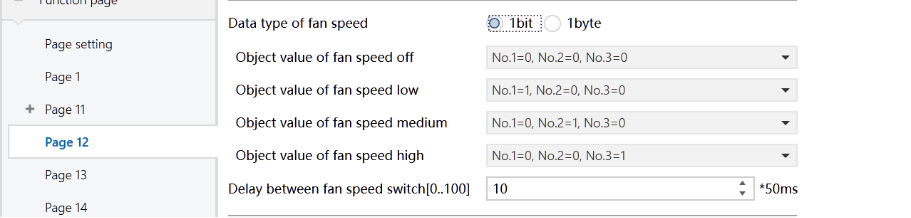
Figure2.4.9-2: Page x--Ventilation system fan speed _1bit interface
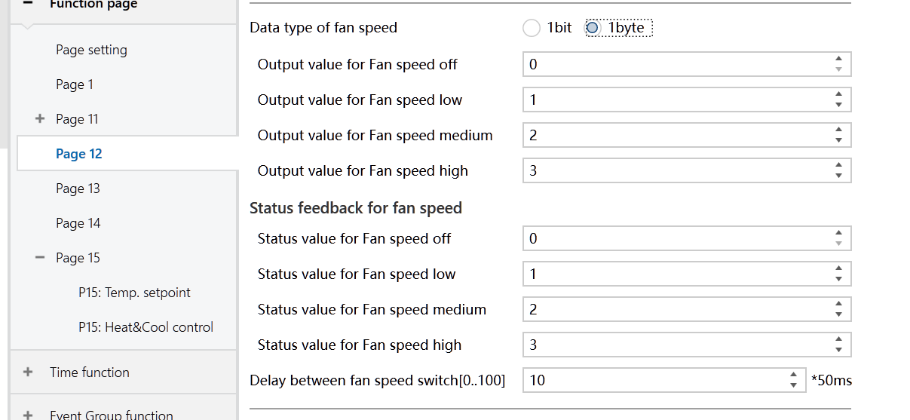
Figure2.4.9-3: Page x--Ventilation system fan speed _1byte interface
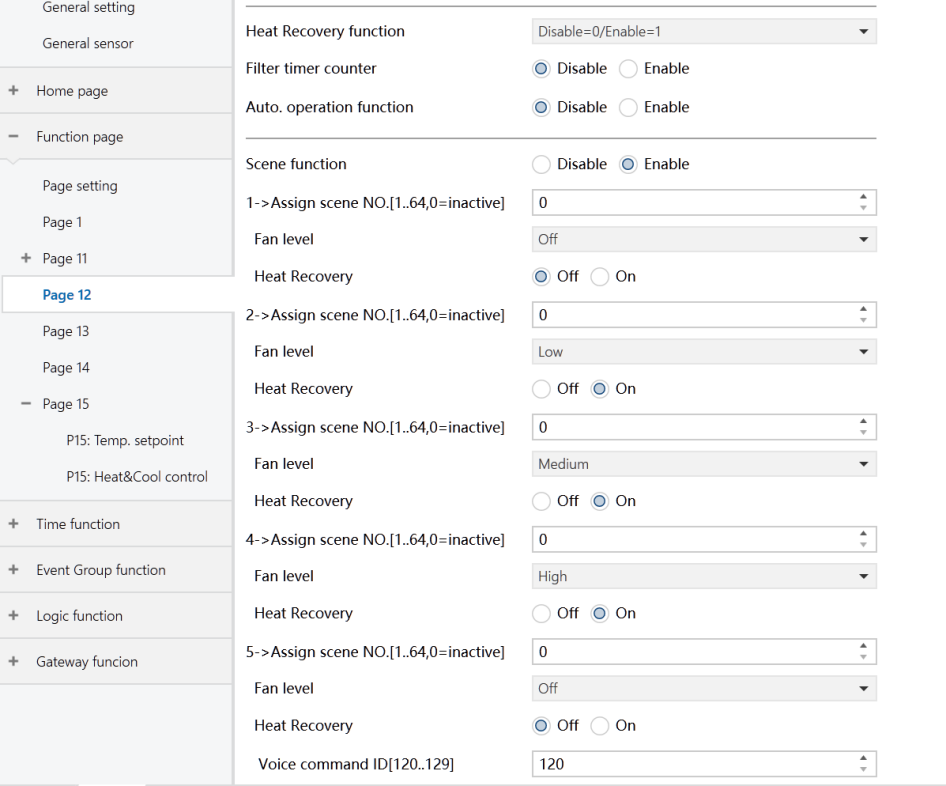
Figure2.4.9-4: Page x--Ventilation system interface
Power on/off status after download
Set the power on/off status of the ventilation interface after the application is downloaded.
Options:
Off
On
Power on/off status after bus recovery
Set the power on/off status of the ventilation interface after the power is restored.
Options:
On: When power is restored, the device will be in the powered-on state, and the interface will be operational.
Off: When power is restored, the device will be in the powered-off state. Other icons in the interface are not operational except for filter reset and on/off icons.
Before power off: Upon power restoration, the device returns to its status prior to power off.
Default fan speed after power on
Set the initial fan speed when the ventilation is turned on.
Options:
Low
Medium
High
Data type of fan speed
Set the data type of the fan speed.
Options:
1bit
1byte
The following parameters are visible when the “Data type of fan speed” is “1byte”, setting the status feedback values for each fan speed.
- Output value for Fan speed off/low/medium/high
Define the values sent to switch to each fan speed.
Options: 0..255s
- Status value for Fan speed off/low/medium/high
Set the status feedback values for each fan speed. The device updates the fan speed icon status based on the received feedback values.
Options: 0..255
The following parameters are visible when the “Data type of fan speed” is “1bit”.
- Object value for Fan speed off/low/medium/high
Define the values sent to switch to each fan speed, simultaneously transmitted by three 1-bit objects.
Options:
No.1=0, No.2=0, No.3=0
No.1=1, No.2=0, No.3=0
No.1=0, No.2=1, No.3=0
No.1=1, No.2=1, No.3=0
No.1=0, No.2=0, No.3=1
No.1=1, No.2=0, No.3=1
No.1=0, No.2=1, No.3=1
No.1=1, No.2=1, No.3=1
- Delay between fan speed switch [0 .. 100]*50ms
Set a delay in changing fan speeds, considering the technical specifications of the fan.
Options: 0 .. 100
When switching fan speeds, the fan speed should first be turned off. Then, after a delay, the fan speed can be turned on before the telegram is sent to the bus. If the delay time is set to 0, the fan will switch directly to the next speed without turning off first.
Heat Recovery function
Enable/disable the heat recovery function.
Options:
Disable
Disable=0/Enable=1
Disable=1/Enable=0
If the last two options are selected, the heat recovery function defaults to enable upon system power-on. If not enabled, the heat recovery function is uncontrollable.
Filter timer counter
Not applicable for HyPanel.
- Evaluation time [100 .. 10000]*h
Not applicable for HyPanel.
Auto. operation function
Enable the automatic control function of the ventilation system.
Options:
Disable: The Auto mode is not available on the panel.
Enable
Scene function
Enable the scene function of the ventilation system, with 5 scenes available for configuration.
Options:
Disable
Enable
- x->Assign scene NO.[1.. 64,0=inactive], x=1~5
Set the scene number.
Options: 0.. 64; 0 = inactive
- Fan level
Set the fan speed status of scene x.
Options:
Off
Low
Medium
High
- Heat Recovery
Set the heat recovery status of scene x.
Options:
Off
On
This parameter is invalid when heat recovery is disabled.
- Voice command ID[120.. 129]
Not applicable for HyPanel.