Security Notification
A security notification informs users or security personnel of any breach or threat that the device detects. For example, if the device detects something unusual, the system sends a notification to users or security via email. Click here to view the detailed configuration.
Set up notifications on the Setting > Action interface.
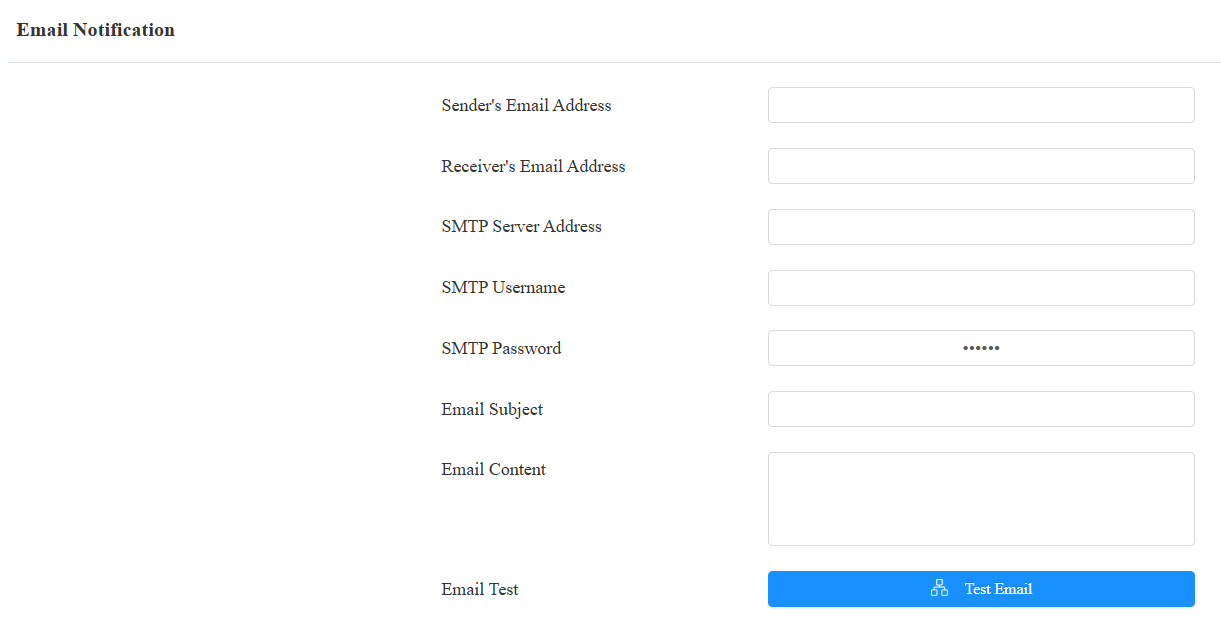
SMTP Server Address: The SMTP server address of the sender.
SMTP Username: The SMTP username is usually the same as the sender's email address.
SMTP Password: The password of the SMTP service is the same as the sender's email address.
Action URL
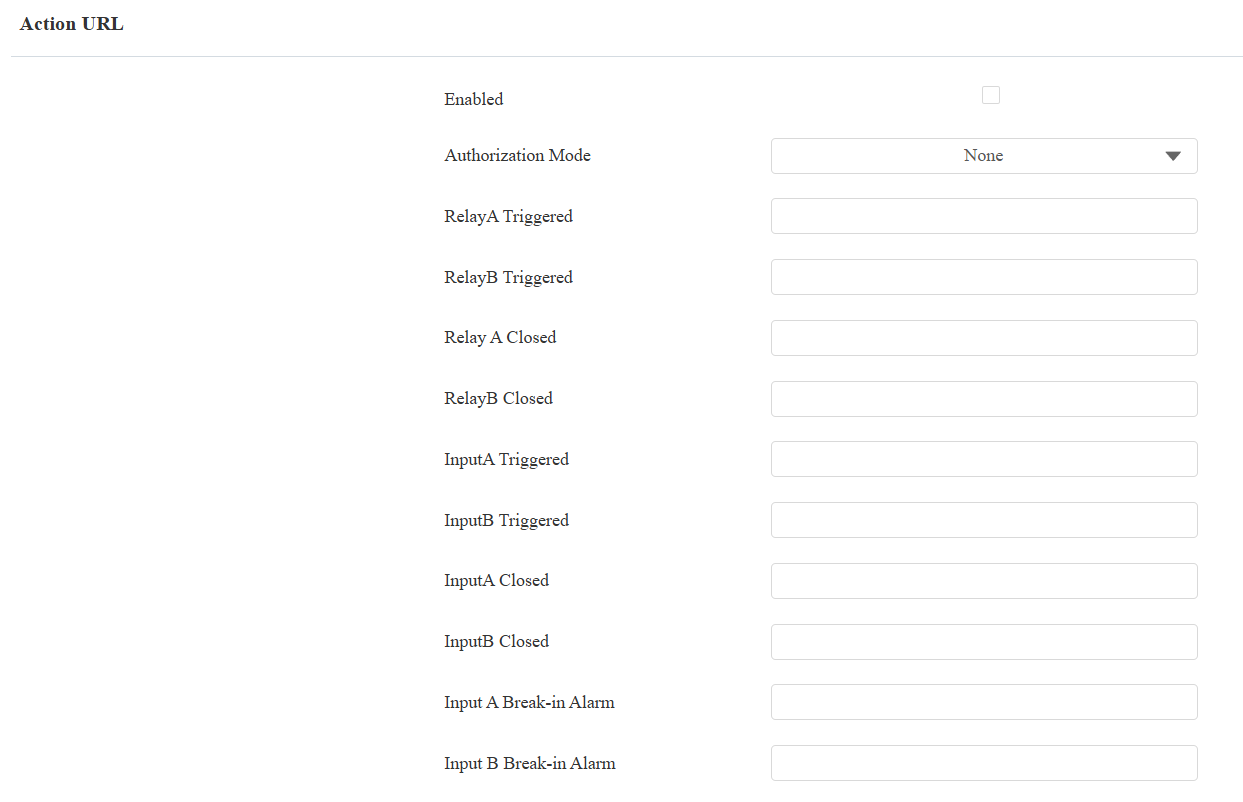
You can use the device to send specific HTTP URL commands to the HTTP server for certain actions. These actions will be triggered when the relay status and input status change.
Akuvox Action URL:
Event | Parameter format | Example |
Relay Triggered | $relay1status | http://server ip/relaytrigger=$relay1status |
Relay Closed | $relay1status | http://server ip/relayclose=$relay1status |
Input Triggered | $input1status | http://server ip/inputtrigger=$input1status |
Input Closed | $input1status | http://server ip/inputclose=$input1status |
Break-in Alarm | $input1status | http://server ip/inputtrigger=$input1status NOTE: $input1-2status corresponds to inputA-B. |
For example: http://192.168.16.118/help.xml? mac=$mac:ip=$ip:model=$model:firmware=$firmware
Set up action URLs on the web Setting > Actions URL interface.
Note
Action URLs and formats are provided by third-party manufacturers. Akuvox device only sends the URL to third-party devices.
Web Interface Automatic Log-out
You can set up the web interface's automatic log-out timing, requiring re-login by entering the username and the password for security purposes or for the convenience of operation.
Set it up on the web System > Security > Session Time Out interface.

High Security Mode
High security mode is designed to enhance the security. It employs encryption across various facets, including the communication process, door opening commands, password storage methods, and more.
Enable/disable the high security mode on the web System > Security > High Security Mode interface.

Important Notes
1. The High Security mode is off by default when you upgrade the device from a version without the mode to one with it. But if you reset the device to its factory settings, the mode is on by default.
2. This mode makes the old version tools incompatible. You need to upgrade them to the following versions or higher to use them.
PC Manager: 1.2.0.0
IP Scanner: 2.2.0.0
Upgrade Tool: 4.1.0.0
SDMC: 6.0.0.34
3. The supported HTTP format for relay triggering varies depending on whether high secure mode is enabled or disabled.
If the mode is on, the device only accepts the new HTTP formats below for door opening.
http://username:password@deviceIP/fcgi/OpenDoor?action=OpenDoor&DoorNum=1
http://deviceIP/fcgi/OpenDoor?action=OpenDoor&DoorNum=1
If the mode is off, the device can use both the new formats above and the old format below:
http://deviceIP/fcgi/do?action=OpenDoor&UserName=username&Password=password&DoorNum=1
4. It is not allowed to import/export configuration files in tgz. format between a device with the high security mode and another one without it. For assistance with file transfer, please contact Akuvox technical support.
Emergency Action
This feature works with Akuvox SmartPlus Cloud. It keeps the door open when an emergency happens. You need to specify the Input that applies the feature.
Click here to view the detailed configuration of this feature.
Set it up on the System > Security > Emergency Action interface.

Real-time Monitoring
This feature displays the door status when the device is connected to the SmartPlus Cloud. Property managers and end users can check the door status, respectively, on the SmartPlus Property Manager platform and SmartPlus App. You need to specify the relay(s) or input(s) that apply this feature.
Click here to see the detailed configuration.
Set it up on the System > Security > Real-time Monitoring interface.

Apply Setting To:
None: Not display door status.
Input: the door is opened by triggering input.
Relay: the door is opened by triggering the relay.