Relay Switch Setting
Local Relay Setting
A local relay is an external unit that is physically nearby and directly connected to the intercom device. It allows the intercom system to trigger actions, such as unlocking a door, based on user input or authorization.
You can do this configuration on web Phone > Relay > Relay Setting > Local Relay interface.
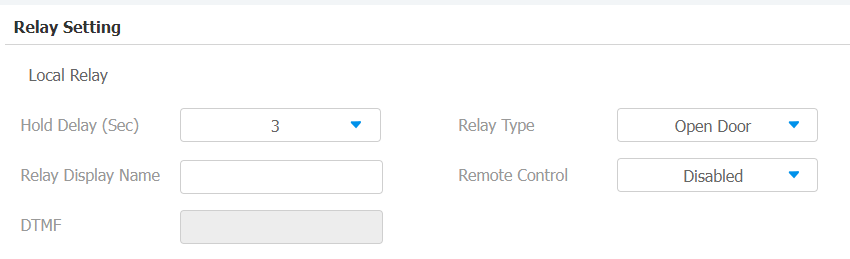
Parameter Set-up:
- Hold Delay (Sec): set the relay hold delay timing (Ranging from 0-60 Sec). For example, if you set the hold delay time as 5 Sec. Then the relay will be delayed for 5 seconds after the door is unlocked.
- Relay Display Name: name the relay switch according to your need. For example, you can name the relay switch according to where it is located for convenience.
- DTMF: Set the DTMF code for the local relay.
- Relay Type: Set relay action type. There are three options, chime bell, open door, and other switches(reset by event).
- Chime Bell: when there is a call, the chime bell will ring.
- Open Door: when pressing the unlock icon, the local relay will be opened.
- Other Switches(Reset By Event): when the call is answered, the relay will be reset.
Remote Relay Switch Setting
You can use the unlock tab during the call to open the door. To configure it on web Phone > Relay > Relay Setting > Remote Relay interface. You are required to set up the same DTMF code in the door phone and indoor monitor.
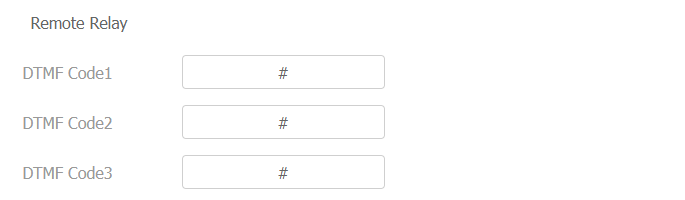
Parameter Set-up:
- DTMF Code: to set DTMF code for the remote relay, which is # by default.
Web Relay Setting
A web relay has a built-in web server and can be controlled via the Internet or a local network. The device can use a web relay to either control a local relay, or a remote relay somewhere else on the network.
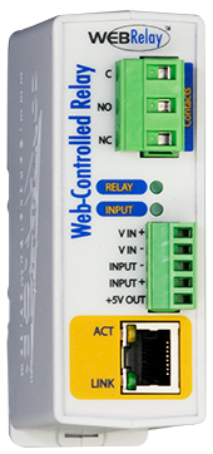
Click here to view how to set up web relay.
To do this configuration on web Phone > Relay > Web Relay interface. IP Address, User Name, and Password are provided by the web relay service provider.

Parameter Set-up:
- Password: the passwords are authenticated via HTTP and you can define the passwords using HTTP Get in Action.
- Web Relay Action: enter the specific web relay action command provided by the web manufacturer for different actions by the web relay.