This section clarifies some terms you may encounter in this guide: the home center device, limitations of a HyPane Lite as different roles, and the Auto Discovery mode.
What the home center is
The home center is the main control hub for all devices in your home. When a device is designated as the home center during the initial setup, it becomes your primary controlling center.
In versions 41.1.24.6, 41.1.25.8, and 41.1.33.10 and later, HyPanel Lite can serve as the home center. However, there are distinct differences and limitations, such as the absence of the user web portal, when it assumes this role.
Identify the designated home center
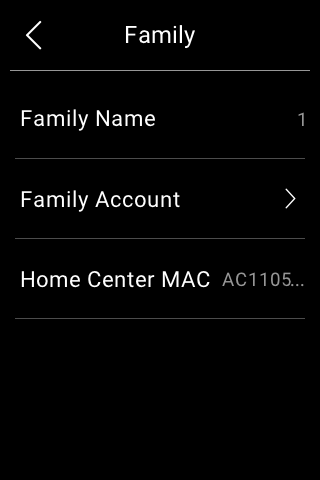 To see which device is the home center within the family, swipe down from top edge of any HyPanel Lite’s screen, then tap
  > System Settings > About > Family > Home Center MAC.
Usage modes
You can use devices with or without cloud connectivity, depending on how your service provider sets them up.
Auto Discovery mode
When the Auto Discovery mode is selected in the initial setups, then the entire system will run on the same local network without a cloud connection. This mode automatically detects all HyPanel devices and door phones in the same network and can group them into one family. In this mode, your data remains on the device, not the cloud, for more privacy and security.
Devices in Auto Discovery mode can be connected to the cloud at any time. To do it, please contact your service provider.
Note that if you use the Auto Discovery mode and never establish cloud connection, the following functions are unavailable:
Receive updates pushed by the cloud server,
Remotely control devices via BelaHome App. In this case, the app can only be used usage within the local area network.
Cloud mode
Weather broadcast on the panel’s screen indicates that your devices are connected to the Cloud. In this case, all devices operate with full functionality, receiving updates pushed by the cloud server and allowing remote control through the BelaHome App.
Please be aware that if cloud-connected devices switch their network connection from the Internet to a local area network, the following functions will become unavailable:
Reset system locks and arming code via registered email;
Use BelaHome app when the phone connected to the Internet.
Function differences
Here are key distinctions in main functions and important notes when HyPanel Lite serves as different roles.
| Home Center (Cloud Connected) | Home Center (Auto Discovery mode & without cloud connection) | Gateway (Other HyPanel models as Home Center) |
Add & Control ZigBee Devices | ✔* | ✔* | ✔ |
Add & Control 3rd-Party Devices | × | × | ✔(Control Only) |
✔(AC Only) | × | ✔ | |
× | × | ✔ | |
Apple HomeKit Integration | × | × | ✔ |
✔ | × | ✔ | |
× | × | ✔ | |
Energy | × | × | ✔ |
✔ | × | ✔(With cloud connection) | |
✔ | ✔ | ✔ | |
✔ | ✔ | ✔ | |
Photo Wall | × | × | ✔ |
BelaHome App | ✔ | × | ✔ |
User Web Portal | × | × | ✔ |
*:Currently, HyPanel Lite, serving as the home center, supports the following types of ZigBee devices.
Lights: On/off lights, RGB lights and dimmers
Curtains/shades and curtain motors
Locks
Sensors: Air detectors, and motion, smoke, flood, door/window, temperature&humidity, CO and gas sensors
Emergency buttons
1-4 gang touch switches and smart plugs
Thermostats and fan coils
Valves
IR controllers
NOTE:
When HyPanel Lite is the home center, its gateways must all be HyPanel Lite (up to 5).
It is strongly recommended to use HyPanel Lite with cloud connectivity when it serves as a home center.