Tamper Alarm
La fonction d’alarme de manipulation empêche quiconque de retirer l’appareil sans permission. Les dispositifs Akuvox prennent en charge deux types de systèmes inviolables : la détection de gravité et la détection de l’état des boutons.
Cliquez ici pour voir quel type est pris en charge par l’appareil et découvrir les détails de la fonction.
Set it up on the System > Security > Tamper Alarm interface.
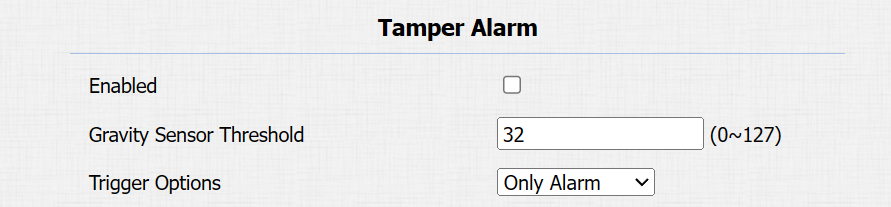
Gravity Sensor Threshold: The threshold for the gravity sensor sensitivity. The lower the value is, the easier the tamper alarm will be triggered. It is 32 by default.
Trigger Options: Select what can be triggered when the gravity sensor is triggered.
Client Certificate Setting
Les certificats garantissent l’intégrité de la communication et la confidentialité. Pour utiliser le protocole SSL, vous devez télécharger les bons certificats pour la vérification.
Web Server Certificate
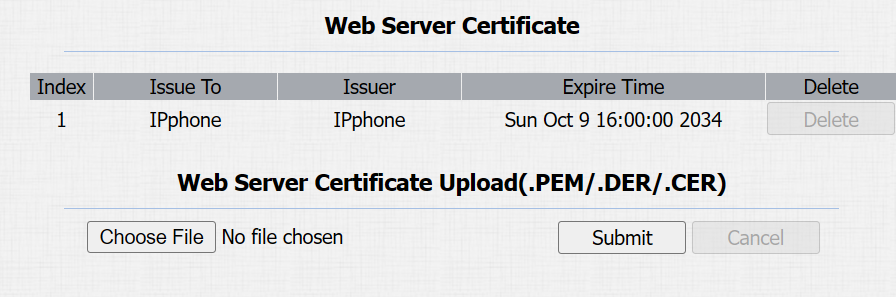
C’est un certificat envoyé au client pour authentification lorsque celui-ci demande une connexion SSL avec le téléphone porte Akubox. Veuillez télécharger les certificats dans les formats acceptés.
Upload Web Server Certificate on the System > Certificate > Web Server Certificate interface.
Client Certificate
Ce certificat vérifie le serveur sur le téléphone porte Akuvox lorsqu’ils souhaitent se connecter via SSL. Le téléphone de porte vérifie le certificat du serveur par rapport à sa liste de certificats clients.
Upload and configure the Client Certificate on the System > Certificate > Client Certificate interface.
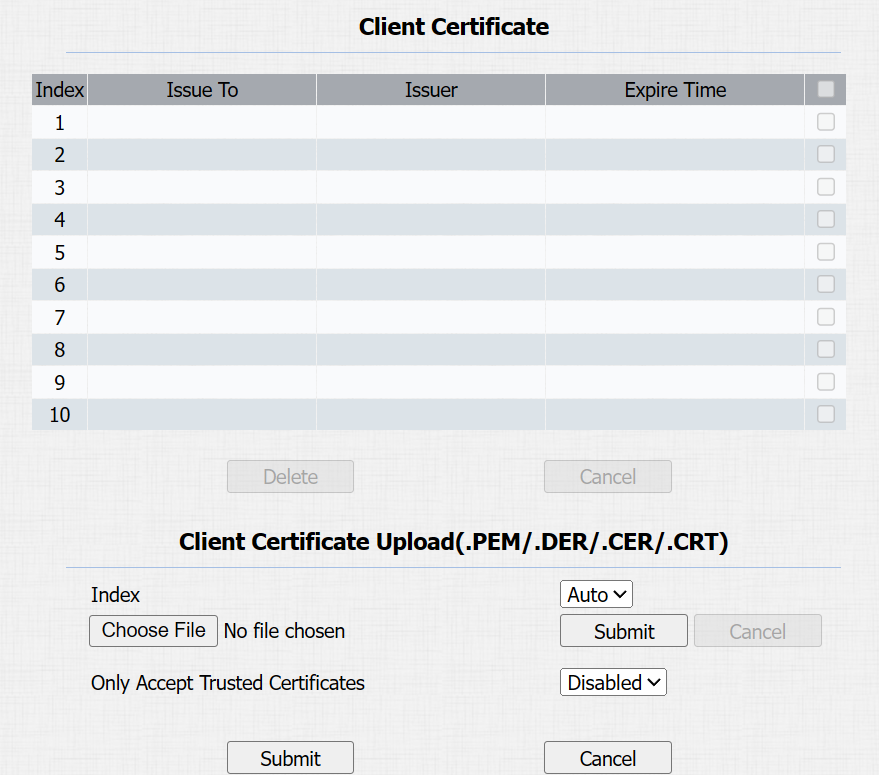
Index:
Auto: The uploaded certificate will be displayed in numeric order.
1 to 10: The uploaded certificate will be displayed according to the value selected.
Choose File: Click Choose File to upload the certificate.
Only Accept Trusted Certificates: When enabled, as long as the authentication succeeds, the door phone will verify the server certificate based on the client certificate list. If select Disabled, the door phone will not verify the server certificate no matter whether the certificate is valid or not.
Upload TLS Certificate for SIP Account Registration
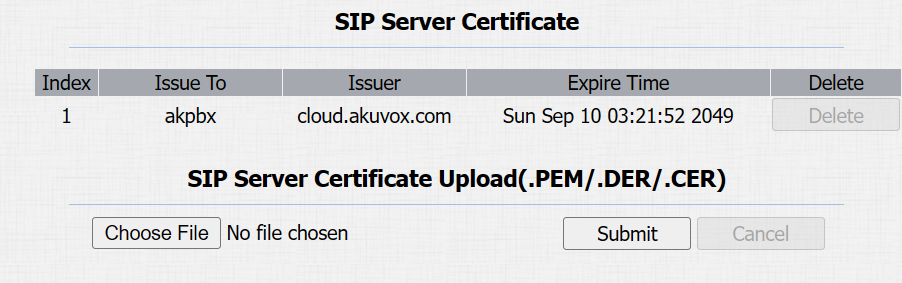
Avant de demander un compte SIP depuis un SIP ou un serveur DNS utilisant le protocole TLS, vous devrez télécharger un certificat. Ce certificat est essentiel pour l’authentification des serveurs.
To set it up, go to System > Certificate interface.
Motion Detection
La détection de mouvement est une fonctionnalité qui permet la surveillance vidéo sans surveillance et les alarmes automatiques. Il détecte tout changement dans l’image capturé par la caméra, comme un passage ou un déplacement de l’objectif, et active le système pour effectuer l’action appropriée.
Set up motion detection on the Surveillance > Motion interface.
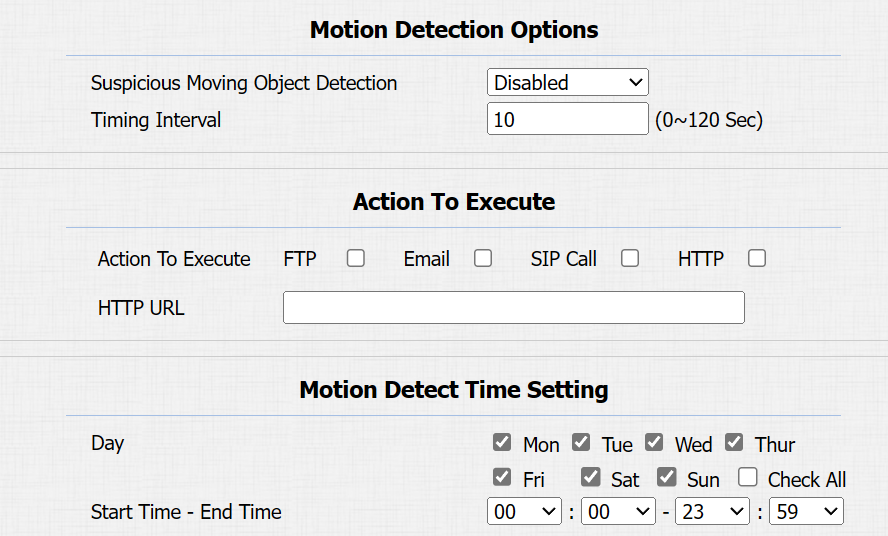
Suspicious Moving Object Detection:
Disabled: Turn off the motion detection function.
IR Detection: When the infrared sensor detects moving objects, preset actions will be triggered.
Video Detection: When the video camera detects moving objects, preset actions will be triggered.
When selecting Video Detection, you need to further set up the following options.
Detection Area: You can specify three detection areas by pressing the left mouse button and drawing boxes.
Detection Accuracy: The detection sensitivity. The greater the value is, the more accurate the detection is. The default value is 3.
Timing Interval: Determine how to delay and trigger motion detection.
Timing Interval between 1–3 seconds: Only need 1 detection during this interval to trigger actions.
Timing Interval > 3 seconds (e.g., 10 seconds): To perform actions, require a second detection within the final 3 seconds of the interval (e.g., between 7–10 seconds for a 10-second interval) after the first detection.
The default interval is 10 seconds.
Action To Execute: Set the desired actions that occur when suspicious movement is detected.
FTP: Send a screenshot to the preconfigured FTP server.
Email: Send a screenshot to the preconfigured Email address.
SIP Call: Call the preset number upon trigger.
HTTP: When triggered, the HTTP message can be captured and displayed in the corresponding packets. To utilize this feature, enable the HTTP server and enter the message content in the designated box below.
HTTP URL: Enter the HTTP message if selecting HTTP as the action to execute. The format is http://HTTP server’s IP/Message content.
Motion Detect Time Setting: Specify the time when the motion detection setting is effective.
Security Notification Setting
Une notification de sécurité informe les utilisateurs ou le personnel de sécurité de toute violation ou menace détectée par l’appareil. Par exemple, si l’appareil détecte quelque chose d’inhabituel, le système envoie une notification aux utilisateurs ou à la sécurité par email, appels téléphoniques ou autres moyens.
To set up security notifications, go to Setting > Action interface.
Email Notification
Configurez des notifications par e-mail pour recevoir des captures d’écran de mouvements inhabituels provenant de l’appareil.
Cliquez ici pour voir comment configurer cette fonctionnalité.
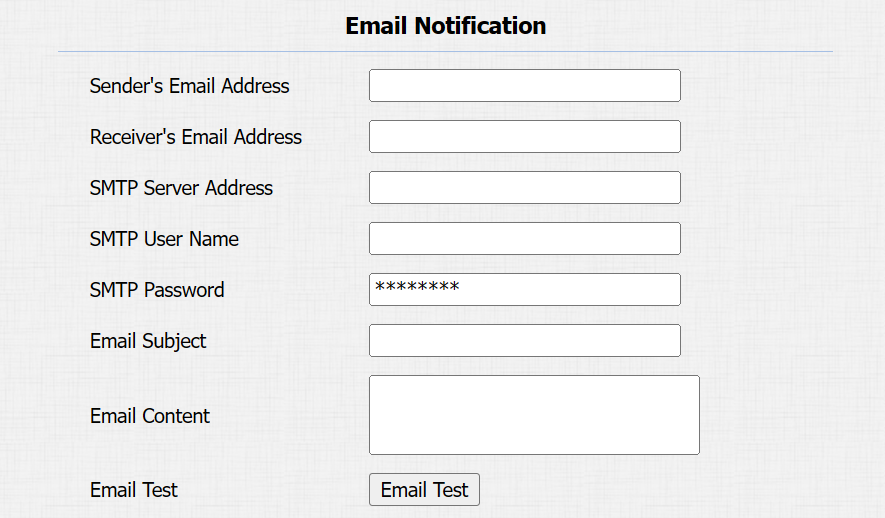
SMTP Server Address: The SMTP server address of the sender.
SMTP User Name: The SMTP username is usually the same as the sender's email address.
SMTP Password: The password of the SMTP service is the same as the sender's email address.
Email Test: Used to test whether the email can be sent and received.
FTP Notification Setting
Pour recevoir des notifications via le serveur FTP, il faut configurer les paramètres FTP. Le téléphone téléverra une capture d’écran dans le dossier FTP spécifié s’il détecte un mouvement inhabituel.
Cliquez ici pour voir les étapes de configuration.
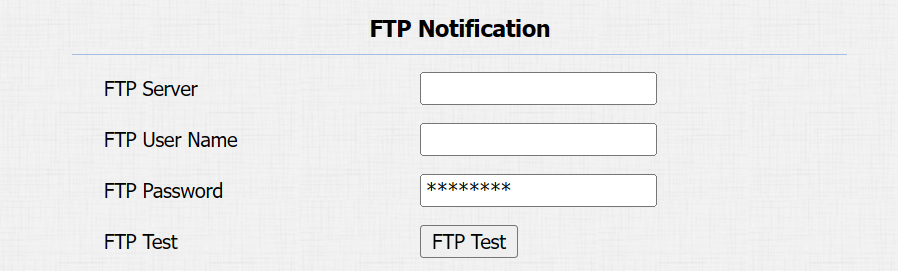
FTP Server: Set the address (URL) of the FTP server.
FTP User Name: Enter the user name to access the FTP server.
FTP Password: Enter the password to access the FTP server.
FTP Test: Used for testing whether the FTP notification can be sent and received by the FTP server.
SIP Call Notification Setting
In addition to FTP and Email notification, the door phone can also make a SIP call when some feature action is triggered.
Set it up in the SIP Call Notification section.

Action URL
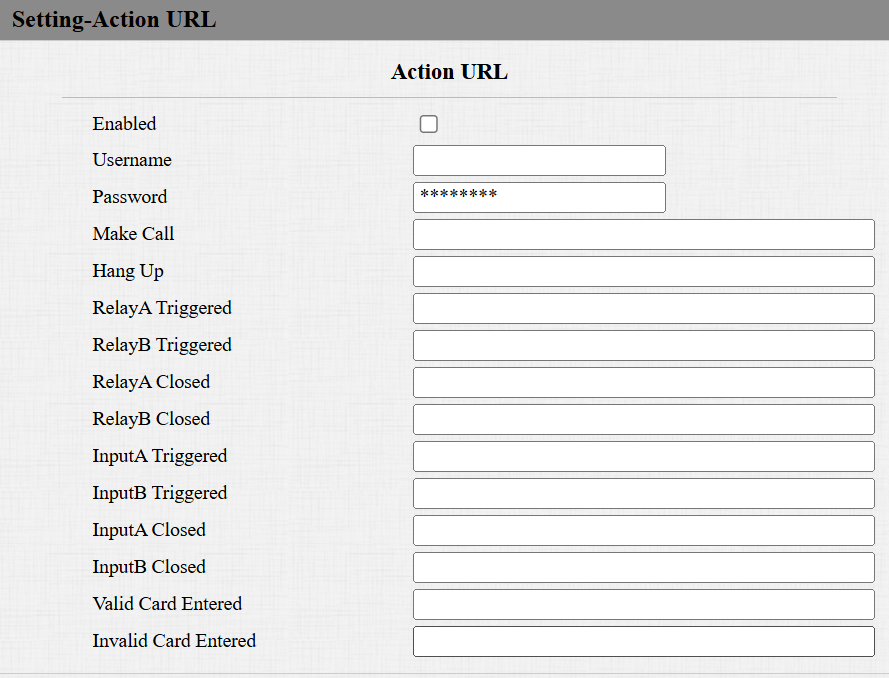
You can use the device to send specific HTTP URL commands to the HTTP server for certain actions. These actions will be triggered when the relay status, input status, or RF card access changes.
Akuvox Action URL:
No | Event | Parameter format | Example |
1 | Make Call | $remote | Http://server ip/Callnumber=$remote |
2 | Hang Up | $remote | Http://server ip/Callnumber=$remote |
3 | Relay Triggered | $relay1status | Http://server ip/relaytrigger=$relay1status |
4 | Relay Closed | $relay1status | Http://server ip/relayclose=$relay1status |
5 | Input Triggered | $input1status | Http://server ip/inputtrigger=$input1status |
6 | Input Closed | $input1status | Http://server ip/inputclose=$input1status |
7 | Valid Card Entered | $card_sn | Http://server ip/validcard=$card_sn |
8 | Invalid Card Entered | $card_sn | Http://server ip/invalidcard=$card_sn |
For example: http://{server IP}/help.xml?mac=$mac:ip=$ip:model=$model:firmware=$firmware:active_url=$active_url:active_user=$active_user:callnumber=$remote:userid=$userid:schedule=$schedule:user_name=$user_name:card_sn=$card_sn
To set it up, go to the Setting > Action URL interface. You can set up the username and password for authentication.
Voice Encryption
Le protocole de transport en temps réel sécurisé (SRTP) est un protocole dérivé du protocole de transport en temps réel (RTP). Il renforce la sécurité de la transmission des données en fournissant le chiffrement, l’authentification des messages, l’assurance de l’intégrité et la protection contre la rediffusion.
Set it up on the Account > Advanced > Encryption interface.

Voice Encryption(SRTP): Choose Disabled, Optional, or Compulsory for SRTP. If Optional or Compulsory is selected, the voice during the call is encrypted, and you can grab the RTP packet to view it.
User Agent
L’agent utilisateur est utilisé à des fins d’identification lorsque vous analysez le paquet de données SIP.
To set it up, go to the Account > Advanced > User Agent interface.

Emergency Action
Cette fonctionnalité fonctionne avec Akuvox SmartPlus Cloud. Cela garde la porte ouverte en cas d’urgence. Vous devez spécifier l’entrée qui applique la fonctionnalité.
Cliquez ici pour voir la configuration détaillée de cette fonctionnalité.
Enable the emergency action function on the System > Security > Emergency Action interface.

Real-Time Monitoring
Cette fonctionnalité affiche l’état de la porte lorsque l’appareil est connecté au SmartPlus Cloud. Les gestionnaires immobiliers et les utilisateurs finaux peuvent vérifier respectivement l’état de la porte sur la plateforme SmartPlus Property Manager et l’application SmartPlus. Vous devez spécifier le(s) relais ou entrée(s) qui appliquent cette fonctionnalité. Cliquer
pour voir la configuration détaillée.
To set it up, go to System > Security > Real-Time Monitoring interface.

Apply Setting To:
None: Not display door status.
Input: The door is opened by triggering the input.
Relay: The door is opened by triggering the relay.
Web Interface Automatic Log-out
Vous pouvez configurer le timing automatique de la déconnexion de l’interface web, nécessitant une reconnexion en saisissant le nom d’utilisateur et les mots de passe pour des raisons de sécurité ou de commodité.
To set it up, go to System > Security > Session Time Out interface.

High Security Mode
Le mode haute sécurité est conçu pour renforcer la sécurité. Il utilise le chiffrement à travers divers aspects, notamment le processus de communication, les commandes d’ouverture de porte, les méthodes de stockage des mots de passe, et plus encore.
Enable it on the System > Security > High Security Mode interface.

Notes importantes
1. Le mode Haute Sécurité est désactivé par défaut lorsque vous mettez à jour l’appareil d’une version sans ce mode vers une version qui l’inclut. Mais si vous réinitialisez l’appareil à ses paramètres d’usine, le mode est activé par défaut.
2. Ce mode rend les anciens outils incompatibles. Il faut les mettre à niveau vers les versions suivantes ou supérieures pour pouvoir les utiliser.
Gestionnaire PC : 1.2.0.0
Scanner IP : 2.2.0.0
Outil de mise à jour : 4.1.0.0
SDMC : 6.0.0.34
3. Le format HTTP pris en charge pour le déclenchement par relais varie selon que le mode hautement sécurisé est activé ou désactivé.
Si le mode est activé, l’appareil n’accepte que les nouveaux formats HTTP ci-dessous pour l’ouverture de porte.
http://username:password@deviceIP/fcgi/OpenDoor?action=OpenDoor&DoorNum=1
http://deviceIP/fcgi/OpenDoor?action=OpenDoor&DoorNum=1
Si le mode est désactivé, l’appareil peut utiliser à la fois les nouveaux formats ci-dessus et l’ancien format ci-dessous :
http://deviceIP/fcgi/do?action=OpenDoor&UserName=username&Password=password&DoorNum=1
4. Il n’est pas permis d’importer/exporter des fichiers de configuration dans tgz. Formatez entre un appareil avec le mode haute sécurité et un autre sans. Pour obtenir de l’aide au transfert de fichiers, veuillez contacter le support technique d’Akubox.